
Return problems name window work document and crashes
Hello,
You had helped me after an issue on Trio Office.
OpenOffice works better but the problem has returned (opening document, starting recovery, renaming, frequent crashes and we start again!)
I downloaded OpenOffice again (thanks CCM) but the problem remains
I even downloaded the latest version, same thing.
If someone can help me get it functioning properly with OpenOffice I would be delighted
Thank you
If anyone
16 answers
-
Hello,
boot recovery
See this already.
If there is a recovery request at each restart, there remains a .~lock file.
When opening a file in OpenDocument format, automatically created, in the same level (in the same folder...) as the file that created it, a hidden .~lock file is created, which serves to lock read access for other users on the network.
Its presence triggers this recurring recovery request..~lock.FILENAME.odt# or for Calc .~lock.FILENAME.ods#This ~lock file can be deleted if it is visible while OpenOffice is not open.
How to show hidden files and folders on Windows: https://support.microsoft.com/fr-fr/help/14201/windows-show-hidden-files.
Best regards
-
Hello,
By the way, a quick note to yclik
In LibreOffice it’s a bit less visible:
Menu Tools > Options > LibreOffice > Advanced > Open Advanced Settings
In the top bar, start a search for cache
In the options, scroll down to org.openoffice.Office.Common > Cache > Writer > OLE Objects > long > 20.
The memory settings are displayed in bytes.
Click to select the line > 2 clicks to open the window where you enter the desired value > OK > OK > Apply > OK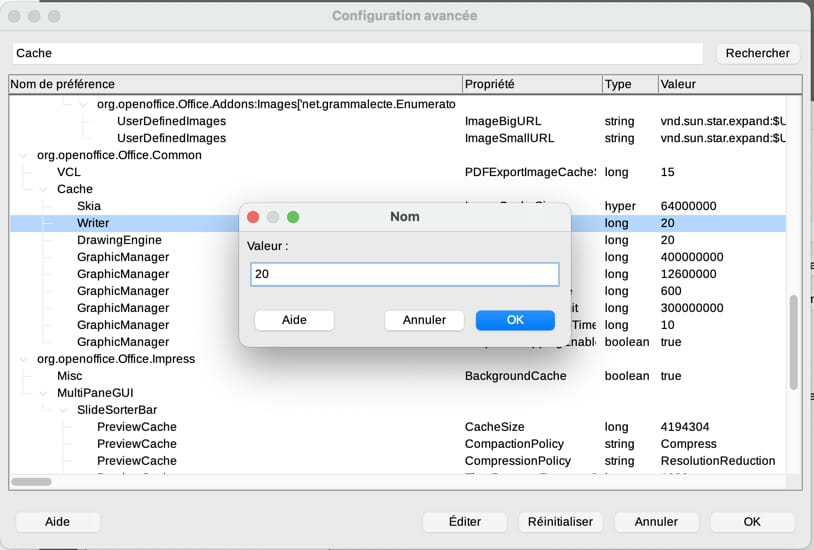
-
For image insertion, see the recommendations (including the one proposed by yclik:
https://forum.openoffice.org/fr/forum/viewtopic.php?p=211369#p211369
-
-
Thank you for your help.
Indeed I saw that strange name in the folder but I can’t find it.
And every time I open my -recovery- document, it opens with the strange name.
and if I work on it it crashes, Grrrr..
I'm not skilled; could you please be more step-by-step in your explanations? Thank you.
-
What happens if you cancel the recovery?
Once the hidden Windows folders are shown, navigate to the file that crashes on opening. If you see next to it a .lock.Filename.odt# file, delete it. Try again.
Remember, when performing the reverse procedure, to make the hidden folders visible again.
Otherwise, try this (it's called profile purge):
- Quit OpenOffice;
- Press the Windows key (the little flag) while holding the R key;
- Type %appdata%;
- Find the OpenOffice folder and rename it OldOpenOffice;
- Restart OpenOffice;
If it still doesn’t work, I suggest tutorials for uninstalling and cleanly reinstalling:
Delete OOo or AOO under MS-Windows:
https://forum.openoffice.org/fr/forum/viewtopic.php?f=39&t=46176
Install Apache OpenOffice 4.1.x [Windows]:
https://forum.openoffice.org/fr/forum/viewtopic.php?f=39&t=49080
The files are not affected by these operations. -
Thank you for your effort but I can’t seem to get anything to work.
I tried to redo the same thing in another Open Office document; it’s not bad for a moment, then when I start again pasting my images, with some overlapping in there, it goes haywire again, even the system! It probably comes from the software that misbehaves with how I place the images...
I think I’ll put my documents on a USB drive and have them printed; it will still cost for the prints but I handle the paper document better.
Thank you
-
Good evening
see:
if the images are not too heavy
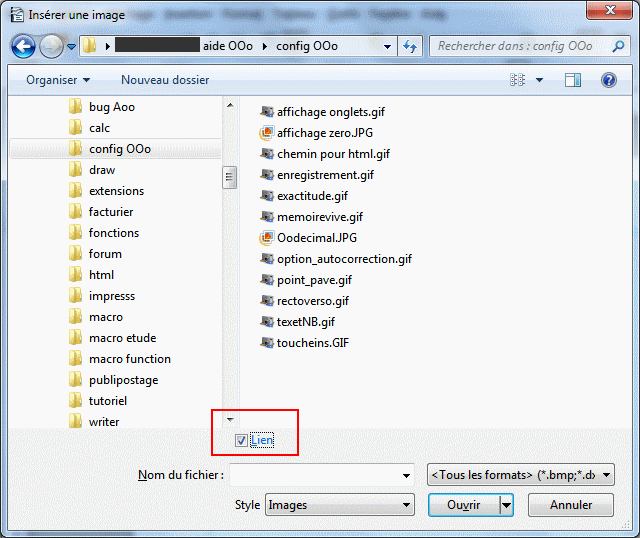
insert the images by checking the link box
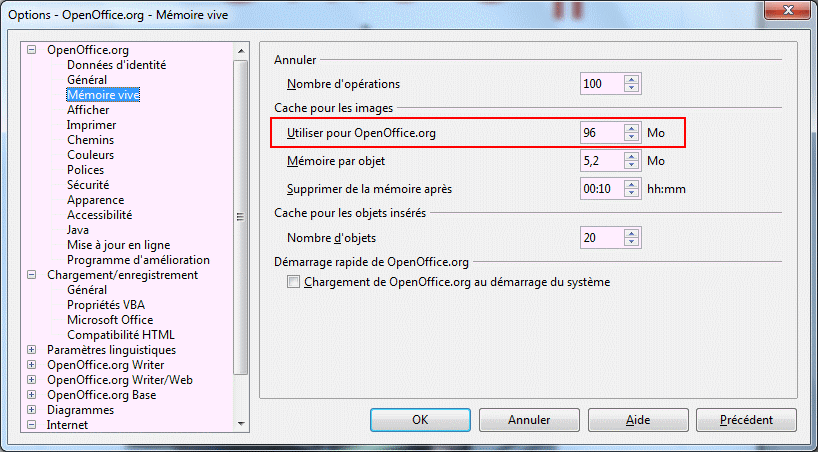
increase the memory allocated for objects
Tools >options>Open Office > switch to 96 MB
-
IT'S MY BAD! The software in question is not "open office" but "libre office"
Maybe that's important to consider.
Another detail, I can't rename PDF documents anymore...
-
my mistake, it’s “LibreOffice”
does that change anything?
-
hello
there must be menus more or less similar for LibreOffice
-
Hi, thank you for getting together on this.
No matter what I do, my LibreOffice document (about 50 pieces inserted) always opens more or less directly, with a name that is just numbers and symbols, and LibreOffice keeps failing after a while.
Unfortunately, I managed to import and paste about half of the pieces anyway. I save it as is with the strange name, also with the original name, but then when I want to convert it to PDF (the goal of the job), nothing happens.
Office methods are mysteriously random for me...
Can we completely remove LibreOffice and everything related to it?
Or take another program to assemble all my documents and make a PDF from them?
Thanks for your help
-
another log if possible free of course, downloadable on CCM? because I trust your site
-
Hello
insertion about 50 pieces
that's a lot
Already apply the recommendations especially the insertion with link and the images in the same folder as the document.
if it is only photos, try with the Draw module,
-
Indeed I must have complicated things, and now something abnormal happens systematically.
When I open a totally free Office document already named (and which worked before), the name displayed in the window title is different from the document title; it is shown in uppercase + symbol and I can only save it like that, which makes it nonfunctional afterward (crash during work, impossibility to convert to PDF...)
I am going to court - digital exchanges - and I am preparing my statement, providing my exhibits but there, I am blocked, there is therefore an urgency.
Help me get LibreOffice working again, please. THANK YOU!
-
Hello,
I’m trying to restore over 15 days before, I can’t even manage it.
There are lots of things that don’t work and I don’t know what to do anymore.
Please help me. Thank you
-
Hello
we're scattering a bit
it would be better to submit a new request in the Windows section of the forum, with the title
I can no longer name Paint!
to resolve Windows problems and then look at LibreOffice
-
Hello,
surprise I wanted to put a key for memo docs and CRACK! a brutal cutoff, screen off and the computer refuses to power back on... it was a complete disaster I freaked out.
Luckily a friend lent me her computer and with another security key for work I recovered everything, PHEW! cherry on top I have LibreOffice available, convert to PDF that works like a charm I was able to finish.
Any idea what could have put my computer into syncope? maybe a fuse, given how it cut off abruptly when I fiddled with the outlet to plug in the key...
Thanks

