
Sorting by name rather than date
Solved
saintaise17
Posted messages
437
Registration date
Status
Member
Last intervention
-
saintaise17 Posted messages 437 Registration date Status Member Last intervention -
saintaise17 Posted messages 437 Registration date Status Member Last intervention -
Hello,
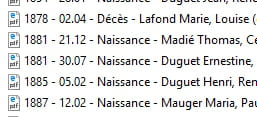
I have a folder where I have put a list of PDFs that I would like to sort by person's name.
I am attaching a screenshot of a few lines for info: I have the sorting by date at the beginning of the line and cannot choose by name after birth or death.
Thank you very much if I can have a solution if it exists!
Configuration: Windows / Chrome 51.0.2704.103
I have a folder where I have put a list of PDFs that I would like to sort by person's name.
I am attaching a screenshot of a few lines for info: I have the sorting by date at the beginning of the line and cannot choose by name after birth or death.
Thank you very much if I can have a solution if it exists!
Configuration: Windows / Chrome 51.0.2704.103
6 answers
-
What is the connection with LibreOffice/OpenOffice?
If you are on Windows, right-click in the white space of the folder and choose "Sort by" > "Date"
--
Like LibreOffice, Apache OpenOffice is a fork of OpenOffice.org. -
The sorting is done on the full text. Since the filename starts with the year and the day, sorting can only be done by year/day ...
--
It's great, retirement! Especially in the West Indies ... :-)
Raymond (INSA, AFPA, CF/R) -
Hello,
An alternative to the one proposed by Raymond (greetings): create subfolders to group the PDFs with the same name.
Best regards -
Hello,
Thank you Raymond for your response. I will indeed start with the name, that's what matters to me to have both birth and death together for the same person, by date the two are offset by others and less evident for my genealogy. I'm at 75! but I'm copying/pasting to shift the beginning, so I should manage!
Thank you Papyl, that's a good solution, but I won't be able to see all the subfolders together, which should complicate things for me.
Thank you shunesburg69 for replying, but it's not by date that I wanted.
Thank you very much.
Have a great weekend everyone. -
Another approach:
You open each file; you click "save as"; you do not change the name but type the name in the "keywords" window; you confirm; you answer "Yes" to the question "Do you want to replace ...?"
Once this is done for all 75 files, you will be able to organize your files by keyword in the directory! They will be sorted by name ...
--
It's great, retirement! Especially in the Antilles ... :-)
Raymond (INSA, AFPA, CF/R)-
Hello Raymond,
Thank you for your response. I just tried and when I open my PDF file, I have to right-click on it to save as. I don't have a file option on the top left. So I do save as, and if I change the title of the line, I find it with my modified line and I don't see the keyword!
Maybe I'm just not fully awake!!!
Thank you very much if you can help.
Have a great Saturday. -
Good evening,
I haven't tried, but in Acrobat Reader DC > File > Properties there is a field for a keyword. I repeat, I haven't tried, so this is subject to all reservations.
Best regards
-
-
No worries Raymond, I'm actually not using Word but LibreOffice and I don't think I have Excel: I have a Calc spreadsheet...
Thank you very much for your help and I appreciate it.
Have a great end of your day and weekend!


