
Remove numbers in front of a filename
gysmo -
Hello,
I am using a Mac and I have several files that have numbers before the name. I want to remove the numbers before the file name, but I have at least 3000. So doing it one by one is time-consuming. Do you have a solution to remove all the digits placed in front of the file name, please?
Thank you in advance
4 answers
-
Hello
You posted your question in the forum that deals with software writing.
Does that mean you want to write dedicated software?
When I was young, the Dead Sea was only sick.
George Burns -
-
Ok, so we are going to use an existing tool.
You can download it here https://mrrsoftware.com/namechanger/
You can read this little tutorial https://www.moyens.net/mac-os/moyen-plus-simple-renommer-des-fichiers-par-lots-sur-mac/
And you will use the "Regular Expression" mode
In this example, both files start with numbers (if that's really what you mean by numbers...) and an underscore (_).
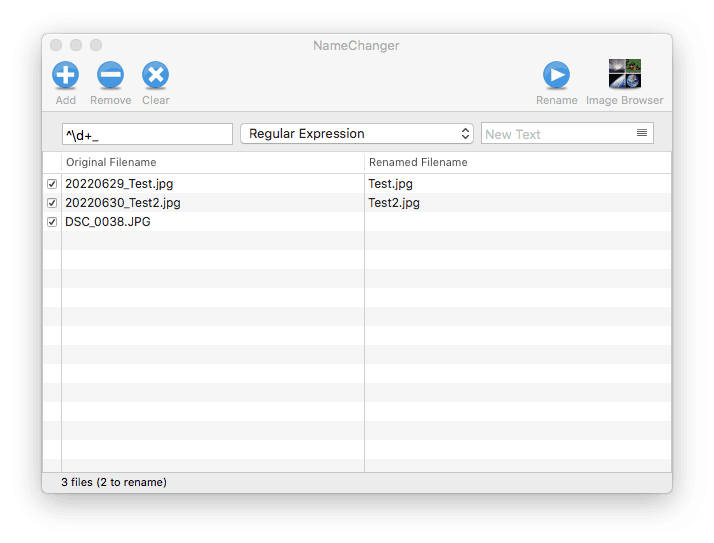
The regex
^\d+_
allows you to select in the file name a piece of text that starts (^) with several digits (\d+) and ends with an underscore (_), and since I am replacing this piece of text with nothing, in the right column the file once renamed will no longer have this part.
A file that does not match will not be renamed.
If you only have numbers, remove the underscore from the regex.
If your numbers follow a different pattern, give me examples.
When I was little, the Dead Sea was only sick.
George Burns -