Ping between 2 PCs WIN10

Samsoum6
Posted messages
22
Status
Member
-
brupala Posted messages 111191 Registration date Status Member Last intervention -
brupala Posted messages 111191 Registration date Status Member Last intervention -
Hello, I can't ping between my two Win10 PCs on the LAN without going through the Wi-Fi card or a router.
From PC to PC with different RG45 cables
192.168.1.8 to 192.168.1.80 ==> Impossible
192.168.1.8 to 192.168.1.45 ==> Impossible
In DHCP addressing for the 1st and the 2nd at 192.168.1.80 ==> Impossible and vice versa
The subnet mask is 255.255.255.0 for both
No gateway or DNS
Thank you for your help.
From PC to PC with different RG45 cables
192.168.1.8 to 192.168.1.80 ==> Impossible
192.168.1.8 to 192.168.1.45 ==> Impossible
In DHCP addressing for the 1st and the 2nd at 192.168.1.80 ==> Impossible and vice versa
The subnet mask is 255.255.255.0 for both
No gateway or DNS
Thank you for your help.
6 answers
-
Hello,
Is network discovery enabled between the 2 Windows 10?
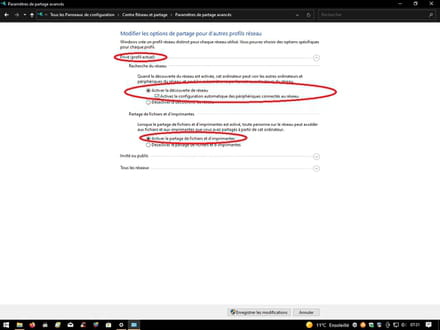
-
Hi,
if I understood correctly, it works when they are connected to a router or a wifi access point, but not with a direct cable, right?
You say that one of the two is on dhcp, so I assume you don't have a dhcp server on the one with a fixed ip.
If it doesn't find a dhcp server, it will take an apipa address (169.254.0.0/16)
To avoid this,
you need to go into the advanced tcpipv4 settings and set your address 1.45 as an alternative configuration.
By the way, who is 1.8?
--
and ... Voilà Voilà Voilà!-
Hi,
Thank you for your quick response.
1-With a router or without a router (with my home router and the work one), pinging between the two PCs doesn't work.
2-It was an example of setting one or the other to DHCP but still connected only to each other; otherwise, with fixed addresses, it doesn't ping.
3-The 192.168.1.8 is my first PC with a fixed address, and the 192.168.1.80 (then the 1.45) is the fixed address of my second PC.
-
-
Alright, so it has never actually worked?
Is it just the ping that isn't going through or something else too?
You mentioned Wi-Fi and Ethernet; do they have both?
Do they show as connected at any point?
--
and ... There you go!-
Yes, indeed, when I wanted to see on my LAN if I could ping the devices on a switch, I noticed the inability to ping from one side or the other (from one PC to the second).
I can ping the other devices from either PC, the first or the second, without any issues.
Yes, I disable the Wi-Fi card when I work on the LAN and without WAN connection.
By running a scan with Angry IP Scanner, I can see both PCs with their respective and correct IPs indeed.
-
-
Dumb question: if it's a straight cable, it's logical that it doesn't work. With a router, it's logical, between 2 PCs, you might need a crossover cable (it depends on the network card).
--
I only make the effort to try to help those who make the effort to express themselves in correct French. -
I think that's it! I found a command line to activate this function, but it's still the same!
It's probably due to the fact that these are company PCs in my opinion... -
Hello!
By default, the Windows firewall blocks incoming ICMP requests.
I invite you to create a firewall rule to allow the ICMP protocol ;)-
-
Indeed,
I just tested with the default settings of the firewall,
you need to allow network diagnostics in Windows Defender to pass the ping ... :-(
or just disable the firewall on the private network, as I do most of the time. -
Good evening,
Certainly: a firewall that doesn't start by asking you when you install it what rules you intend to set up for the local network, or at the very least doesn't ask for your opinion instead of silently censoring, is really worthless.
But still: all the soothsayers will continue to claim that only Windows Defender is, if I may say so, defensible. -
Windows Defender is like other firewalls,
except that we never really know what the default rules are for any firewall.
It's only when you delve into it, which is not easy and is a real profession, that conclusions can be drawn and adjustments made.
That said, in my opinion, ICMP echo requests should not be blocked by default, both in IPv4 and in IPv6.
However, it remains cumbersome to configure the Defender firewall in advanced mode, I agree, but on paper, you can adjust a lot of things (pretty much everything) with precision, perhaps too much precision, in my opinion. Still, as I've said, configuring a firewall is truly a profession. -
But yes: I don't use Windows Defender but Comodo, to each their own, which I initially set to no default rules, asking for my opinion on every connection attempt; obviously, we'll then simplify things by grouping this by application type, network zones, port groups..., and still, everything that isn't explicitly allowed or denied (echo requests, as far as we're concerned) will then be in trouble.
Few people do this because it makes work very tedious for a few weeks, but it's just a matter of patience and common sense, not a profession.
Somewhere, the principle is that what is not essential should be prohibited (or at least questioned), which principle is much harder to implement for managing script permissions (NoScript and the like).
The reason for responding to Ping on the WAN is not obvious (some routers block it by default or as an option); but it may be a false problem if we start by creating a set of authorization rules for what circulates only on the local network (including localhost, which we sometimes have the unfortunate tendency to forget).
-