EPSON WF-3640 & WF-3520 Printers

Jack59162
Posted messages
3
Status
Member
-
jmarion3 Posted messages 49487 Registration date Status Contributor Last intervention -
jmarion3 Posted messages 49487 Registration date Status Contributor Last intervention -
Hello everyone.
I would like to get some advice regarding EPSON printers.
This has happened twice now. Following recommendations from a website, I held down the power button while disconnecting the printer’s power supply; this is a WF-3640.
After this operation, the printer should have restarted, but it remains desperately off.
I also performed the same operation with another EPSON printer, also a WF-3520, which also remains desperately off.
Is there anyone who could please help me and provide advice?
On my WF-3640, I just changed the print head (myself), it worked, but it was in the ink charging phase for the new head.
Thank you for your help and advice.
Best regards.
I would like to get some advice regarding EPSON printers.
This has happened twice now. Following recommendations from a website, I held down the power button while disconnecting the printer’s power supply; this is a WF-3640.
After this operation, the printer should have restarted, but it remains desperately off.
I also performed the same operation with another EPSON printer, also a WF-3520, which also remains desperately off.
Is there anyone who could please help me and provide advice?
On my WF-3640, I just changed the print head (myself), it worked, but it was in the ink charging phase for the new head.
Thank you for your help and advice.
Best regards.
1 answer
-
Hello .....
Just so you know, I don't know this printer (WF3640) at all, but while browsing the user manual, I saw that it is possible to reset it to factory settings... and that could potentially solve your issue.... (subject to confirmation) but I think it's worth a try since you didn't specify why you want to reset this printer..
On the control panel, there is also a reset button No. 5; what is it for??
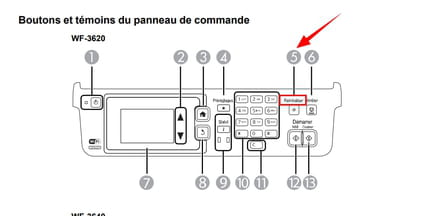
Link to the WF 3640 manual ► Here
For resetting the printer to factory settings ► See page 295 of the manual
Talk to you later, and we’ll see about the second printer afterwards if that's okay
Best regards-
-
I went through the documentation, thank you again, but unfortunately, the answer to my problem is not there.
The problem is that I have absolutely nothing on my screen and the printer refuses to start.
I wanted to carry out the manipulation following the change of my print head; I had seen on another forum that I needed to unplug the power while holding the power button down (for a reset), but since then, I have no way to turn it back on.
I will continue to try some manipulations.- If nothing lights up on the dashboard, it might be a disconnected wire or something else when changing the print head... a blown fuse if there is one?
Have you tried changing the power outlet for the printer?
Have you tried unplugging the printer's power supply for X minutes and then plugging it back in?
I'll check on my end if I find anything new... but it's a bit difficult without being in front of the machine...
See you!
-