No image on PC via HDMI to TV screen (desktop)
Yrauma_1011
Posted messages
12
Status
Member
-
Yrauma_1011 Posted messages 12 Status Member -
Yrauma_1011 Posted messages 12 Status Member -
Hello, my ASUS ROG tower is connected via HDMI to my TV screen, and no image is displayed at all, right from the moment the PC is turned on (nothing, not even a logo or startup options before Windows).
There were no warning signs, it started today, all of a sudden, while everything had been working well for 2 and a half years (I’ve always used TV screens with this PC).
I haven’t changed anything recently, neither cables nor screens (only plugged in new Roccat keyboard and mouse via USB, but everything worked fine for several weeks with them).
I’ve tried all the usual solutions:
- unplugging / replugging HDMI + power several times,
- changing the TV source (haha) and changing the HDMI port,
- connecting with another HDMI cable,
- connecting to another TV, etc.
The result is the same with another cable and on another screen, which makes me fear a malfunction in a component like the graphics card... unless it’s a software issue like a driver update, which I imagine would be preferable...
Anyway, I am reaching the end of my very limited skills, and I looked a lot without finding anything, which is why I’m reaching out for your help before going to see a computer repair technician. Do you have any idea what might be causing this failure? Any suggested solutions apart from those already tested? A way to start in safe mode?
My config for your information (very roughly):
Asus ROG Strix GS10CS-FR069T 1 To SATA 256 Go SSD 16 Go RAM Intel Core i7 9700K, Nvidia GEFORCE RTX 2060 graphics card.
Bought new and fully assembled, of course, at Fnac 2 and a half years ago. Sorry, I don't know the other specifications, like the motherboard, power supply, and others.
Thank you in advance for your help!
Amaury
There were no warning signs, it started today, all of a sudden, while everything had been working well for 2 and a half years (I’ve always used TV screens with this PC).
I haven’t changed anything recently, neither cables nor screens (only plugged in new Roccat keyboard and mouse via USB, but everything worked fine for several weeks with them).
I’ve tried all the usual solutions:
- unplugging / replugging HDMI + power several times,
- changing the TV source (haha) and changing the HDMI port,
- connecting with another HDMI cable,
- connecting to another TV, etc.
The result is the same with another cable and on another screen, which makes me fear a malfunction in a component like the graphics card... unless it’s a software issue like a driver update, which I imagine would be preferable...
Anyway, I am reaching the end of my very limited skills, and I looked a lot without finding anything, which is why I’m reaching out for your help before going to see a computer repair technician. Do you have any idea what might be causing this failure? Any suggested solutions apart from those already tested? A way to start in safe mode?
My config for your information (very roughly):
Asus ROG Strix GS10CS-FR069T 1 To SATA 256 Go SSD 16 Go RAM Intel Core i7 9700K, Nvidia GEFORCE RTX 2060 graphics card.
Bought new and fully assembled, of course, at Fnac 2 and a half years ago. Sorry, I don't know the other specifications, like the motherboard, power supply, and others.
Thank you in advance for your help!
Amaury
5 answers
-
Hello, thanks for your reply :)
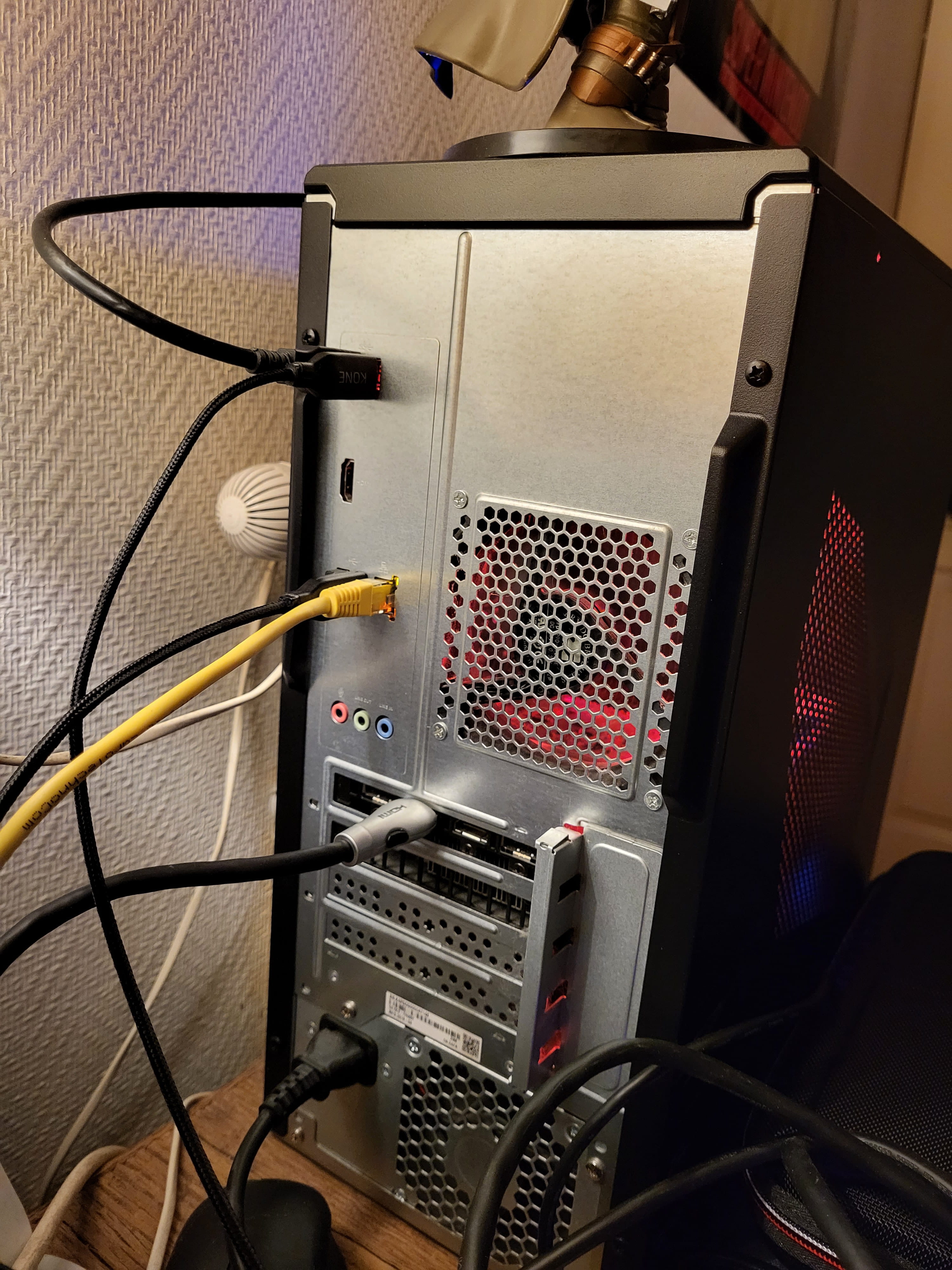
I’m going to post a picture but I can already say that there is no other video output than the single HDMI port on the back of the case. No VGA or anything else, so it's unlikely that the motherboard has any.
No beeps or sounds at startup (including when trying keyboard shortcuts).
Would it be possible (and relevant) to use an HDMI to USB adapter?-
could you post a photo of the motherboard too please
no for the adapter
there are sort of mini USB graphics cards like this one: https://www.amazon.fr/Adaptateur-1080P-Femelle-Ordinateur-Portable/dp/B09N38TM74/
but I can't say if it really works (according to the reviews, yes) and whether there is any specific software installation to do
does the computer turn on properly (LED/fan) when you power it on?
you can try to do a clear CMOS, that solves a lot of issues: https://fr.wikihow.com/r%C3%A9initialiser-le-BIOS-de-votre-PC#Retirer-la-pile-du-CMOS
-
-
Hello,
could you post a photo of the back of the case please?
The idea is that if there is a video output on the motherboard, you disconnect the graphics card and connect the screen to the motherboard. If it works, the problem is with the graphics card or something related.
Does the PC not make any "beep" sounds at startup? -
Hello, well... here I'm super noob... I didn't even realize (or I had forgotten) that there were two other HDMI ports lower down. They are probably the ones from the graphics card... they are next to each other, while the other one I was using until now (toward the top of the tower, above the yellow ethernet) is isolated.
By plugging into one of these two ports, it works very well. It doesn't explain why the other suddenly stopped working (nothing serious, I hope), could it be the one from the motherboard?
Sorry for the inconvenience and thank you very much for your help anyway. -
-
The HDMI on top is for the iGPU (the integrated graphics chipset in the processor), while the ones at the bottom, as you guessed, are for the graphics card.
Normally, when a graphics card is plugged in, the iGPU is automatically disabled, but it is possible to keep it enabled through a setting in the BIOS.
For an unknown reason, the BIOS may have been reset, which would have turned this option back to disabled. The other reason could be a defect with the HDMI (possible) or the iGPU (I doubt that very much).
To confirm this, you can try to find this option in the BIOS, but normally the screen is supposed to be connected to the graphics card to use it.
-
-
Thank you very much for this information :) I will try to find this option in the BIOS and test it.