Sound issues UNOWHY Y13
Solved/Closed
InfiniteKima
-
kj -
kj -
Hello,
I have been searching for solutions to my problem by going through various forums for a long time, but unfortunately, nothing seems to work, so I decided to ask my question.
I believe I'm not the only one experiencing an audio device issue on my UNOWHY Y13 PC (those famous PCs from the Île-de-France region for high schools). Like others, it seems, the speaker icon in the taskbar shows a cross and says, "No speakers or headphones are plugged in."
I thought it might be a driver issue; this device's driver is called "High Definition Audio Device," and the files needed for its installation are: drmk.sys; HdAudio.sys; ksthunk.sys; portcls.sys; SysFxUI.dll; WMALFXGFXDSP.dll and the files are all present where they should be, namely in the system32 folder.
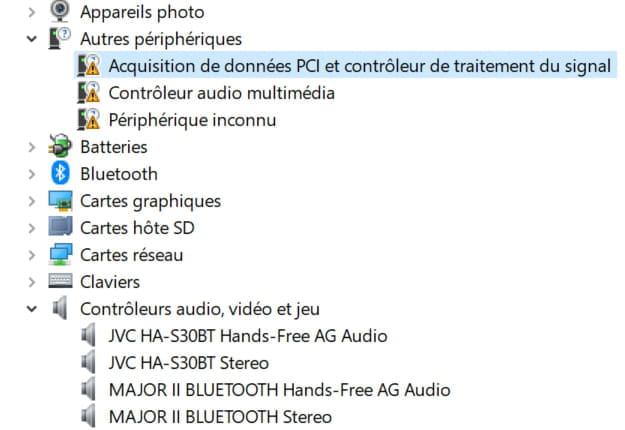
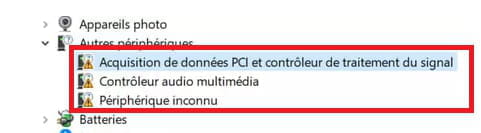
At this point, you might be tempted to tell me to go to Device Manager, expand "Audio controllers," and click on the driver to update it... But that's the crux of the problem: the driver is not there!
Despite the presence of the files in the system folder, it's as if the driver simply did not install during the installation of Windows.
So, since the driver is completely missing, whenever it comes to "Troubleshoot" or Windows Update, my computer detects no issues because if there's no driver, then there's no problem (it’s ridiculous, I know).
Anyway, sorry for this long message: if you happen to know how to manually install a driver (especially this one in particular, given that the files are curiously in place), you would be a great help! Thanks in advance.
I have been searching for solutions to my problem by going through various forums for a long time, but unfortunately, nothing seems to work, so I decided to ask my question.
I believe I'm not the only one experiencing an audio device issue on my UNOWHY Y13 PC (those famous PCs from the Île-de-France region for high schools). Like others, it seems, the speaker icon in the taskbar shows a cross and says, "No speakers or headphones are plugged in."
I thought it might be a driver issue; this device's driver is called "High Definition Audio Device," and the files needed for its installation are: drmk.sys; HdAudio.sys; ksthunk.sys; portcls.sys; SysFxUI.dll; WMALFXGFXDSP.dll and the files are all present where they should be, namely in the system32 folder.
At this point, you might be tempted to tell me to go to Device Manager, expand "Audio controllers," and click on the driver to update it... But that's the crux of the problem: the driver is not there!
Despite the presence of the files in the system folder, it's as if the driver simply did not install during the installation of Windows.
So, since the driver is completely missing, whenever it comes to "Troubleshoot" or Windows Update, my computer detects no issues because if there's no driver, then there's no problem (it’s ridiculous, I know).
Anyway, sorry for this long message: if you happen to know how to manually install a driver (especially this one in particular, given that the files are curiously in place), you would be a great help! Thanks in advance.
13 answers
-
Great! After multiple adventures, I have solved my problem!
By googling the identification number of the "Multimedia Audio Controller" driver that wasn't installed, namely
PCI\VEN_8086&DEV_3198&SUBSYS_11BC10EC&REV_03, I came across the driveridentifier site, which suggested several audio drivers to download that, in theory, work for this computer.
I downloaded the driver Audio_Realtek_6.0.9038.1_W10x64_A and it works!
Thank you very much once again @kaneagle and @jeannets for your help :)