
Generic steam controller
Sekkachi
Posted messages
6
Registration date
Status
Member
Last intervention
-
Anonymous user -
Anonymous user -
hey, is it possible to make my generic controller recognized as an Xbox controller? thanks.
1 answer
-
Hello,
Yes. You need to enable generic controller support in the Steam Controller settings.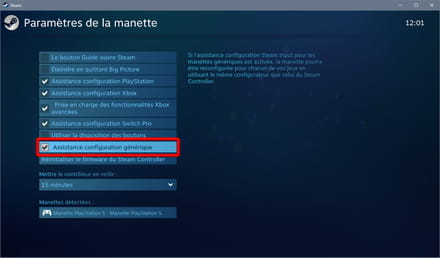
You will then probably need to click on your controller (at the bottom of my image) and then on the "Define Layout" button, which will allow you to map your controller buttons.
If the controller has been detected and configured correctly, it will be recognized as an Xbox controller in all compatible games, including non-Steam games launched from Steam (personal example: I play Crash 4 with my PS5 controller).
