Freebox, no internet service access

simwyck
Posted messages
5
Status
Member
-
brupala Posted messages 111189 Registration date Status Member Last intervention -
brupala Posted messages 111189 Registration date Status Member Last intervention -
Hello,
No online service, video or otherwise, seems to be working. I tried Netflix, Amazon Prime, Freestore, Twitter, and all indicate an internet connection problem, while the internet seems to be working normally (I have access to TV channels and can browse on computers or mobiles).
Thank you for your help.
Configuration: Freebox Optique, Revolution, firmware v. 4.4.0
No online service, video or otherwise, seems to be working. I tried Netflix, Amazon Prime, Freestore, Twitter, and all indicate an internet connection problem, while the internet seems to be working normally (I have access to TV channels and can browse on computers or mobiles).
Thank you for your help.
Configuration: Freebox Optique, Revolution, firmware v. 4.4.0
3 answers
-
Hi,
have you tried contacting Free about this issue?
--
and ... Here you go! -
Hello @brupala,
Yes, I contacted them in parallel; I'm waiting for their response.
But I asked the question here because it could be a simple configuration issue.-
If you arrive here from this box, it shouldn't.
You can paste here the result of the ipconfig/all command just to see if everything looks normal in ipv4 and ipv6.
You can also check on this site:
https://ipv6-test.com/
-
-
Thank you @brupala for your response.
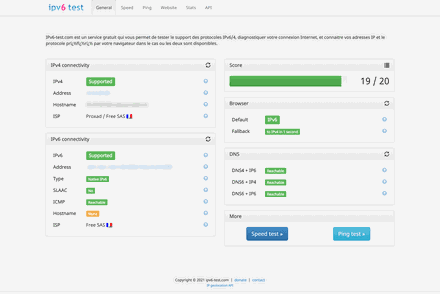
Attached is my IPv6 test result but I doubt that it's coming from there (I think it's more likely a hardware/software failure).
Response from Free:
"To restore the operation of your Freebox Player, I invite you to reset it by following these instructions:
- Disconnect the round power cable from the FreePlug at the back of the Freebox Player (12v socket far left)
- Press and hold the pairing button (located behind the Freebox at the grey foot, after "SPDIF" and the next empty space)
- Reconnect the power cable
- Then release the button as soon as the LED turns purple on the front (or after 10 long seconds following reconnection)
- You will then need to re-pair the remote control
- Accept the display
- Respond "Yes" (“Yes” must be in red) if the question is asked
- You can skip the scan for TNT channels (if you don't have a TNT cable at the back of your Freebox Player).
If it still doesn't work, please feel free to get back to us.
Best regards"
So basically they don't know, they just tell me to reset the box. I will try but it will require me to do a lot of manipulations without being sure of the result.
If I can't get everything to work normally, I will cancel because I find the Revolution subscription way too expensive compared to the services and the migration fees to change subscriptions are quite discouraging in my opinion.