Responsable logiciel
Solved/Closed
lamouche2208
Posted messages
179
Status
Member
-
MisteryBean Posted messages 8950 Registration date Status Moderator Last intervention -
MisteryBean Posted messages 8950 Registration date Status Moderator Last intervention -
Hello,
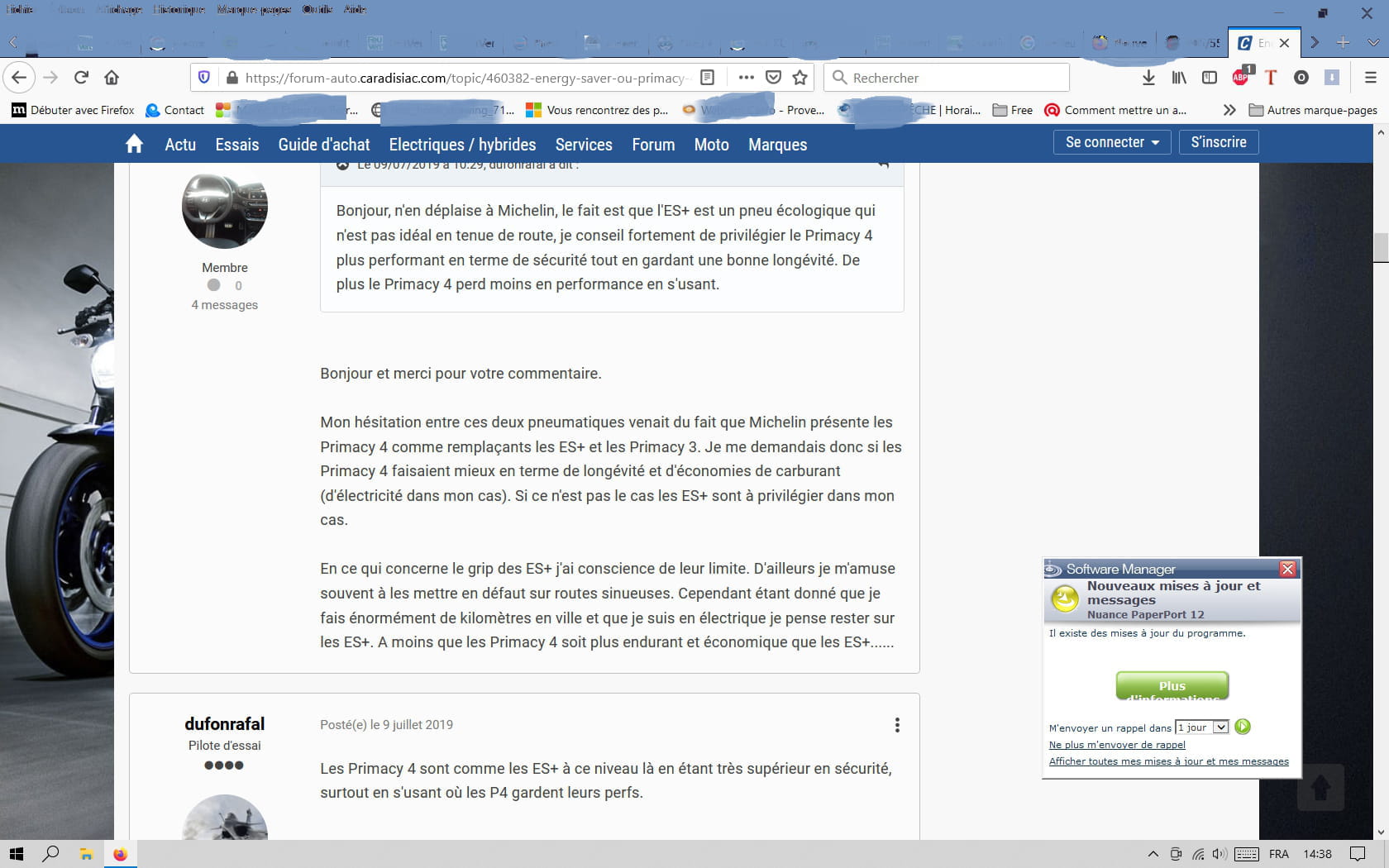
I am infected with software manager! (see bottom right of the screenshot)
After doing some research, I installed and ran Frst
I followed the tutorial and obtained the "pjjoint" links
Can you interpret the reports and tell me what I should do, please?
Thank you to anyone who can help me
(I am on W10 32 bits

frst txt
https://pjjoint.malekal.com/files.php?id=FRST_20210608_c151410m14s7
addition
https://pjjoint.malekal.com/files.php?id=20210608_l8t10r12k12k6
shortcut
https://pjjoint.malekal.com/files.php?id=20210608_g6z10k11o9y12
I am infected with software manager! (see bottom right of the screenshot)
After doing some research, I installed and ran Frst
I followed the tutorial and obtained the "pjjoint" links
Can you interpret the reports and tell me what I should do, please?
Thank you to anyone who can help me
(I am on W10 32 bits
frst txt
https://pjjoint.malekal.com/files.php?id=FRST_20210608_c151410m14s7
addition
https://pjjoint.malekal.com/files.php?id=20210608_l8t10r12k12k6
shortcut
https://pjjoint.malekal.com/files.php?id=20210608_g6z10k11o9y12
11 answers
-
Hello,
Try this manipulation (just download the file in the link and run it):
https://depannage-informatique-lyon.com/index.php/2020/02/18/desinstaller-flexnet-connect-software-manager/
Utility:
http://support.installshield.com/kb/files/Q112918/SoftwareManagerUninstall.exe
Best regards. -
Hello,
Procedure to follow in the indicated order:
1- Open FRST as an administrator by right-clicking on FRST and selecting run as administrator
2 - Copy the entire script that is in the box below:Start::
CreateRestorePoint:
CloseProcesses:
HKLM\SOFTWARE\Policies\Microsoft\Windows Defender: Restriction
HKU\S-1-5-21-1706182957-1354195410-2425831371-1000\...\Run: [] => [X]
HKU\S-1-5-21-1706182957-1354195410-2425831371-1000\...\Run: [ISUSPM] => C:\ProgramData\FLEXnet\Connect\11\ISUSPM.exe [222496 2009-05-05] (Acresso Software Inc. -> Acresso Corporation)
C:\ProgramData\FLEXnet
Task: {0121280D-125C-47A4-B650-5B30E2C062C1} - \Microsoft\Windows\Setup\gwx\refreshgwxcontent -> No file
Task: {03BB4EE8-6291-4EE6-A781-EF6CF3BF0ECD} - \Microsoft\Windows\Setup\gwx\launchtrayprocess -> No file
Task: {08E70B74-7E50-4291-9FD7-69D866921CCD} - \Microsoft\Windows\Setup\GWXTriggers\Time-5d -> No file
Task: {0FC09699-C0B2-4C93-A9ED-B5F0FE65D152} - \Microsoft\Windows\Setup\GWXTriggers\Telemetry-4xd -> No file
Task: {1983A4C1-025F-4FBC-BD12-BED35D69E86D} - \Microsoft\Windows\Setup\gwx\refreshgwxconfig -> No file
Task: {363702FD-F8D9-475C-8CF1-8ADE9D3F33D5} - \Microsoft\Windows\Setup\GWXTriggers\refreshgwxconfig-B -> No file
Task: {390F2883-DCC9-492C-8178-4A0810710675} - \Microsoft\Windows\Setup\GWXTriggers\Logon-5d -> No file
Task: {4EF6E36F-CF57-4649-8325-68722275E103} - \Microsoft\Windows\Setup\GWXTriggers\OutOfIdle-5d -> No file
Task: {A93C9726-AD89-4DA7-A151-D9EBCB9E6B69} - \Microsoft\Windows\Setup\GWXTriggers\MachineUnlock-5d -> No file
Task: {B6129CBC-D7E4-4A00-8016-A8B091ABDA9F} - \Microsoft\Windows\Setup\gwx\refreshgwxconfigandcontent -> No file
Task: {F44914F2-EF7A-4BEA-94B2-2466289B6414} - \Microsoft\Windows\Setup\GWXTriggers\OutOfSleep-5d -> No file
U3 idsvc; no ImagePath
FF Notifications: Mozilla\Firefox\Profiles\m2ppep45.default-1439647071646-1509959922428 -> hxxps://www.facebook.com; hxxps://www.endesaclientes.com; hxxps://www.commentcamarche.net; hxxps://www.naturabuy.fr
FF HKLM\...\Firefox\Extensions: [{F003DA68-8256-4b37-A6C4-350FA04494DF}] - C:\Program Files\Logitech\SetPointP\LogiSmoothFirefoxExt => not found
EmptyTemp:
End::
3- Once the script is copied, click on Fix.
Let the fix take place. Once it is complete, you will be prompted to restart your PC. Do so as soon as requested, see below.
Then once your computer has restarted:
4- You will have a Fixlog file on your desktop. Afterwards, upload these reports on https://www.cjoint.com/ see this tutorial then provide the link generated by Cjoint in your next message.5- CHECK AND TELL ME IF YOUR PROBLEM IS STILL PRESENT
FOR INFORMATION:
Your version of Windows 10 is not up to date. To check, go to this page click on Update now, this will start downloading the Microsoft tool, which you just need to open to update Windows 10 to the latest version and it will tell you if it is compatible with your PC. Be aware that this update takes some time. If you have a laptop, plug it into a power source, as it would be unfortunate for the battery to die before the update is complete.
bazfile
Moderator/Security Contributor.
A hello, a response, a thank you are always appreciated. -
Thank you bazfile for your help!
Here is the report
(I am going to update the computer, I have 2 and this one hasn't started in a few days. Otherwise, the update happens automatically)
https://www.cjoint.com/c/KFiogpgh1Ho -
-
Hi,
you need to click on "download and install" for version 21H1
--
Security contributor. -
Oh damn!!
Thanks, I hadn't noticed!
Why didn’t he do the installation by himself like the other updates?
On another note, MysteryBean, is there anything I could do for you to check my computer?
It's really slow, I thought it was the software manager, but apparently, there's something else!
Thanks in advance -
RE_
On the other hand, MysteryBean, is there something I could do for you to take a look at my computer?
Bazfile has already checked, he will let you know if there is anything else to do :-)
--
Security contributor. -
There is nothing else to do regarding the infection.
Your processor is from 2009, you only have 3.5 GB of RAM available, which is all that the 32-bit version of Windows 10 can manage.
For Windows 10, the current standard is more like 8 GB, but to manage this amount of RAM, you need a 64-bit version of Windows. We can see that your RAM is 87% occupied, which is a lot. Additionally, you have a third-party antivirus (Avira and a whole bunch of other Avira software), none of this is designed to speed up your PC. Know that Windows 10 has its own antivirus, which slows down the system very little and is effective; it automatically takes over as soon as no antivirus is installed on the PC.
@ MisteriBean if you see anything else, don’t hesitate.
bazfile
Moderator/Security Contributor.
A hello, a response, a thank you are always appreciated. -
RE_
As Bazfile said, freeing it from Avira and all its modules can only do it good.
It's the same problem as on your other PC; it's 32-bit while the processor seems to be 64: https://ark.intel.com/content/www/fr/fr/ark/products/42915/intel-core-i5-750-processor-8m-cache-2-66-ghz.html
You should reinstall in 64-bit and add more memory.
We'll see if it's worth the trouble given the age of the PC.
--
Security Contributor. -
Thank you for all that, but it has been lagging for only 2 weeks!!!
Before, it was working really well!
I don't understand why it is slower on certain web pages! -
RE_
If it's on Firefox, try safe mode to see if an extension is slowing it down.
=> The three lines at the top right
=> Click on Help
=> Troubleshooting Mode
=> Restart
=> See how it goes
--
Security contributor.