Boot device not found

Solved
Burger_King_Kong Posted messages 26 Status Member -  
 Parisse -
Hello,
I have a problem:
I’m on Windows and when I start it I land on a blue screen that tells me:

Boot Device Not Found

Please install an operating system

Hard Drive - (3FD)

F2 - System Diagnostics

For more information, please consult
https://support.hp.com/us-en/document/c01442956?openCLC=true

I don’t understand anything help

19 answers

  1. Burger_King_Kong Posted messages 26 Status Member 2
     
    Ok and ??? (Because nothing is happening (same error))
    1
    1. jfmimi Posted messages 13734 Registration date   Status Contributor Last intervention   1 929
       
      We need to get the PC to start from the USB key
      or have the USB key recognized in the boot menu
      do you have another PC?
      0
  2. Burger_King_Kong Posted messages 26 Status Member 2
     
    Hello, I’m getting back to you after a while,
    I finally managed to get the USB key to install Windows 10 working correctly.
    Your help was very useful to me, I thank you.
    1
  3. jfmimi Posted messages 13734 Registration date   Status Contributor Last intervention   1 929
     
    Hello
    your PC can’t find the hard drive or the system startup files
    check in the BIOS if the hard drive is recognized

    If my answer helped you, click the Thank you button.
    Set as resolved if your problem is fixed.
    0
  4. Burger_King_Kong Posted messages 26 Status Member 2
     
    The problem is that I just can't access the BIOS.
    0
    1. jfmimi Posted messages 13734 Registration date   Status Contributor Last intervention   1 929
       
      What is the brand of the PC?
      0
  5. Burger_King_Kong Posted messages 26 Status Member 2
     
    It’s an HP PRO 3405 MT
    0
    1. jfmimi Posted messages 13734 Registration date   Status Contributor Last intervention   1 929
       
      When the computer is off, press the Power button to turn it on, then immediately press and hold the “F10 or Escape” key to access the BIOS.
      0
  6. Burger_King_Kong Posted messages 26 Status Member 2
     
    And now what do I do?
    0
    1. jfmimi Posted messages 13734 Registration date   Status Contributor Last intervention   1 929
       
      check in the BIOS if the hard drive is recognized
      attach a photo of the bios if you don't find it
      0
  7. Burger_King_Kong Posted messages 26 Status Member 2
     
    Yes, the hard drive is detected.
    0
    1. jfmimi Posted messages 13734 Registration date   Status Contributor Last intervention   1 929
       
      So these must be the startup files that are corrupted
      we'll try to recreate them
      do you have a USB drive or Windows 10 installation DVD?
      0
  8. Burger_King_Kong Posted messages 26 Status Member 2
     
    Yes a USB drive
    0
    1. jfmimi Posted messages 13734 Registration date   Status Contributor Last intervention   1 929
       
      Do you have a USB key or is there Windows 10 on it?
      0
  9. Burger_King_Kong Posted messages 26 Status Member 2
     
    A Windows 10 installer
    0
    1. jfmimi Posted messages 13734 Registration date   Status Contributor Last intervention   1 929
       
      well then start on it
      then arrive at this page


      click bottom left on " Repair the computer "
      then " Troubleshooting "
      then " Command Prompt "
      0
  10. Burger_King_Kong Posted messages 26 Status Member 2
     
    The problem is that the computer starts up but does not display a menu with conventional files and therefore I cannot access the files.
    0
    1. jfmimi Posted messages 13734 Registration date   Status Contributor Last intervention   1 929
       
      restart the PC and do it as for BIOS access
      choose " boot option "
      it should be " F9 " I think
      0
  11. Burger_King_Kong Posted messages 26 Status Member 2
     
    I can’t find it.
    0
    1. jfmimi Posted messages 13734 Registration date   Status Contributor Last intervention   1 929
       
      give photo of the page when you pressed "Escape or F10"
      0
  12. Burger_King_Kong Posted messages 26 Status Member 2
     
    0
    1. jfmimi Posted messages 13734 Registration date   Status Contributor Last intervention   1 929
       
      This is the BIOS
      don’t put on the flash I can’t clearly see what’s written at the top as a menu
      which key did you press at startup of the PC?
      0
  13. Burger_King_Kong Posted messages 26 Status Member 2
     
    It is a reflection of the light I’m sending you the photo and at startup I press the F10 key
    0
    1. jfmimi Posted messages 13734 Registration date   Status Contributor Last intervention   1 929
       
      USB key plugged in
      restart and press "Esc"
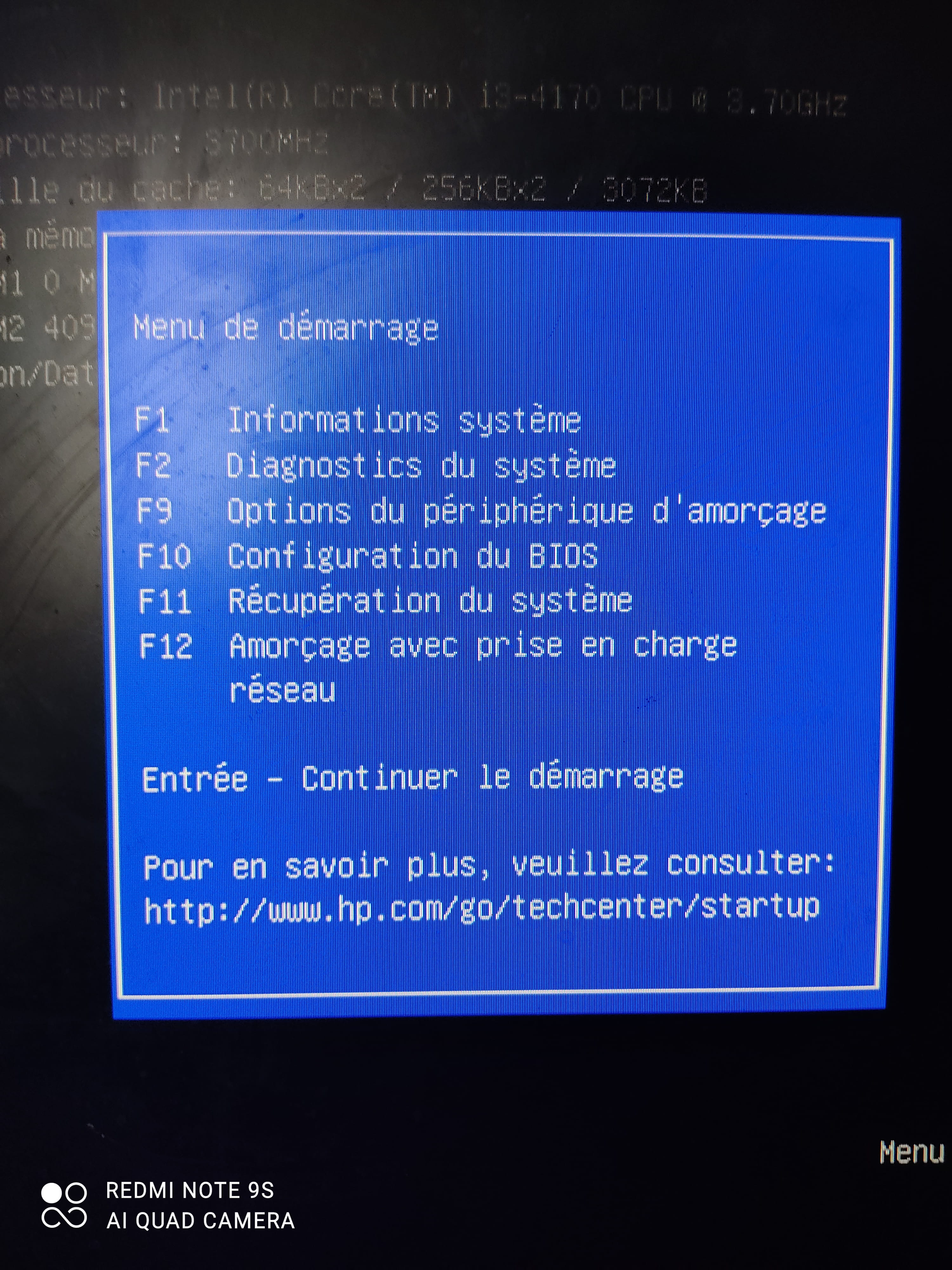
      instead of going into the BIOS you should have a menu of options
      provide photo
      0
  14. Burger_King_Kong Posted messages 26 Status Member 2
     
    0
    1. jfmimi Posted messages 13734 Registration date   Status Contributor Last intervention   1 929
       
      press the " F9 "
      0
  15. Burger_King_Kong Posted messages 26 Status Member 2
     
    And I land on this menu:
    0
    1. jfmimi Posted messages 13734 Registration date   Status Contributor Last intervention   1 929
       
      Do you have the Windows 10 USB key plugged in?
      0
  16. Burger_King_Kong Posted messages 26 Status Member 2
     
    Yes but it doesn’t work
    So I don’t have the right app on the USB key
    So I would need the right software but which one?
    0
    1. jfmimi Posted messages 13734 Registration date   Status Contributor Last intervention   1 929
       
      strange the key and the hard drive is not detected in the boot option
      go back into the Bios and go to the "Storage" menu
      and show me the recognized hard drive
      0
  17. Burger_King_Kong Posted messages 26 Status Member 2
     
    I will send you all the images that can be seen here:
    0
    1. jfmimi Posted messages 13734 Registration date   Status Contributor Last intervention   1 929
       
      so yes the hard drive is indeed recognized by the BIOS " ST 500 DM002 "
      it's a 500 GB drive
      go to the " Advanced " menu
      give photo
      0
  18. Burger_King_Kong Posted messages 26 Status Member 2
     
    Here is the translation to English:

    Voila :
    0
    1. jfmimi Posted messages 13734 Registration date   Status Contributor Last intervention   1 929
       
      go to "Device Options"
      0
  19. Burger_King_Kong Posted messages 26 Status Member 2
     
    And?
    0
    1. jfmimi Posted messages 13734 Registration date   Status Contributor Last intervention   1 929
       
      I don’t understand why the USB drive isn’t recognized
      return to the menu here:

      and set "USB hard drive" in the 1st position using the "Enter" key
      then do "F10" to save
      and restart the PC with the USB drive plugged in
      0
    2. Parisse
       
      Man
      I have a problem and I don't have a USB key, my mom must have one but am I obliged to do it to solve the problem?
      0