Dwm.exe - Black Screen Crash
Solved
Hello everyone,
I currently have quite a big problem preventing me from using my computer properly. After a certain amount of time when I'm playing, the computer display turns off, resulting in a black screen with the only option being to manually restart the PC (using the tower button).
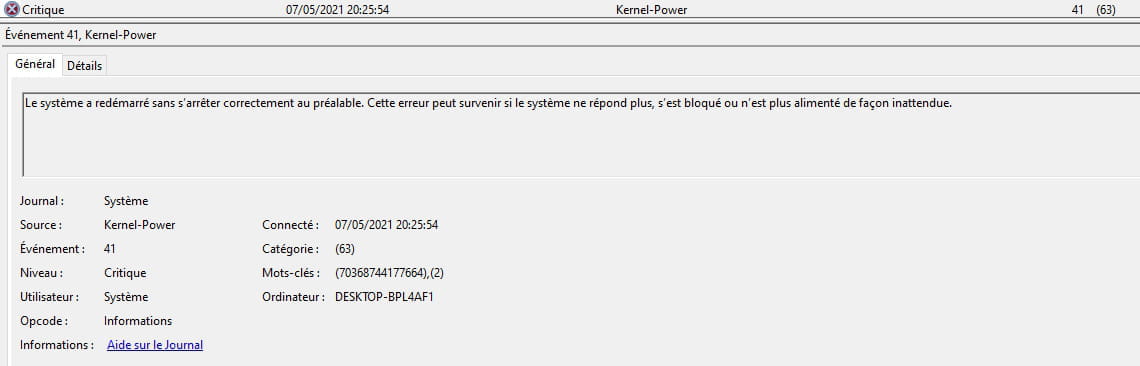
After some research, I found that it was related to this error:

I found several solutions on the internet, including that it might be related to NVIDIA graphics drivers, but nothing has worked:
- Clean all NVIDIA residues and components and reinstall the drivers normally.
- Run scans with antivirus....
I even went as far as resetting Windows to zero!
But the bug persists. And I'm starting to despair seeing that the only viable solution is to buy a new graphics card or new RAM (which I want to avoid)
Can anyone help me and find the solution that will fix this problem? Thank you.
Configuration:
CPU: AMD Ryzen 5 2600X Six-Core Wraith Spire Edition
Motherboard: Gigabyte B450 AORUS M
RAM: 2x4 GB 3200 MHz G.Skill
Graphics Card: NVIDIA GeForce GT 1030
I currently have quite a big problem preventing me from using my computer properly. After a certain amount of time when I'm playing, the computer display turns off, resulting in a black screen with the only option being to manually restart the PC (using the tower button).
After some research, I found that it was related to this error:

I found several solutions on the internet, including that it might be related to NVIDIA graphics drivers, but nothing has worked:
- Clean all NVIDIA residues and components and reinstall the drivers normally.
- Run scans with antivirus....
I even went as far as resetting Windows to zero!
But the bug persists. And I'm starting to despair seeing that the only viable solution is to buy a new graphics card or new RAM (which I want to avoid)
Can anyone help me and find the solution that will fix this problem? Thank you.
Configuration:
CPU: AMD Ryzen 5 2600X Six-Core Wraith Spire Edition
Motherboard: Gigabyte B450 AORUS M
RAM: 2x4 GB 3200 MHz G.Skill
Graphics Card: NVIDIA GeForce GT 1030
5 answers
-
ModeratorHi,
You didn't say that you reinstalled, so reinstall.
--------------------------------------------------------------------------------------------------------------------------------------------------------------------------------
BUT, a new version of Windows 10 will be released in ... 3 or 4 days ... Version 21H1
The version available at the moment is 20H2
So if the problems don't bother you too much, it would be good to wait for the new version before doing the following...
--------------------------------------------------------------------------------------------------------------------------------------------------------------------------------
Use the tool to create the media (8GB USB Key Min.) to repair or reinstall Windows
(No need to format if there is space, if there are data, they will be found in a Windows.old folder)
[French France] https://www.microsoft.com/fr-fr/software-download/windows10
[French Canada] https://www.microsoft.com/fr-ca/software-download/windows10
If you already have the Windows ISO file, you can create your USB key with Rufus
Boot from it using the PC's Boot Menu
The key to press:
https://www.malekal.com/liste-touches-acces-bios-boot-menu-constructeur/
Choose "Custom Installation" (Not upgrade)
Install on the same partition, or if you prefer, delete all system partitions and create a new one (Deletes data).
And be careful what you install on your Windows.
Do the updates.
Update the drivers, you can use DriversCloud and/or Touslesdrivers.