
Sleep mode, close my programs - Asus laptop after update
dom2
Posted messages
148
Registration date
Status
Member
Last intervention
-
dom2 Posted messages 148 Registration date Status Member Last intervention -
dom2 Posted messages 148 Registration date Status Member Last intervention -
Hello everyone. I'm reaching out to you again because this morning, the laptop that was in sleep mode is taking longer to wake up and all applications are closed. I shut it down and restarted it, but it produces the same result.
Last night there were 3 updates: kb2267602 (1.335.789.0) and (1.335.740.0) and kb5001330 (update 20H2).
I believe the problem comes from the latter. Every time I close the lid and wake it up, all the apps are closed, which was not the case yesterday during the day. I searched online and saw there are things in the event viewer, but my skills are very limited to spot anything there.
I'm attaching an image of the last "crash." I'm open to advice. Thanks for the help.

Configuration: Windows / Firefox 87.0
Last night there were 3 updates: kb2267602 (1.335.789.0) and (1.335.740.0) and kb5001330 (update 20H2).
I believe the problem comes from the latter. Every time I close the lid and wake it up, all the apps are closed, which was not the case yesterday during the day. I searched online and saw there are things in the event viewer, but my skills are very limited to spot anything there.
I'm attaching an image of the last "crash." I'm open to advice. Thanks for the help.

Configuration: Windows / Firefox 87.0
44 answers
- 1
- 2
- 3
Next
-
Hello,
Have you checked that the action performed when closing the lid is indeed sleep and not a complete shutdown? (Power options / Choose the action that follows lid closing)
Best regards. -
Hello, everything is fine, everything is on standby.
-
Hello.
If the problem has appeared recently, perform a restore. Type "RSTRUI" in the Cortana search box.
Then click "Next", check "Show more restore points", choose a point prior to the problem, then click "Next" and "Finish". If you have an antivirus other than Windows Defender installed, disable it. -
Good evening everyone. I created a restore point yesterday, so the restoration was completed successfully. I’m doing a couple of things. I close the lid. A minute later, I open it. It takes a very long time. Windows opens and... the restore point could not be restored. Alright. I am currently trying to restore again.
-
take an older point.
-
I just restored it to the same date and time as the first time. I turned it off and on again twice. I opened Firefox, closed the lid, and opened the lid again. It takes a little time but less than before, and Firefox has disappeared. I launch Firefox, and it asks me to restore the session. I will check later to do an older restore.
I'm attaching the log:
-
When you take a screenshot of the event viewer, first select a line that contains an error or a critique.
-
Thank you for the advice, but which one should I choose when I don't know anything because right now, it's totally incomprehensible to me. I'm working at the moment, I'll redo the experiment later.
-
Good evening everyone, well I've reverted to an installation from March 20th and the problem persists. The PC seems to wake up from sleep, then a black screen appears followed by the startup screen.
So back to square one. I'm open to any advice. -
If you don't put the computer to sleep, is it perfectly functional?
-
Thank you, stats_fr, for your availability. The PC seems to be fully operational; I'm working on it right now. Sleep mode is of great interest to me because it's common for me to have 4 or 5 Firefox windows with at least 10 tabs per window and 4 or 5 text files plus some PDF docs. Sleep mode allows me to find my workspace just as I left it. So I'm eager to find the solution. It happened to me once before, and I don't remember what I did; it's been too long.
-
Why don't you try to see if the deep sleep mode works? I use it every day; it's like sleep mode but the PC shuts down completely, and when it turns back on, it's in the same state as before it shut down.
-
Hello, I just put everything into hibernation but it's still the same. The time it happened to me, I think, my memories are very vague, I acted on a "kernel" recovery parameter or something like that. I can't remember where it is, I'm going to look for it and try.
-
Hello,
when I go to the event log, there are 3 red circles with
1) DptfPolicyCriticalService
ServiceMain: ServiceStart() failed.
2) DptfPolicyCriticalService
ServiceStart: ConnectToDptfFrameworkDriver() failed.
3) DptfPolicyCriticalService
ConnectToDptfFrameworkDriver: SetupDiEnumDeviceInterfaces() failed.
Last error = [0x00000103]
then a little earlier there is a gray information circle
1) DptfPolicyLpmService
CreateApplicationList: dptfFrameworkHandle is NULL.
2) DptfPolicyLpmService
ConnectToDptfFrameworkDriver: SetupDiEnumDeviceInterfaces() failed.
Last error = [0x00000103]
3) DptfParticipantDisplayService
GetDisplayBrightnessFromPowerSettings: Could not inform driver of current brightness value.
4) DptfParticipantDisplayService
SetBrightnessSettingInDriver: p_handle is NULL.
5) DptfParticipantDisplayService
SetDisplayBrightnessViaPowerSettings: Could not obtain brightness value to set from driver.
6) DptfParticipantDisplayService
GetBrightnessSettingFromDriver: p_handle is NULL.
7) DptfParticipantDisplayService
GetBrightnessSettingFromDriver: p_handle is NULL.
8 and 9 are the same sequence as 4, 5, and 6
10) DptfParticipantDisplayService
ConnectToDptfDisplayDriver: SetupDiEnumDeviceInterfaces() failed.
Last error = [0x00000103]
and then we find the same sequence again.
I notice that the display service is implicated and other things, but I am not able to understand. What do you think? -
Hello. This goes far beyond my knowledge, but it could be about the display drivers.
Provide the identification number of the graphics card: https://www.malekal.com/rechercher-pilote-peripherique-inconnu-identifiant/ -
I updated the drivers. It's strange, in W7, I could navigate with my eyes closed, and in W10, I keep getting lost in the menus. I've searched several times for that environment variable that allows you to interact with the (I can't remember the name) kernel, I believe it's backup, that's where Windows handles the information to recover faster after sleep mode. I'm going to look for it.
-
It's the Microsoft disease. Change just for the sake of changing.
That's why I gave up on Word, tired of looking for functions with every new version. -
Hello everyone, the problem is still not resolved.
I spontaneously had an update today.
I open the event log and regarding the latest event, here is what is written: Log Name: System
Source: Microsoft-Windows-Kernel-Power
Date: 04/17/2021 14:21:20
Event ID: 41
Task Category: (63)
Level: Critical
Keywords: (70368744177664),(2)
User: System
Computer: Dominique-PC-Asus
Description:
The system has restarted without shutting down properly first. This error can occur if the system is unresponsive, has crashed, or has lost power unexpectedly.
Event XML:
<Event xmlns="http://schemas.microsoft.com/win/2004/08/events/event">
<System>
<Provider Name="Microsoft-Windows-Kernel-Power" Guid="{331c3b3a-2005-44c2-ac5e-77220c37d6b4}" />
<EventID>41</EventID>
<Version>8</Version>
<Level>1</Level>
<Task>63</Task>
<Opcode>0</Opcode>
<Keywords>0x8000400000000002</Keywords>
<TimeCreated SystemTime="2021-04-17T12:21:20.9141487Z" />
<EventRecordID>119180</EventRecordID>
<Correlation />
<Execution ProcessID="4" ThreadID="8" />
<Channel>System</Channel>
<Computer>Dominique-PC-Asus</Computer>
<Security UserID="S-1-5-18" />
</System>
<EventData>
<Data Name="BugcheckCode">0</Data>
<Data Name="BugcheckParameter1">0x0</Data>
<Data Name="BugcheckParameter2">0x0</Data>
<Data Name="BugcheckParameter3">0x0</Data>
<Data Name="BugcheckParameter4">0x0</Data>
<Data Name="SleepInProgress">4</Data>
<Data Name="PowerButtonTimestamp">0</Data>
<Data Name="BootAppStatus">0</Data>
<Data Name="Checkpoint">0</Data>
<Data Name="ConnectedStandbyInProgress">false</Data>
<Data Name="SystemSleepTransitionsToOn">1</Data>
<Data Name="CsEntryScenarioInstanceId">0</Data>
<Data Name="BugcheckInfoFromEFI">false</Data>
<Data Name="CheckpointStatus">0</Data>
<Data Name="CsEntryScenarioInstanceIdV2">0</Data>
<Data Name="LongPowerButtonPressDetected">false</Data>
</EventData>
</Event>
It's the same message since the 13th, the date of the first problem.
Does anyone know how to decode this? I'm incompetent. Thank you for the help. -
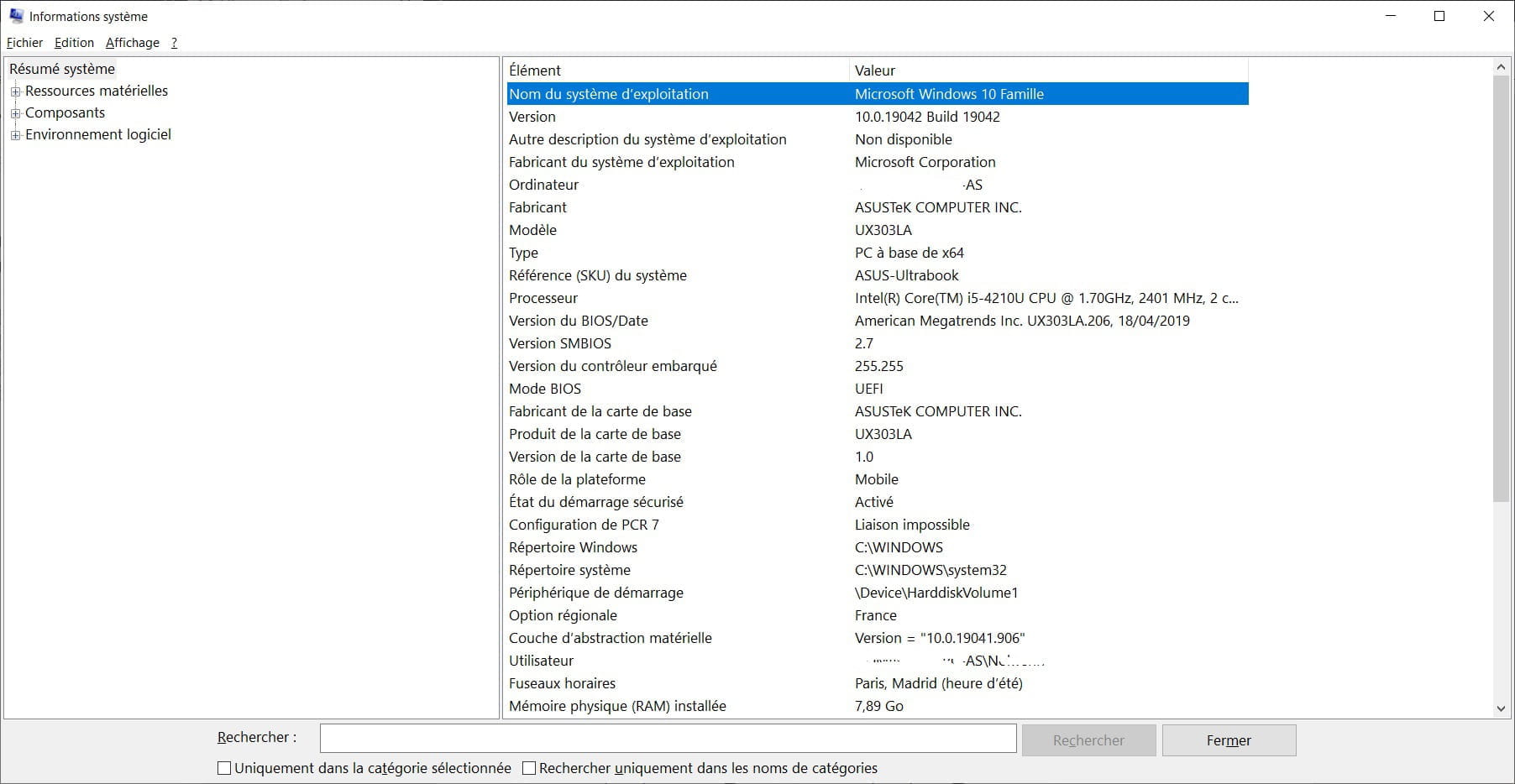
Hello. Please provide the exact model of the PC (preferably a screenshot of the MSINFO32 function, just the first page).
-
Good evening, I removed the graphics card and the drivers from the device manager because I found several sites indicating a problem with the GPU, but there was no change.
I'm providing the requested information
For your information, I tried to run sfc /scannow from a cmd command.
Access is denied because I do not have administrator rights. I'm surprised because I thought I had them; I've done prompt commands before and it worked, quite strange.
Thank you for the advice.


- 1
- 2
- 3
Next