
Disappearance of the Junk folder in Thunderbird
Solved
indochinois
Posted messages
141
Status
Member
-
Oiseau -
Oiseau -
Hello,
can you help me find the missing junk folder? Thank you in advance.
can you help me find the missing junk folder? Thank you in advance.
3 answers
-
pistouri Posted messages 19010 Registration date Status Contributor Last intervention Ambassador 8 732
Hello,
1- In Thunderbird:
Right-click on the account name (your email address in the left column), then click on "Subscribe..."
Then select "Junk" as the folder.
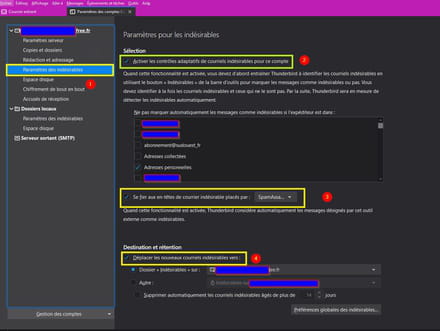
2- In Thunderbird:
Go to Tools -► Account Settings -► [account name] -► Junk Settings check Check -►Enable adaptive controls
Check -►Trust the headers of this junk mail placed in...SpasmAss...
Check -►Move new junk emails to
A+
--
pistouri

