
Affichage de boutons dynamiques en fonction d'une Listbox
Phil_1857 Messages postés 1883 Date d'inscription Statut Membre Dernière intervention -
J'ai besoin d'afficher un nombre de boutons en fonction des résultats d'une ListBox.
(En cliquant sur 2 il faut afficher 2 boutons par exemple)
Je pense que ce qui pose problème c'est la variable "Selected_item" que je place dans la boucle...
Merci d'avance si quelqu'un réussi à m'aider.
from tkinter import *

#Création de la fenetre
root = Tk()

lbx = Listbox(root)
lbx.insert(0, "1")
lbx.insert(1, "2")
lbx.insert(2, "3")
lbx.insert(3, "4")
lbx.insert(4, "5")
lbx.insert(5, "6")
lbx.insert(6, "7")
lbx.insert(7, "8")
lbx.insert(8, "9")
lbx.insert(9, "10")
lbx.insert(10, "11")
lbx.insert(11, "12")
lbx.insert(12, "13")
lbx.insert(13, "14")
lbx.insert(14, "15")
lbx.insert(15, "16")
lbx.select_set(0)
lbx.grid(row=0, column=0)

selected_item = StringVar()#valeur stockée

# fonction appelée avec le bouton
def updateLabel():
    line = lbx.curselection()[0]
    item = lbx.get(line)
    # on affecte la valeur de l'item à la variable
    selected_item.set(item)

#Construction des boutons
def construct_button(i):
    b = Button(root, text=str(i), command=lambda i=i: print(i))
    return b

#Pose les boutons
for i in range(selected_item):
    construct_button(i).pack()

root.mainloop()
7 réponses
L’objectif est d’afficher un nombre de boutons en fonction de l’élément sélectionné dans une Listbox Tkinter, mais la gestion de la valeur sélectionnée dans une variable pose problème. Plusieurs propositions consistent à déclencher une fonction après sélection, lire l’élément courant avec curselection, convertir la valeur en entier et générer une boucle qui crée le nombre exact de boutons. D'autres retours privilégient des approches plus concises, affichant les résultats dans la fenêtre et évitant des structures lourdes, ou présentant des exemples plus courts qui fonctionnent. Une nuance utile est de commencer par des exercices simples pour comprendre les liaisons entre sélection, récupération et création dynamique, puis d’envisager des extensions comme l’ouverture d’une deuxième fenêtre.
-
Bonjour,
je vois que tu n'as pas profité de mon code raccourci, tu as toujours ta longue liste de
lbx.insert
Et dans ton dernier message, tu n'as toujours pas mis les balises de code Python
Dans def construct_button(), tu fais un return, et ensuite tu appelles cette même fonction avec
un seul argument : bizarre
Mais de toutes façons, avec le return, tu ne passe jamais là-dedans, en fait cette fonction n'est jamais appelée
Moi, j'ai fait le truc en 24 lignes et ça donne ça:
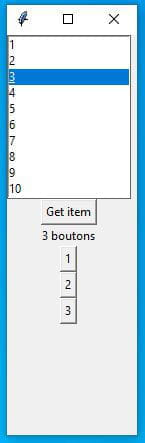
-
- OK, mais as-tu compris les trucs bizarres que je te signale dans ma réponse précédente ?
Si on te donne un truc tout fait, ca ne t'aide pas, il faut que tu comprennes comme tout ça fonctionne
(fonctions, appels de fonctions)
En fait dans le code raccourci que je t'ai envoyé, j'ai mis à jour la fonction updateLabel(): pour y ajouter une boucle de création de boutons:
for k in range(int(cursel)): Button(w, text= str(k+1)).grid(row=4+k, column=0)
cursel étant la variable qui contient le résultat de lbx.get(line)
(comme tu le vois dans mon code, j'ai éliminé la variable selected_item = StringVar())
Tu as vu aussi comment dimensionner la fenêtre, pour un affichage plus sympa:
w.geometry('130x400+300+100') # -*- coding:Latin-1 -*- from tkinter import * w = Tk() w.geometry('300x300+300+100') # création listbox lbx = Listbox(w) for k in range(1,15): lbx.insert(k, str(k)) lbx.select_set(0) lbx.grid(row=0, column=0) # fonction appelée avec le bouton def updateLabel(): line = lbx.curselection()[0] item = lbx.get(line) lbl = Label(w, text=str(item)).grid(row=2, column=0) for k in range(int(item)): Button(w, text=str(k + 1)).grid(row=4 + k, column=0) # bouton bt = Button(w, text="Get item", command=updateLabel).grid(row=1, column=0) w.mainloop()
Je pense que ce code fonctionne bien.
Merci
-
-
yg_be Messages postés 23437 Date d'inscription Statut Contributeur Dernière intervention Ambassadeur 1 588
bonjour,
peux-tu expliquer ton soucis?
cela t'aidera à progresser, si tu expliques et réfléchis à ce qui se passe. -
Le problème c'est que le code ne fonctionne pas, je suis débutant en python donc je ne trouve pas ou ça coince...
Je pense que c'est au moment de la pose des boutons avec le for. -
Bonjour,
ca n'est pas de la magie :
selected_item = StringVar()#valeur stockée
ta variable n'est pas liée du tout à ta listbox, donc ne contient pas le résultat de la selection ...# fonction appelée avec le bouton def updateLabel():
ta fonction n'est pas appelée par le bouton !-
J'ai testé la variable après la listbox seule et elle me retourne bien le résultat dans la console pourtant.
(le problème vient probablement de la boucle des boutons)- Voila le code du test (je me suis trompé, le résultat s'affiche sur la fenêtre et non dans la console)
from tkinter import * w = Tk() # création listbox lbx = Listbox(w) lbx.insert(0, "1") lbx.insert(1, "2") lbx.insert(2, "3") lbx.insert(3, "4") lbx.insert(4, "5") lbx.insert(5, "6") lbx.insert(6, "7") lbx.insert(7, "8") lbx.insert(8, "9") lbx.insert(9, "10") lbx.insert(10, "11") lbx.insert(11, "12") lbx.insert(12, "13") lbx.insert(13, "14") lbx.insert(14, "15") lbx.insert(15, "16") lbx.select_set(0) lbx.grid(row=0, column=0) # on crée une variable StringVar() pour stocker la # valeur de l'item sélectionné selected_item = StringVar() # fonction appelée avec le bouton def updateLabel(): line = lbx.curselection()[0] item = lbx.get(line) # on affecte la valeur de l'item à la variable : selected_item.set(item) # bouton bt = Button(w, text="Get item", command=updateLabel).grid(row=1, column=0) # label qui affiche l'item sélectionné # on utilise une option textvariable pour # le lier à l'objet StringVar qu'on a défini auparavant lbl = Label(w, textvariable=selected_item).grid(row=2, column=0) w.mainloop()
Malheureusement, c'est un projet de BTS. Je dois même par la suite afficher dans une autre fenêtre.
-
-
-
Vous n’avez pas trouvé la réponse que vous recherchez ?
Posez votre question -
Ah évidemment, tu as changé le code ...
Ton code en plus court (24 lignes au lieu de 47):
# -*- coding:Latin-1 -*- from tkinter import * w = Tk() w.geometry('300x300+300+100') # création listbox lbx = Listbox(w) for k in range(1,15): lbx.insert(k, str(k)) lbx.select_set(0) lbx.grid(row=0, column=0) # fonction appelée avec le bouton def updateLabel(): line = lbx.curselection()[0] item = lbx.get(line) lbl = Label(w, text=str(item)).grid(row=2, column=0) # bouton bt = Button(w, text="Get item", command=updateLabel).grid(row=1, column=0) w.mainloop() -
Refais ta boucle de création de bouton, mais ne mélange pas .grid et .pack
dans le même programme, comme tu le faisais au début ...-
from tkinter import *
# Création de la fenetre
root = Tk()
lbx = Listbox(root)
lbx.insert(0, "1")
lbx.insert(1, "2")
lbx.insert(2, "3")
lbx.insert(3, "4")
lbx.insert(4, "5")
lbx.insert(5, "6")
lbx.insert(6, "7")
lbx.insert(7, "8")
lbx.insert(8, "9")
lbx.insert(9, "10")
lbx.insert(10, "11")
lbx.insert(11, "12")
lbx.insert(12, "13")
lbx.insert(13, "14")
lbx.insert(14, "15")
lbx.insert(15, "16")
lbx.select_set(0)
lbx.pack()
selected_item = StringVar() # valeur stockée
# fonction appelée avec le bouton
def updateLabel():
line = lbx.curselection()[0]
item = lbx.get(line)
# on affecte la valeur de l'item à la variable
selected_item.set(item)
# Construction des boutons
def construct_button(i):
b = Button(root, text=str(i), command=lambda i=i: print(i))
return b
# Pose les boutons
for i in range(selected_item):
construct_button(i).pack()
root.mainloop()
Ca ne change pas le problème, ca doit venir de la liaison entre la ListBox et les boutons qui sont générer automatiquement en fonction de la Listbox. -
-
-
-
peux-tu préciser le langage quand tu utilises les balises de code? explications ici: https://codes-sources.commentcamarche.net/faq/11288-les-balises-de-code
-
-
... si tu as bien compris tes erreurs et la logique de tout ça, sinon, ca n'a aucun intérêt
-
import tkinter as tk                # python 3
from tkinter import font as tkfont  # python 3
from tkinter import ttk

SIZED = "1024x768"

BgColor = '#C4C4C4'

# Dimensions bouton Retour
BtnBackWidth = "30"
BtnBackHeight = "5"

# Dimensions bouton 1
Btn1Width = "100"
Btn1Height = "15"


class SampleApp(tk.Tk):

    def __init__(self, *args, **kwargs):
        tk.Tk.__init__(self, *args, **kwargs)
        self.title("Projet FA")  # Titre "Projet FA"
        self.configure(bg=BgColor)
        self.geometry(SIZED)  # Recupere la taille definie
        self.resizable(False, False)  # Bloque la taille

        self.title_font = tkfont.Font(family='Helvetica', size=18, weight="bold", slant="italic")
        container = tk.Frame(self)
        container.pack(side="top", fill="both", expand=True)
        container.grid_rowconfigure(0, weight=1)
        container.grid_columnconfigure(0, weight=1)

        self.frames = {}
        for F in (Menu, OuvrirCreerSq, SélecSqSupprModif, CreerSq, SupprSq, ModifSq,ProgrammerLignes,SauvegarderSq, AjouterSupprLignes, EditSqTirs, AjouterLignes, SupprLignes,
                  ModifTempsRetardDeclench, SauvegarderModif, ModeAutoManuel, TestLignSimuActiSqTirs, SimulerSqTirs, TestLignes, ActiverSqTirs, DéclancherSqDistance,
                  DéclancherSqSurSysteme, DéclencherManuTirs, ChoixNbrLignes):
            page_name = F.__name__
            frame = F(parent=container, controller=self)
            self.frames[page_name] = frame
            frame.grid(row=0, column=0, sticky="nsew")

        self.show_frame("Menu")

    def show_frame(self, page_name):
        frame = self.frames[page_name]
        frame.tkraise()


class Menu(tk.Frame):
    def __init__(self, parent, controller):
        tk.Frame.__init__(self, parent)
        self.controller = controller
        bouton1 = tk.Button(self, text="Programmation", width=Btn1Width, height=Btn1Height, command=lambda: controller.show_frame("OuvrirCreerSq")).place(x=150, y=100)
        bouton2 = tk.Button(self, text="Spectacle", width=Btn1Width, height=Btn1Height, command=lambda: controller.show_frame("ModeAutoManuel")).place(x=150, y=400)


class OuvrirCreerSq(tk.Frame):
    def __init__(self, parent, controller):
        tk.Frame.__init__(self, parent)
        self.controller = controller
        bouton1 = tk.Button(self, text="Ouvrir une séquence", width=Btn1Width, height=Btn1Height, command=lambda: controller.show_frame("SélecSqSupprModif")).place(x=150, y=100)
        bouton2 = tk.Button(self, text="Créer une séquence", width=Btn1Width, height=Btn1Height, command=lambda: controller.show_frame("CreerSq")).place(x=150, y=400)
        tk.Button(self, text="Retour", width=BtnBackWidth, height=BtnBackHeight, command=lambda: controller.show_frame("Menu")).place(x=400, y=650)


class SélecSqSupprModif(tk.Frame):
    def __init__(self, parent, controller):
        tk.Frame.__init__(self, parent)
        self.controller = controller
        bouton1 = tk.Button(self, text="Supprimer la séquence", width=Btn1Width, height=Btn1Height, command=lambda: controller.show_frame("SupprSq")).place(x=150, y=100)
        bouton2 = tk.Button(self, text="Modifier la séquence", width=Btn1Width, height=Btn1Height, command=lambda: controller.show_frame("ModifSq")).place(x=150, y=400)
        tk.Button(self, text="Retour", width=BtnBackWidth, height=BtnBackHeight, command=lambda: controller.show_frame("OuvrirCreerSq")).place(x=400, y=650)


class CreerSq(tk.Frame):
    def __init__(self, parent, controller):
        tk.Frame.__init__(self, parent)
        self.controller = controller
        bouton1 = tk.Button(self, text="Programmer les lignes", width=Btn1Width, height=Btn1Height, command=lambda: controller.show_frame("ProgrammerLignes")).place(x=150, y=100)
        bouton2 = tk.Button(self, text="Sauvegarder la séquence", width=Btn1Width, height=Btn1Height, command=lambda: controller.show_frame("SauvegarderSq")).place(x=150, y=400)
        tk.Button(self, text="Retour", width=BtnBackWidth, height=BtnBackHeight, command=lambda: controller.show_frame("OuvrirCreerSq")).place(x=400, y=650)


class SupprSq(tk.Frame):
    def __init__(self, parent, controller):
        tk.Frame.__init__(self, parent)
        self.controller = controller
        #bouton1 = tk.Button(self, text="Ouvrir une séquence", width=Btn1Width, height=Btn1Height, command=lambda: controller.show_frame(OuvrirSq)).pack()
        #bouton2 = tk.Button(self, text="Créer une séquence", width=Btn1Width, height=Btn1Height, command=lambda: controller.show_frame(CreerSq)).pack()
        tk.Button(self, text="Retour", width=BtnBackWidth, height=BtnBackHeight, command=lambda: controller.show_frame("SélecSqSupprModif")).place(x=400, y=650)


class ModifSq(tk.Frame):
    def __init__(self, parent, controller):
        tk.Frame.__init__(self, parent)
        self.controller = controller
        bouton1 = tk.Button(self, text="Modifier le nombre de lignes", width=Btn1Width, height=Btn1Height, command=lambda: controller.show_frame("AjouterSupprLignes")).place(x=150, y=100)
        bouton2 = tk.Button(self, text="Editer la séquence de tirs", width=Btn1Width, height=Btn1Height, command=lambda: controller.show_frame("EditSqTirs")).place(x=150, y=400)
        tk.Button(self, text="Retour", width=BtnBackWidth, height=BtnBackHeight, command=lambda: controller.show_frame("SélecSqSupprModif")).place(x=400, y=650)


class ProgrammerLignes(tk.Frame):
    def __init__(self, parent, controller):
        tk.Frame.__init__(self, parent)
        self.controller = controller
        #bouton1 = tk.Button(self, text="Ouvrir une séquence", width=Btn1Width, height=Btn1Height, command=lambda: controller.show_frame(OuvrirSq)).pack()
        #bouton2 = tk.Button(self, text="Créer une séquence", width=Btn1Width, height=Btn1Height, command=lambda: controller.show_frame(CreerSq)).pack()
        tk.Button(self, text="Retour", width=BtnBackWidth, height=BtnBackHeight, command=lambda: controller.show_frame("CreerSq")).place(x=400, y=650)


class SauvegarderSq(tk.Frame):
    def __init__(self, parent, controller):
        tk.Frame.__init__(self, parent)
        self.controller = controller
        #bouton1 = tk.Button(self, text="Ouvrir une séquence", width=Btn1Width, height=Btn1Height, command=lambda: controller.show_frame(OuvrirSq)).pack()
        #bouton2 = tk.Button(self, text="Créer une séquence", width=Btn1Width, height=Btn1Height, command=lambda: controller.show_frame(CreerSq)).pack()
        tk.Button(self, text="Retour", width=BtnBackWidth, height=BtnBackHeight, command=lambda: controller.show_frame("CreerSq")).place(x=400, y=650)


class AjouterSupprLignes(tk.Frame):
    def __init__(self, parent, controller):
        tk.Frame.__init__(self, parent)
        self.controller = controller
        bouton1 = tk.Button(self, text="Ajouter des lignes", width=Btn1Width, height=Btn1Height, command=lambda: controller.show_frame("AjouterLignes")).place(x=150, y=100)
        bouton2 = tk.Button(self, text="Supprimer des lignes", width=Btn1Width, height=Btn1Height, command=lambda: controller.show_frame("SupprLignes")).place(x=150, y=400)
        tk.Button(self, text="Retour", width=BtnBackWidth, height=BtnBackHeight, command=lambda: controller.show_frame("ModifSq")).place(x=400, y=650)


class EditSqTirs(tk.Frame):
    def __init__(self, parent, controller):
        tk.Frame.__init__(self, parent)
        self.controller = controller
        bouton1 = tk.Button(self, text="Modifier le temps de retard au déclenchement", width=Btn1Width, height=Btn1Height, command=lambda: controller.show_frame("ModifTempsRetardDeclench")).place(x=150, y=100)
        bouton2 = tk.Button(self, text="Sauvegarder les modifications", width=Btn1Width, height=Btn1Height, command=lambda: controller.show_frame("SauvegarderModif")).place(x=150, y=400)
        tk.Button(self, text="Retour", width=BtnBackWidth, height=BtnBackHeight, command=lambda: controller.show_frame("ModifSq")).place(x=400, y=650)


class AjouterLignes(tk.Frame):
    def __init__(self, parent, controller):
        tk.Frame.__init__(self, parent)
        self.controller = controller
        #bouton1 = tk.Button(self, text="Ouvrir une séquence", width=Btn1Width, height=Btn1Height, command=lambda: controller.show_frame(OuvrirSq)).pack()
        #bouton2 = tk.Button(self, text="Créer une séquence", width=Btn1Width, height=Btn1Height, command=lambda: controller.show_frame(CreerSq)).pack()
        tk.Button(self, text="Retour", width=BtnBackWidth, height=BtnBackHeight, command=lambda: controller.show_frame("AjouterSupprLignes")).place(x=400, y=650)


class SupprLignes(tk.Frame):
    def __init__(self, parent, controller):
        tk.Frame.__init__(self, parent)
        self.controller = controller
        #bouton1 = tk.Button(self, text="Ouvrir une séquence", width=Btn1Width, height=Btn1Height, command=lambda: controller.show_frame(OuvrirSq)).pack()
        #bouton2 = tk.Button(self, text="Créer une séquence", width=Btn1Width, height=Btn1Height, command=lambda: controller.show_frame(CreerSq)).pack()
        tk.Button(self, text="Retour", width=BtnBackWidth, height=BtnBackHeight, command=lambda: controller.show_frame("AjouterSupprLignes")).place(x=400, y=650)


class ModifTempsRetardDeclench(tk.Frame):
    def __init__(self, parent, controller):
        tk.Frame.__init__(self, parent)
        self.controller = controller
        #bouton1 = tk.Button(self, text="Ouvrir une séquence", width=Btn1Width, height=Btn1Height, command=lambda: controller.show_frame(OuvrirSq)).pack()
        #bouton2 = tk.Button(self, text="Créer une séquence", width=Btn1Width, height=Btn1Height, command=lambda: controller.show_frame(CreerSq)).pack()
        tk.Button(self, text="Retour", width=BtnBackWidth, height=BtnBackHeight, command=lambda: controller.show_frame("EditSqTirs")).place(x=400, y=650)


class SauvegarderModif(tk.Frame):
    def __init__(self, parent, controller):
        tk.Frame.__init__(self, parent)
        self.controller = controller
        #bouton1 = tk.Button(self, text="Ouvrir une séquence", width=Btn1Width, height=Btn1Height, command=lambda: controller.show_frame(OuvrirSq)).pack()
        #bouton2 = tk.Button(self, text="Créer une séquence", width=Btn1Width, height=Btn1Height, command=lambda: controller.show_frame(CreerSq)).pack()
        tk.Button(self, text="Retour", width=BtnBackWidth, height=BtnBackHeight, command=lambda: controller.show_frame("EditSqTirs")).place(x=400, y=650)


class ModeAutoManuel(tk.Frame):
    def __init__(self, parent, controller):
        tk.Frame.__init__(self, parent)
        self.controller = controller
        bouton1 = tk.Button(self, text="Mode Automatique", width=Btn1Width, height=Btn1Height, command=lambda: controller.show_frame("TestLignSimuActiSqTirs")).place(x=150, y=100)
        bouton2 = tk.Button(self, text="Mode Manuelle", width=Btn1Width, height=Btn1Height, command=lambda: controller.show_frame("DéclencherManuTirs")).place(x=150, y=400)
        tk.Button(self, text="Retour", width=BtnBackWidth, height=BtnBackHeight, command=lambda: controller.show_frame("Menu")).place(x=400, y=650)


class TestLignSimuActiSqTirs(tk.Frame):
    def __init__(self, parent, controller):
        tk.Frame.__init__(self, parent)
        self.controller = controller
        bouton1 = tk.Button(self, text="Simuler la séquence de tirs", width=Btn1Width, height=Btn1Height, command=lambda: controller.show_frame("SimulerSqTirs")).pack()
        bouton2 = tk.Button(self, text="Tester les lignes", width=Btn1Width, height=Btn1Height, command=lambda: controller.show_frame("TestLignes")).pack()
        bouton3 = tk.Button(self, text="Activer la séquence de tirs", width=Btn1Width, height=Btn1Height, command=lambda: controller.show_frame("ActiverSqTirs")).pack()
        tk.Button(self, text="Retour", width=BtnBackWidth, height=BtnBackHeight, command=lambda: controller.show_frame("ModeAutoManuel")).place(x=400, y=650)


class SimulerSqTirs(tk.Frame):
    def __init__(self, parent, controller):
        tk.Frame.__init__(self, parent)
        self.controller = controller
        #bouton1 = tk.Button(self, text="Test les lignes Manuellement", width=Btn1Width, height=Btn1Height, command=lambda: controller.show_frame(TestLignesManuel)).pack()
        #bouton2 = tk.Button(self, text="Activer les lignes", width=Btn1Width, height=Btn1Height, command=lambda: controller.show_frame(ActiverLignes)).pack()
        tk.Button(self, text="Retour", width=BtnBackWidth, height=BtnBackHeight, command=lambda: controller.show_frame("TestLignSimuActiSqTirs")).place(x=400, y=650)


class TestLignes(tk.Frame):
    def __init__(self, parent, controller):
        tk.Frame.__init__(self, parent)
        self.controller = controller
        #bouton1 = tk.Button(self, text="Test les lignes Manuellement", width=Btn1Width, height=Btn1Height, command=lambda: controller.show_frame(TestLignesManuel)).pack()
        #bouton2 = tk.Button(self, text="Activer les lignes", width=Btn1Width, height=Btn1Height, command=lambda: controller.show_frame(ActiverLignes)).pack()
        tk.Button(self, text="Retour", width=BtnBackWidth, height=BtnBackHeight, command=lambda: controller.show_frame("TestLignSimuActiSqTirs")).place(x=400, y=650)


class ActiverSqTirs(tk.Frame):
    def __init__(self, parent, controller):
        tk.Frame.__init__(self, parent)
        self.controller = controller
        bouton1 = tk.Button(self, text="Déclencher la séquence à distance", width=Btn1Width, height=Btn1Height, command=lambda: controller.show_frame("DéclancherSqDistance")).place(x=150, y=100)
        bouton2 = tk.Button(self, text="Déclancher la séquence sur le système", width=Btn1Width, height=Btn1Height, command=lambda: controller.show_frame("DéclancherSqSurSysteme")).place(x=150, y=400)
        tk.Button(self, text="Retour", width=BtnBackWidth, height=BtnBackHeight, command=lambda: controller.show_frame("TestLignSimuActiSqTirs")).place(x=400, y=650)


class DéclancherSqDistance(tk.Frame):
    def __init__(self, parent, controller):
        tk.Frame.__init__(self, parent)
        self.controller = controller
        #bouton1 = tk.Button(self, text="Test les lignes Manuellement", width=Btn1Width, height=Btn1Height, command=lambda: controller.show_frame(TestLignesManuel)).pack()
        #bouton2 = tk.Button(self, text="Activer les lignes", width=Btn1Width, height=Btn1Height, command=lambda: controller.show_frame(ActiverLignes)).pack()
        tk.Button(self, text="Retour", width=BtnBackWidth, height=BtnBackHeight, command=lambda: controller.show_frame("ActiverSqTirs")).place(x=400, y=650)


class DéclancherSqSurSysteme(tk.Frame):
    def __init__(self, parent, controller):
        tk.Frame.__init__(self, parent)
        self.controller = controller
        #bouton1 = tk.Button(self, text="Test les lignes Manuellement", width=Btn1Width, height=Btn1Height, command=lambda: controller.show_frame(TestLignesManuel)).pack()
        #bouton2 = tk.Button(self, text="Activer les lignes", width=Btn1Width, height=Btn1Height, command=lambda: controller.show_frame(ActiverLignes)).pack()
        tk.Button(self, text="Retour", width=BtnBackWidth, height=BtnBackHeight, command=lambda: controller.show_frame("ActiverSqTirs")).place(x=400, y=650)


class DéclencherManuTirs(tk.Frame):
    def __init__(self, parent, controller):
        tk.Frame.__init__(self, parent)
        self.controller = controller

#--------------------------------------

        # création listbox
        lbx = Listbox(self)
        for k in range(1, 15):
            lbx.insert(k, str(k))
        lbx.select_set(0)
        lbx.grid(row=0, column=0)

        # fonction appelée avec le bouton
        def updateLabel(self):
            line = lbx.curselection()[0]
            item = lbx.get(line)
            lbl = Label(self, text=str(item)).grid(row=2, column=0)
            for k in range(int(item)):
                Button(self, text=str(k + 1)).grid(row=4 + k, column=0)

        # bouton
        bt = Button(self, text="Valider", command=updateLabel).grid(row=1, column=0)

#--------------------------------------

        bouton1 = tk.Button(self, text="Valider le nombre de lignes", width=Btn1Width, height=Btn1Height, command=lambda: controller.show_frame("ChoixNbrLignes")).place(x=150, y=400)
        #bouton2 = tk.Button(self, text="Activer les lignes", width=Btn1Width, height=Btn1Height, command=lambda: controller.show_frame("ActiverLignes")).place(x=150, y=400)
        tk.Button(self, text="Retour", width=BtnBackWidth, height=BtnBackHeight, command=lambda: controller.show_frame("ModeAutoManuel")).place(x=400, y=650)


class ChoixNbrLignes(tk.Frame):
    def __init__(self, parent, controller):
        tk.Frame.__init__(self, parent)
        self.controller = controller
        #bouton1 = tk.Button(self, text="Ouvrir une séquence", width=Btn1Width, height=Btn1Height, command=lambda: controller.show_frame(OuvrirSq)).pack()
        #bouton2 = tk.Button(self, text="Créer une séquence", width=Btn1Width, height=Btn1Height, command=lambda: controller.show_frame(CreerSq)).pack()
        tk.Button(self, text="Retour", width=BtnBackWidth, height=BtnBackHeight, command=lambda: controller.show_frame("DéclencherManuTirs")).place(x=400, y=650)


if __name__ == "__main__":
    app = SampleApp()
    app.mainloop()
Oui, merci j'ai compris, mais je n'arrive pas à l'inclure dans mon code, j'ai rajouter des self, mais dans la fonction ca n'est pas reconnu
J'ai inclus le code de la ListBox ligne 243 à 263 -
Merci pour l'aide !
une dernière petite question.
On essaye d'incrémenter les colonnes à chaque création de bouton mais avec la méthode que j'utilise, les boutons se placent toujours sur une colonne sans incrémenter...for k in range(int(item)): n = 1 n = n + 1 Button(w, text=str(k + 1)).grid(row=4 + k, column=n) -
-


