Default application for mailto protocol (Thunderbird Portable)
Solved
Nai
Posted messages
718
Registration date
Status
Member
Last intervention
-
Anonymous user -
Anonymous user -
Good evening everyone!
I am desperately trying to assign the mailto protocol to Thunderbird.
However, my TB is a portable version (which I wish to keep).
Is there a way to assign a portable application to a protocol (for a file extension)?
I followed this tutorial but it does not address the case of protocols
https://www.commentcamarche.net/informatique/windows/107-choisir-les-logiciels-utilises-par-defaut-dans-windows-10/
Perhaps it is possible to act from the registry or system files, but in that case I would need your insights! :)
Thank you in advance for your help!
Configuration: Windows 10 / Chrome 89.0.4389.90 / Thunderbird 78.8 (32 bits)
--
Best regards,
Naï
P.S.: I monitor all my unresolved topics, if you have a solution, I will definitely read it! :)
I am desperately trying to assign the mailto protocol to Thunderbird.
However, my TB is a portable version (which I wish to keep).
Is there a way to assign a portable application to a protocol (for a file extension)?
I followed this tutorial but it does not address the case of protocols
https://www.commentcamarche.net/informatique/windows/107-choisir-les-logiciels-utilises-par-defaut-dans-windows-10/
Perhaps it is possible to act from the registry or system files, but in that case I would need your insights! :)
Thank you in advance for your help!
Configuration: Windows 10 / Chrome 89.0.4389.90 / Thunderbird 78.8 (32 bits)
--
Best regards,
Naï
P.S.: I monitor all my unresolved topics, if you have a solution, I will definitely read it! :)
8 answers
-
Hello,
A mailto URL will launch the default mail client. In the default application settings, for Mail, Thunderbird, if it’s a portable version, it won't appear. And there isn’t an option like with a file extension to choose an .exe for "open with".
One suggestion, try to make the portable Thunderbird the default Mail application:
and check if it then appears in the list of default applications.
-
Thank you for this answer! It's so obvious now...
However, even though TB opens correctly when clicked, it asks me to configure an account (see below)
Obviously, I already have accounts set up correctly.
Is it another "instance" of TB that is being called?- I have never been there, it might be because of the checked box "discussion group" at creation with TB set as the default application, since it doesn't seem related to a messaging account.
- I didn't check anything. This page opens immediately after clicking :(
What I don't understand is that it's not a discussion group (it's my Pôle Emploi advisor's mailto).
P.S.: your avatar is funny ^^
-
-
Hello @Nai,
In my opinion, it is impossible to automatically invoke portable Thunderbird when using "send to..." by right-clicking on a Windows file because portable Thunderbird is not a program that is installed in the Windows sense of the term. It is merely a .exe program located somewhere that does not appear in the list of installed programs visible in the Start menu.
I also use portable Thunderbird and I have another "normal" Thunderbird installed for testing. It is this other Thunderbird that opens on a Mailto, and if no account is set up for it, its request for account setup is normal.-
Hello @SerBal22,
right-click on a Windows file
That's not it.I have another "normal" Thunderbird installed for tests. It's this other Thunderbird that opens on a Mailto
From Thunderbird, I set it as the default email application. It works.
Indeed, when I click on a mailto, it’s indeed Thunderbird that opens. But which instance?
I checked my installed programs (recognized by W10) and there's no trace of Thunderbird. So, the Thunderbird that opens when I click on a mailto must be the portable instance, right?
It seems obvious, yet despite having configured accounts on the portable instance, I have to configure an account.
I would consider installing a clean version for W10 if I can't find anything :/
What a real mess this is!
Thank you for your help!- As I mentioned earlier, what he is requesting is a "discussion group" account, not messaging, probably because in Thunderbird, upon activating the program, the default "discussion group" option was checked, as shown in the image of my first post.
Discussion group account, I don’t even know what that is :-/ When the default program is activated, the "discussion group" option was checked, as shown in the image from my first post.
Oh yes! Exactly! And besides, in my Portable TB, I haven't set up a discussion group account.
But the boxes are grayed out, I can't uncheck them :(
I've tried to set a different default program for messaging, but TB retains the setting :/
I'll check tomorrow after restarting the PC.
-
-
Unable to uncheck the discussion group groups.
Moreover, I don’t understand why when I click I can’t even set up an email account.
I will check their forum.
Thank you for your help :)
--
Best regards,
Naï
P.S.: I monitor all my unresolved topics, if you have a solution, I will definitely read it :) -
Hello @Nai,
... And on their forum, you received the same response as mine in post No. 6: Portable Thunderbird is not a program installed in the Windows sense of the term, and therefore cannot be defined as the default email program in Windows.
That’s the purpose of Portable Thunderbird, to be able to work on any computer without leaving any trace. For example, on one from a hotel or an internet café, by connecting a USB drive that contains TBP and all its email.
https://forums.mozfr.org/viewtopic.php?f=4&t=145979&sid=6e816eddee766f2f0bd0235f1dc5a4bf
Instead of insisting on that, when you want to send a file by email, you go into Portable Thunderbird and create an email to which you attach the relevant file.-
In my opinion, it is impossible to automatically invoke portable Thunderbird when you right-click on a Windows file and select "send to...".
It's not a right-click -> "send to..." on a Windows file.
This other Thunderbird opens on a Mailto and if no account is defined for it, its request to define an account is normal.
If no account is defined for it, does Thunderbird ask to set up an email account? Not a discussion group account. Is it the same? I don't use that at all...
Portable Thunderbird is not an installed program in the Windows sense.
Yes...and therefore cannot be set as the default email program in Windows.
But no ;)
Demot's message seems clear to me:When speaking of Mailto, you mean the one found in Firefox, for example.
Of course you can designate in Mailto → portable Thunderbird.
By the way, in my Firefox (Options/Applications), I can switch between my regular TB and my portable TB.
Now, if we are talking about SendTo... that's in Windows.
Then:Well, Mailto is part of Options/Applications to designate what we want... Gmail, Yahoo Mail, or others, just like Thunderbird and also portable Thunderbird... no relation to an installation.
What Demot is doing is what I want to do. Use mailto with TBP :)
Instead of insisting on this
Well, I want to understand and make it work ^^
If there is ultimately no solution, I will indicate it here. But I would have tried ;)
when you want to send a file by email, you go into portable Thunderbird and create an email to which you attach the relevant file.
It's not about sending a file.
Then, that's already what I do anyway. I copy the email address that I paste into TBP. But then, mailto has no interest for me anymore. And that's quite useful ;)
-
-
@Nai
"In HTML, the mailto: command allows you to request the user's email client from a web page. You can therefore place it on your site to enable your visitors to send you an email."
(Source arobase.org https://www.arobase.org/webmaster/mailto.htm )
The user's email client on a Windows system is the one defined as default in the system and a default program must be a program installed on the system (in the sense of program installation on Windows).
Portable Thunderbird is not a program installed on the system (in the sense of program installation on Windows) to ensure its portability.
It is therefore impossible to invoke Portable Thunderbird with a Mailto command.
Is it that hard to understand?
End of discussion. -
I successfully got everything to work correctly in Firefox.
In Firefox, I click on example@mail.com and TBP opens as it should.
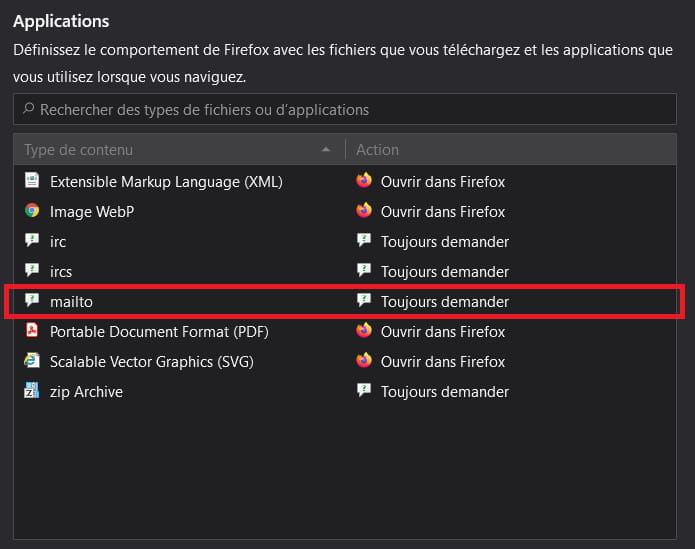
So, in Firefox:
Scroll down to "Applications":
And locate the mailto line
Right-click and choose "Always ask". Be careful, if it says Thunderbird (default) that is not the right one. Really choose "Always ask".
Then click on example@mail.com (or any email address).
Firefox will ask you to choose:
The first Thunderbird is not the right one.
Click on "Choose" and find the .exe of Thunderbird Portable and "Open link".
Check "Always use this application to open mailto links" if necessary and the problem is solved.
Now I still need to know where the mailto setting is in Chrome ^^
--
Best regards,
Naï
P.S.: I am monitoring all my unresolved topics, if you have a solution, I will definitely read it :) -
@Nai,
I meticulously followed your process in Firefox and when I click on an email address,
I get this:
No call to TBP but only the option to send an email via webmail. -
@Nai,
If I click on New message, it opens the compose page for a new Orange webmail message.
In any case, your tinkering does not fulfill the objectives you had at the beginning of this discussion, which is to make TBP the default messaging system for a system, because even if it works, it only does so for this internet browser and not for the one next to it. Moreover, it does not fulfill the role that the default messaging function of a system should play because if you right-click / send to... on an item in Windows Explorer, it should also activate the default messaging system and it does not because your solution only applies to one browser and not to the system.
By the way, why would you want to make TBP the default messaging system when, by definition, its purpose is to be portable and leave no trace on the computer it runs on, which is not the case if you could make it the default messaging system.
If it's for a system, one wonders why you don't use the regular Thunderbird instead of TBP!
At my place, TBP is on a USB stick with all my messaging history for years.
When I go on the go, I take my USB stick with me and plug it into any computer to be at home but without leaving any trace. At home, I make automatic, transparent and daily backups because a messaging system changes every day.
That is the true role of TBP.