Enable/Disable the touchpad
Solved
Hello, I have a problem,
I would like to be able to enable or disable the touchpad, but I can't find how to do it, and I have been searching for hours and hours.
If possible, I would like to activate it using software or even a shortcut, allowing me to press one or multiple keys to enable the touchpad and then press the same key(s) again to disable it. I have already installed "Touchpad Blocker," but the problem is that it temporarily disables the keyboard for a maximum of 3 seconds, while I would like the keyboard to be locked until I press again, whether by using a key combination or by going into software settings.
So, I would appreciate it if the solutions you provide are not too complicated, as I am not an IT expert.
I would like to be able to enable or disable the touchpad, but I can't find how to do it, and I have been searching for hours and hours.
If possible, I would like to activate it using software or even a shortcut, allowing me to press one or multiple keys to enable the touchpad and then press the same key(s) again to disable it. I have already installed "Touchpad Blocker," but the problem is that it temporarily disables the keyboard for a maximum of 3 seconds, while I would like the keyboard to be locked until I press again, whether by using a key combination or by going into software settings.
So, I would appreciate it if the solutions you provide are not too complicated, as I am not an IT expert.
18 answers
-
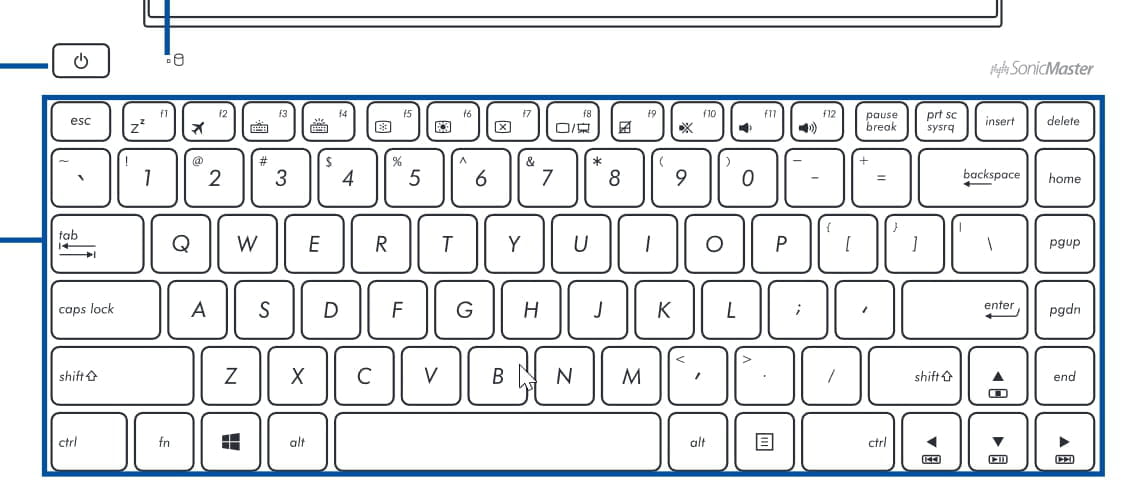
Moderatormadmyke was right: It's indeed Fn + F9 (usually).
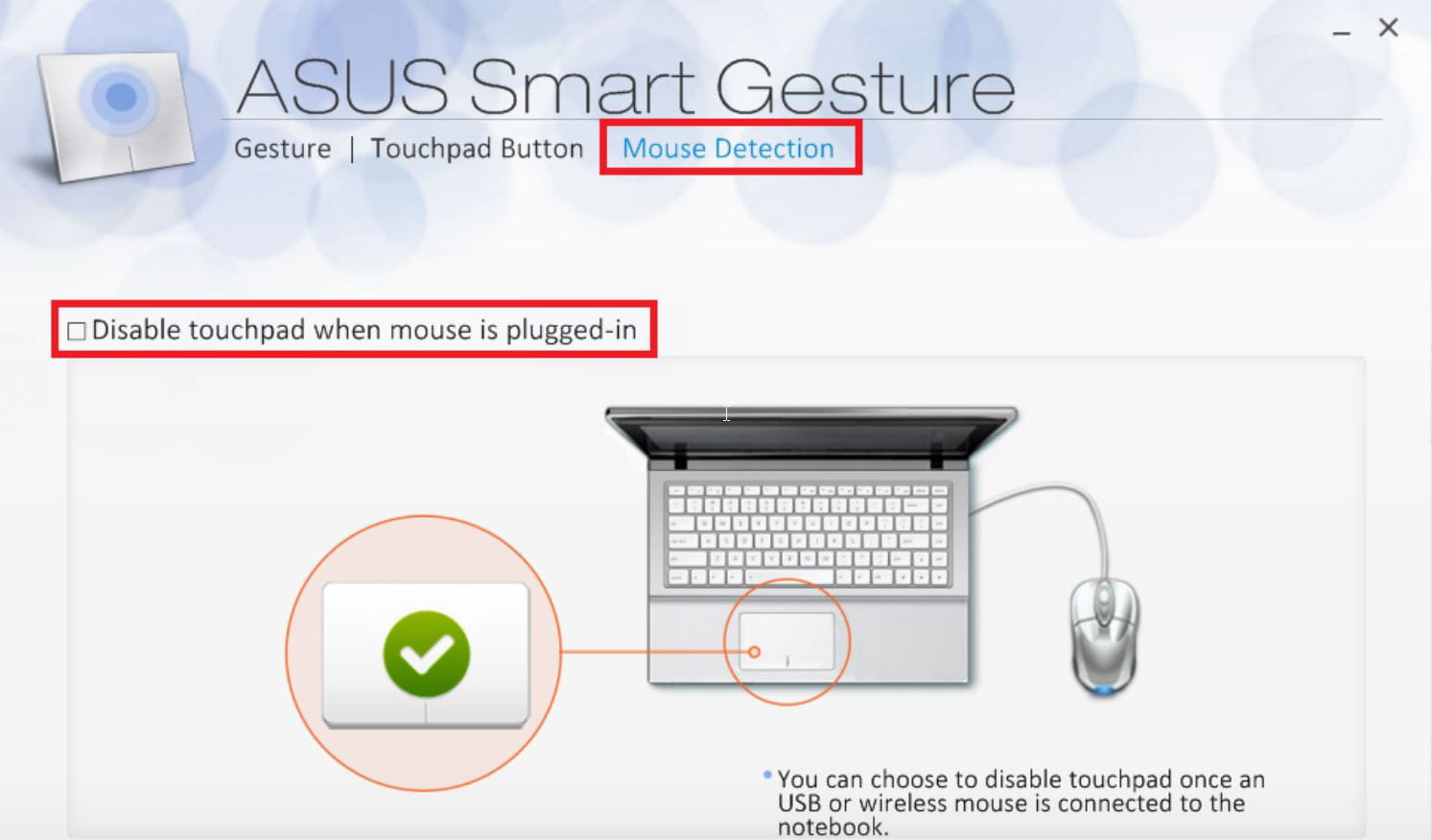
While searching on the Internet, there's also talk of a software: Smart Gesture.
Do you have it?
https://www.asus.com/fr/support/FAQ/1009641 with a download link.
--
What is well conceived is clearly expressed,
And the words to say it come easily.
(Boileau) -
ModeratorHello
What type of computer (Laptop? Desktop? Brand? Model?)
Best regards
--
“We gulp down the flattering lie in big swallows, while we sip the bitter truth drop by drop.” -
I am on a laptop and it's an Asus X555L.
-
Moderator
-
It's the first one.
-
Well, if it's the F9 key, I've already tried and it doesn't work, and I want to enable or disable the touchpad, not the numeric keypad.
-
ModeratorIt's not F9 but FNC + F9

--
“We gulp down the flattering lie and sip drop by drop the bitter truth.” -
That's what I'm doing, I press both fn and f9 at the same time but it does absolutely nothing at all.
-
ModeratorDo the other Function keys (with Fn) work properly?
--
"We swallow the lie that flatters us in one big gulp and we drink the truth that is bitter to us drop by drop." -
Yes, they work very well.
-
ModeratorHello,
You probably need to press the F9 key but not Fn: just F9.
It's possible that on the Asus you have an Elan touchpad. Check in the programs of the Start menu if you find Elan Touchpad Setting.
What is well conceived is clearly stated,
And the words to say it come easily.
(Boileau) -
F9 alone does nothing but on the other hand I don't think I have an Elan touchpad.
-
Or maybe there is software similar to keyboard locker. Touchpad Blocker is pretty good, but it's a shame it only blocks for a maximum of 3 seconds because I would like the touchpad to stay locked until I press a shortcut or go into the software options.
-
Yes, I have already tried, but I can't find where to go next because I believe you can't disable it from there; maybe you can, but I don't know where.
-
But the problem is that the option to disable the touchpad is grayed out; do you have a solution for this issue??
-
Apparently, Smart Gesture is already installed, but I really don't know what to do next. Otherwise, do you know of any useful applications?
-
ModeratorI don't have an Asus and I don't know any software for this kind of work. Normally everything should be in the computer and working.
You can try updating the driver in the Device Manager.
But with Smart Gesture, you should be fine.
Go to the Mouse Detection tab and check Disable TouchPad when mouse is plugged-in
https://www.asus.com/fr/support/FAQ/1009613/
-
-
But where is the mouse detection tab located?
-
Oh yes, I found it now that when my Bluetooth mouse is on, the touchpad is disabled.
In any case, thank you very much for your help.