Which RAM stick(s) for an Asus N61JV?
lesloubim
Posted messages
12
Status
Member
-
gugu01 Posted messages 15669 Registration date Status Contributor Last intervention -
gugu01 Posted messages 15669 Registration date Status Contributor Last intervention -
Good evening,
I currently own an Asus N61JV and would like to increase the capacity of my single 4GB RAM stick, but I'm a bit lost, so I'm asking you for some advice.
Here are its specifications:


This isn't visible on this screen, but there are indeed 4 slots.
Would buying a "Corsair Vengeance so-dimm 8GB DDR3 1600 MHz" stick be suitable for my case?
And if so, can I combine my old 4GB stick with this one?
Thank you.
I currently own an Asus N61JV and would like to increase the capacity of my single 4GB RAM stick, but I'm a bit lost, so I'm asking you for some advice.
Here are its specifications:


This isn't visible on this screen, but there are indeed 4 slots.
Would buying a "Corsair Vengeance so-dimm 8GB DDR3 1600 MHz" stick be suitable for my case?
And if so, can I combine my old 4GB stick with this one?
Thank you.
5 answers
-
Good evening,
You can see on the manufacturer's site or, for example, on Crucial.
This is to get information like maximum, slots, characteristics... then you can buy wherever you want.
The correct model is:
https://www.crucial.fr/compatible-upgrade-for/asus/n61jv#memory
8 GB max
2 slots (not 4)
so 8 : 2 = 4 GB max per slot.
So your idea of a single 8 GB stick is not possible, and if you were thinking of combining an 8 GB and your 4 GB, that's not possible either.
2 x 4 GB max and that's it ;-)
Moreover, on your PC it's DDR3L, L for the voltage which is 1.35 v (compared to 1.5 for standard DDR3)
You need to pay attention to that as well.
Scan your PC on Crucial
https://www.crucial.fr/
And specify your model
(it should be something like Asus N61JV-JX007V or N61Jv-JX011V or ...it's a series so different models)
But these PCs don’t have 4 slots, just two.
Auto message
Without regular feedback from you... you can always refer to article 22 ;-)
Mini Regarding the volunteers who help you: Reply, Respect, Politeness,...-
Good evening, thank you for your response, but your Amazon link leads to an adapter!
Would this one be suitable, for example?
https://www.accessoires-asus.com/barrette-memoire-4go-ddr3-68740-59134.htm#n61jv|l
Because I don't quite understand what the difference is between "DDR3-8500" and "DDR3-10600", like here:
https://www.offtek.fr/asus/mises-a-niveau-de-memoire-pour-ordinateur-portable/n-series/n60-notebook-series/n61jv-ram?gclid=Cj0KCQjw3s_4BRDPARIsAJsyoLNEv77bD3Kqcr_ZiJhjItTDi2EpBUN4GAg3ZqaTHiTfzcwePd7M6aYaApNQEALw_wcB
What should I choose according to my configuration, a "DDR3-8500" or "DDR3-10600"? Thank you.- I've modified the link (oops ;-) )
The crucial link doesn't provide a choice of RAM sticks, do the scan on their site because I don't know your exact model.
I've made some additions and warnings in my first message, read it again just in case you missed it (like the L story)
I'll check your links and get back to you.
The first one is already overpriced, a huge luxury for nothing.
-
-
level choice.
The best option would be to take the same model and brand for good compatibility.
At least the same voltage, frequency, and CL (CL is basically the performance index)...
I would advise you to base yourself on the characteristics of the original one.
So a Samsung M471B5173DB0-YK0
Manufacturer: Samsung
P/N: M471B5173DB0-YK0
Chip: Samsung
Module Type: SO-DIMM DDR3 SDRAM
Bus Type: PC3-128000S
Frequency: 1600MHz
Density: 4GB
Logical Arrangement: 1Rx8
Physical Arrangement: Double-Sided, 204-Pin So-DIMM
CAS Latency: CL11
Voltage: 1.35 v (often incorrectly indicated as 1.5 v in my opinion because your capture clearly indicates 1.35 v, hence L)
(Knowing that this is an original reference or it's not always available for sale under the same reference).
Sellers take advantage of this to claim that it's original and multiply the price by 3 or 4
(example from your first link)
In the second link, we don't have much information, such as the voltage of DDR3 1.5 v or DDR3L 1.35 v.
Personally, given the original stick, I'm looking for the same one second-hand (leboncoin, sales on fb...) for around ten euros, purchase face-to-face, and if there’s an issue, we can resolve it.
Because it’s not uncommon to find original ones for sale, after some who bought pairs sell the old one that is no longer needed.
Otherwise here:
https://www.ldlc.com/recherche/ddr3l/+fcat-4262+fi454-l1h1+fi62-l4h4c1073741824+fv1857-10319+fv283-4563+fv639-3945.html?department=all
or
https://www.crucial.fr/memory/ddr3/ct51264bf160b
or
...
Auto message
Without regular feedback from your part...you can always refer to article 22 ;-)
Mini Consideration towards the volunteers who assist you: Respond, Respect, Politeness,...-
- You're welcome, happy future purchase ;-)
But but but ATTENTION, you still haven't given your exact laptop model.
The Asus N61JV series seems to be from 2010-2011.
I just saw your little image in the first message (I hadn't seen it) and it indicates an i3-4030U processor, which was released in 2014.
That wouldn't match your claimed model.
So, possibly incorrect information regarding the max RAM...
(Your RAM is also from 2014, I think you might be mistaken about your model, so it's possible you have a more recent laptop with a possibly higher max RAM...) - So wait... let's start over because I just realized that I made a mistake about the brand of my laptop (I have two... what a fool...) I apologize... I just wasted your time... I wasn't fully focused last night, haha! (The screenshots above are from the correct laptop, but not the brand of the laptop)
So here is the scan result from the correct laptop this time! (an Acer and not an Asus!)
https://www.crucial.fr/scanview/F906CD4D31D926C3
-
-
hello
as @ Gugu01 says, whom I greet
be careful to take DDR3L at 1.35 volts
frequency 1600Mhz
-
Hello
this barrette will do the trick
https://www.topachat.com/pages/detail2_cat_est_micro_puis_rubrique_est_w_sodimm_puis_ref_est_in10074460.html#avis
same voltage; same frequency; same CAS
--
today, I'm doing nothing, if I haven't finished, I'll continue tomorrow -
A thorough investigation is needed and don't forget the clues to understand ;-)))
Okay, so it's not the same PC anymore.
Essentially, the idea remains the same; we take the right characteristics, frequency, voltage...
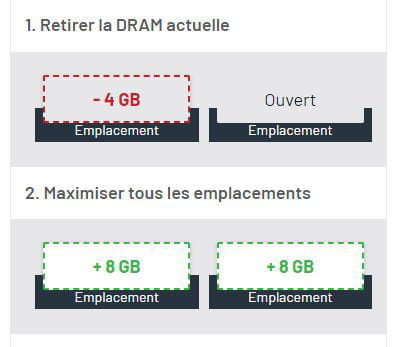
On this PC, a maximum of 16 GB, so 2 x 8 GB maximum.
Regarding your initial question, yes you can put in an 8 GB, and yes you can combine it with your 4 GB.
It's worth noting that sometimes we talk about dual; we prefer to install two so that they operate in dual channel, which basically means slightly better performance, working hand in hand.
So there are 3 possibilities
_ 2 x 8, which would be the best and maximum, but it comes at a cost.
_ 2 x 4, which would still be good; you'd be in dual, but...
_ your 4 GB plus a compatible 8 GB (with the same characteristics), they may not function in dual mode, but 12 GB in non-dual is still better than 8 GB in dual.
It's up to you to decide based on your budget, needs, and desires.
In the end, we still don't know the exact model of the PC. :-)
Aspire V3-371 is a series containing different models
Based on deduction, given your processor it should be this specific model > Acer Aspire V3-371-325V
I wanted to know about the storage type you have.
It seems to be an SSD, which is good.
If it's another model with an HDD, to improve performance, it's better to invest in an SSD that will be noticeable.-
Ahaha! Sorry for my inaccuracies!
Here is the model: Aspire V3-371-38RA
Thank you for your explanations.- I pulled out some info since it's different.
So this Aspire V3-371-38RA would have a 1TB HDD and 4GB of RAM originally.
Given the scan, you know you can go up to 16GB of RAM.
Your PC isn't a powerhouse and it won't become one. ;-)
For Windows 10, 8GB or more is better.
Replacing your HDD with an SSD will make a difference in performance and speed.
(much more noticeable than just maxing out the RAM)
Clone the HDD to the SSD and then replace it, or do a fresh install on the SSD.
SSD of at least 500GB (avoid too small SSDs as they fill up quickly and have a poor price/space ratio) depending on your needs.
There you go, you know everything you can do.
It's up to you now.
;-)
-