Acer Quick Access - CapsLock, Num Lock Display
metric05
-
metric05 -
metric05 -
Hello,
I have an Acer Aspire E5-523. It does not have any indicators for CapsLock and NumLock, but it does show on-screen notifications when I press the keys.
While trying to uninstall some programs, I accidentally uninstalled AcerQuickAccess, which I believe manages this display. In any case, since the uninstallation, the display no longer appears. I would like to have it back.
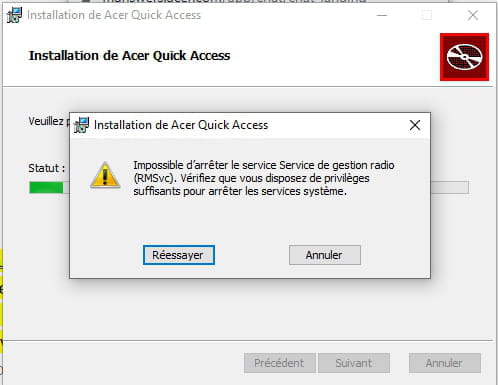
When I try to reinstall AcerQuickAccess, I get the following message and I have to cancel the process (I've already tried "Run as administrator").
After contacting Acer support via chat, they told me that I need to completely reset the PC to retrieve it, which I categorically refuse to do since I spend a lot of time customizing my PC the way I want every time I change it.
I believe there must be a way to restore the CapsLock and NumLock display without going through this method. Can you help me, please?
I have an Acer Aspire E5-523. It does not have any indicators for CapsLock and NumLock, but it does show on-screen notifications when I press the keys.
While trying to uninstall some programs, I accidentally uninstalled AcerQuickAccess, which I believe manages this display. In any case, since the uninstallation, the display no longer appears. I would like to have it back.
When I try to reinstall AcerQuickAccess, I get the following message and I have to cancel the process (I've already tried "Run as administrator").
After contacting Acer support via chat, they told me that I need to completely reset the PC to retrieve it, which I categorically refuse to do since I spend a lot of time customizing my PC the way I want every time I change it.
I believe there must be a way to restore the CapsLock and NumLock display without going through this method. Can you help me, please?