
NA Antivirus
Solved
Gaspard
-
bazfile Posted messages 58537 Registration date Status Moderator Last intervention -
bazfile Posted messages 58537 Registration date Status Moderator Last intervention -
Hello, I have a problem my PC is infected by SAntivirus and I don't know how to get rid of it. When I try to remove it, windows tells me that I don't have administrator rights. I don't know what to do. Could someone help me. Thanks
6 answers
-
Hello,
Download FRST, once downloaded save it to the desktop and then open it; you will get this:
Then check the shortcut box as shown:
Click on Analyze; at the end of the analysis you will have three text files on the desktop FRST, Addition and Shortcut, make sure to wait until the messages stating that the analysis is finished appear, then upload these reports to https://pjjoint.malekal.com/ see this tutorial paragraph Send the analysis reports to pjjoint and then provide the three links generated by Pjjoint in your next message.
--
bazfile
Security Moderator/Contributor.
A hello, a reply, a thank you always brightens the day. -
-
He tells me that this application is going to put my device in danger. Should I not take that into account.
-
Ignore it, it's a false alarm; this software is used to detect infections.
- It is necessary to read what I told you; everything is explained. I remind you of the page https://www.malekal.com/tutoriel-farbar-recovery-scan-tool-frst/#Envoyer_les_rapports_danalyse_sur_pjjoint paragraph SEND THE ANALYSIS REPORTS TO PJJOINT.
-
-
Procedure to follow in the indicated order:
To start in Safe Mode with "Network support" (OPTION 5) you just need to read carefully this page and follow what is indicated in the paragraph Start Windows 10 in Safe Mode.
ATTENTION for the disinfection to work you must start your PC in Safe Mode with "Network support".Once Windows has started in Safe Mode with Network Support
1- Open FRST
2- Copy the entire script that is in the box below:Start::
CloseProcesses:
HKLM\SOFTWARE\Policies\Mozilla\Firefox: Restriction
R2 SAntivirusIC; C:\Program Files (x86)\Digital Communications\SAntivirus\SAntivirusIC.exe [6939968 2020-10-06] (Digital Communications Inc -> Corp DCom)
S2 SAntivirusSvc; C:\Program Files (x86)\Digital Communications\SAntivirus\SAntivirusService.exe [628032 2020-10-06] (Digital Communications Inc -> Corp DCom)
R1 TASANTIVIRUSKD; C:\Program Files (x86)\Digital Communications\SAntivirus\TASAntivirusKD.sys [85480 2020-10-06] (Digital Communications Inc -> Corp DCom
C:\Users\33767\AppData\Roaming\santivirusclient
C:\ProgramData\SAntivirus
C:\ProgramData\Microsoft\Windows\Start Menu\Programs\SAntivirus
C:\Program Files (x86)\Digital Communications
EmptyTemp:
End::
3- Once the script is copied, click on Fix.
Let the fix complete; when it finishes you will be prompted to restart your PC, do it as soon as it asks, see below.
Then once your computer has rebooted :
4- You will have a Fixlog file on your desktop; send it via https://pjjoint.malekal.com/ then put the link generated by Pjoint in your next message.
5- CHECK AND TELL ME IF YOUR PROBLEM IS STILL PRESENT.
bazfile
Moderator/Security Contributor.
a hello, a reply, a thank you always pleases. -
-
Everything is OK, even though you didn’t follow my instructions not to start in Safe Mode. Santivirus is no longer on your PC. - In the future, be careful when you install free software; during installation you should read the screens carefully to avoid getting tricked. - Deselect the options offered; they are not always visible at first. For example:


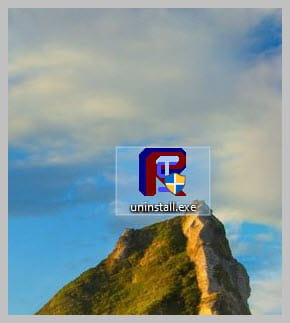
If you wish, you can uninstall FRST; rename the FRST file you downloaded and rename it to uninstall, then run it—the uninstall will happen automatically after a PC restart.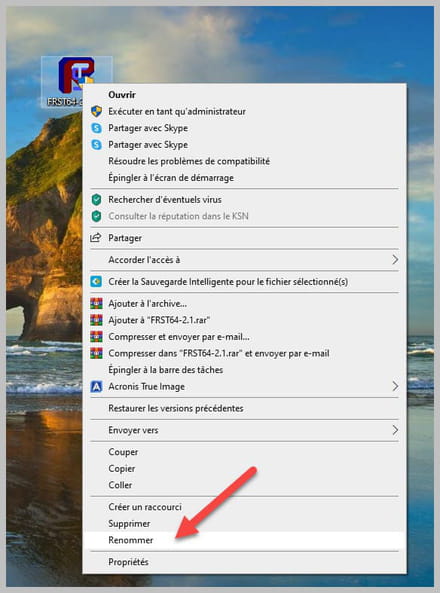
-
-



