Accessing the BIOS on Sony VAIO VPCSE1C5E
Nel-864
Posted messages
4
Status
Member
-
Redbart Posted messages 20955 Registration date Status Member Last intervention -
Redbart Posted messages 20955 Registration date Status Member Last intervention -
Hello,
I have a Sony Vaio VPCSE1C5E, running Windows 7 which has recently been equipped with an SSD. I'm trying to access the BIOS and have tried various options found below, but none work:
power+f2 several times: nothing, Windows starts
power+f3 several times: nothing, Windows starts
power+f12 several times: nothing, Windows starts
power+f8 several times: recovery options
power+delete: nothing, Windows starts
esc+f10: Windows Boot Manager
Pressing Assist button: nothing, Windows starts
Pressing Assist button +f2: nothing, Windows starts
Pressing Assist button +delete: nothing, Windows starts
Do you have any suggestions?
Thank you
Nel-864
I have a Sony Vaio VPCSE1C5E, running Windows 7 which has recently been equipped with an SSD. I'm trying to access the BIOS and have tried various options found below, but none work:
power+f2 several times: nothing, Windows starts
power+f3 several times: nothing, Windows starts
power+f12 several times: nothing, Windows starts
power+f8 several times: recovery options
power+delete: nothing, Windows starts
esc+f10: Windows Boot Manager
Pressing Assist button: nothing, Windows starts
Pressing Assist button +f2: nothing, Windows starts
Pressing Assist button +delete: nothing, Windows starts
Do you have any suggestions?
Thank you
Nel-864
6 answers
-
Hello
since I can't read or write, I'm leaving you with this heavy task
https://www.sony.fr/electronics/support/laptop-pc-vpc-series/vpcse1c5e/manuals
Take the time to comment!
A thank you is appreciated.
Mark it as resolved if your issue has been addressed. I use the informal "you" with everyone. -
Since I can read and write, this answer does not help me at all, just like any form of arrogance, by the way; what is said in the manual was already mentioned in my question...
-
hello
test this:
click on the ASSIST button when the PC is off, a loading will occur and you should arrive at the BIOS/UEFI menu depending on your PC
see you later
--
the radiation level is higher at the job center than at Chernobyl -
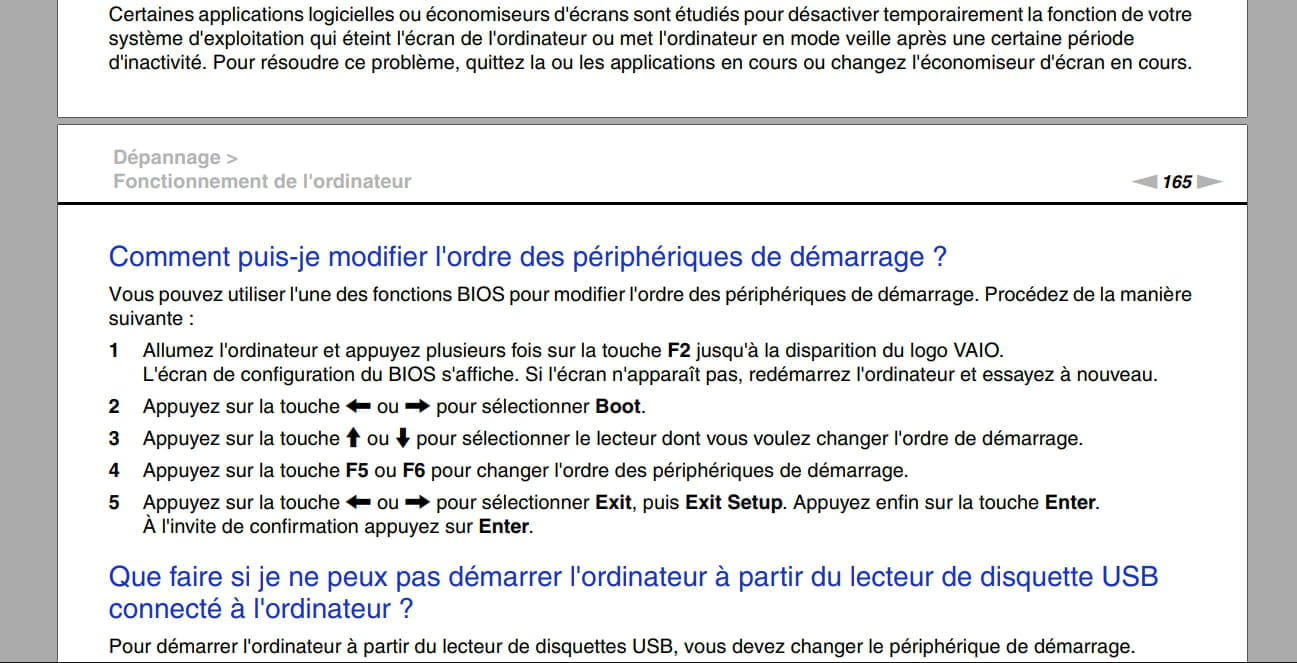
the manual says to turn on the PC (normal press on the toggle button to turn on/off, then release) and immediately tap F2
it does not say to press power and tap F2 at the same time
on most PCs, it is the Del or F2 key
https://community.sony.fr/t5/ordinateurs-et-accessoires/sony-vaio-sve1512a4e-comment-acceder-au-bios/td-p/649971?nobounce
here it is recommended to hold down Assist, turn on the PC, and I assume release Assist as soon as the BIOS screen appears
Take the time to comment!
A thank you is appreciated.
Mark as resolved if your issue has been solved. I use the informal form with everyone. -
Hello
Thank you, but I had already tried that, it doesn't work.... -
Thank you, but I already tried that, it doesn't work....
Are you responding to my message --> click here
or to Redbart's message --> click here
I'm also attaching this page for accessing your PC's BIOS --> click here
@+
--
the radiation level is higher at the unemployment office than at Chernobyl