ASUS is incredibly slow
Solved
LordG
-
bazfile Posted messages 58529 Registration date Status Moderator Last intervention -
bazfile Posted messages 58529 Registration date Status Moderator Last intervention -
Good evening everyone, my Asus laptop is running very slowly, and it pains me because it is only 3 years old.
Operating System
Windows 10 Home 64-bit
Processor
Intel Core i5 6300HQ @ 2.30GHz 74 °C
Skylake 14nm Technology
RAM
8.00 GB Single Channel Unknown @ 1064 MHz (15-15-15-35)
Motherboard
ASUSTeK COMPUTER INC. GL752VW (U3E1)
Graphics
Generic PnP Monitor (1600x900@60Hz)
W2261 (1920x1080@59Hz)
Intel HD Graphics 530 (ASUStek Computer Inc)
2047 MB NVIDIA GeForce GTX 960M (ASUStek Computer Inc) 72 °C
SLI disabled
Storage
931GB Hitachi HGST HTS721010A9E630 (SATA) 43 °C (413 GB free)
Optical Drives
Slimtype DVD A DA8AESH
Audio
Conexant SmartAudio HD
I'm reaching out to you because I don't know enough about hardware computing to identify the problem on my own. Maybe it's infected, maybe it's something else.
If you could help me, I would be extremely grateful (especially since it's my work tool).
Operating System
Windows 10 Home 64-bit
Processor
Intel Core i5 6300HQ @ 2.30GHz 74 °C
Skylake 14nm Technology
RAM
8.00 GB Single Channel Unknown @ 1064 MHz (15-15-15-35)
Motherboard
ASUSTeK COMPUTER INC. GL752VW (U3E1)
Graphics
Generic PnP Monitor (1600x900@60Hz)
W2261 (1920x1080@59Hz)
Intel HD Graphics 530 (ASUStek Computer Inc)
2047 MB NVIDIA GeForce GTX 960M (ASUStek Computer Inc) 72 °C
SLI disabled
Storage
931GB Hitachi HGST HTS721010A9E630 (SATA) 43 °C (413 GB free)
Optical Drives
Slimtype DVD A DA8AESH
Audio
Conexant SmartAudio HD
I'm reaching out to you because I don't know enough about hardware computing to identify the problem on my own. Maybe it's infected, maybe it's something else.
If you could help me, I would be extremely grateful (especially since it's my work tool).
4 answers
-
Hello,
Your RAM is heavily occupied.
No active infection on your PC.
Uninstall WebAdvisor by McAfee
Your version of Windows 10 is not up to date you are on version 1903 while you should be on version 2004, check it with THIS MICROSOFT TOOL it will tell you if everything is OK for your PC.
Procedure to be done in the given order:
You have remnants of WebCompanion
1- Open FRST
2 - Copy the entire script that is in the box below:Start::
CreateRestorePoint:
CloseProcesses:
HKU\S-1-5-21-1432123037-3485310787-2115630236-1001\...\Run: [Web Companion] => C:\Program Files (x86)\Lavasoft\Web Companion\Application\WebCompanion.exe --minimize
C:\Program Files (x86)\Lavasoft\Web Companion
EmptyTemp:
End::
3- Once the script is copied, click on Fix.
Let the fix complete, once it's done you will be asked to restart your PC, do it as soon as prompted, see below.
Then once your computer has restarted:
4- You will have a Fixlog file on your desktop send it via https://pjjoint.malekal.com/ then put the link generated by Pjoint in your next message.
If it's still not better you should uninstall AVG free antivirus to see if that improves things as AVG is quite resource-intensive, Windows Defender will automatically take over and is sufficient as an antivirus.
To uninstall it use RevoUninstaller read carefully THIS PAGE
--
bazfile
Moderator/Security Contributor.
A hello, a response, a thank you are always appreciated.-
https://pjjoint.malekal.com/files.php?id=20201001_y12c14n8k10r11
Here's the fixlog :).
As for AVG, I had already uninstalled it this morning but with the Windows uninstaller "uninstall a program", not with RevoUninstaller, so is that serious? -
-
https://pjjoint.malekal.com/files.php?id=FRST_20201001_w5b6k14f14x12
https://pjjoint.malekal.com/files.php?id=20201001_n13f5v14y7l12
Thank you. Here are the links to the FRST analyses. -
Hello,
There are still remnants of AVG and also of McAfee, which has nonetheless been uninstalled. I think McAfee was your original antivirus, and McAfee WebAdvisor that you previously uninstalled was just a leftover.
Procedure to follow in the indicated order:
You need to perform the FRST correction with Windows started in safe mode with networking.
To start in "safe mode with networking" (option 5), simply read carefully this page.
1- Open FRST
2 - Copy the entire script that is in the box that follows:Start::
CreateRestorePoint:
CloseProcesses:
Task: {AD127219-05F6-4F3C-98B0-4CC5012C48CF} - System32\Tasks\AVGPCTuneUp_Task_BkGndMaintenance => C:\Program Files (x86)\AVG\AVG PC TuneUp\tuscanx.exe
S2 AvgWscReporter; "C:\Program Files (x86)\AVG\Antivirus\wsc_proxy.exe" /runassvc /rpcserver [X]
S2 McAfee WebAdvisor; "C:\Program Files\McAfee\WebAdvisor\ServiceHost.exe" [X]
S3 mfefire; C:\Program Files\Common Files\McAfee\SystemCore\\mfefire.exe [241040 2017-01-18] (McAfee, Inc. -> McAfee, Inc.)
R2 mfemms; C:\Program Files\Common Files\McAfee\SystemCore\\mfemms.exe [385112 2017-01-18] (McAfee, Inc. -> McAfee, Inc.)
S3 cfwids; C:\WINDOWS\System32\drivers\cfwids.sys [88464 2017-01-20] (McAfee, Inc. -> McAfee, Inc.)
S3 mfevtp; C:\Windows\system32\mfevtps.exe [343792 2017-01-18] (McAfee, Inc. -> McAfee, Inc.)
R3 mfeavfk; C:\WINDOWS\System32\drivers\mfeavfk.sys [366328 2017-01-20] (McAfee, Inc. -> McAfee, Inc.)
S0 mfeelamk; C:\WINDOWS\System32\drivers\mfeelamk.sys [85048 2017-01-23] (Microsoft Windows Early Launch Anti-malware Publisher -> McAfee, Inc.)
R3 mfefirek; C:\WINDOWS\System32\drivers\mfefirek.sys [518704 2017-01-20] (McAfee, Inc. -> McAfee, Inc.)
R0 mfehidk; C:\WINDOWS\System32\drivers\mfehidk.sys [923640 2017-01-20] (McAfee, Inc. -> McAfee, Inc.)
R0 mfewfpk; C:\WINDOWS\System32\drivers\mfewfpk.sys [254800 2017-01-20] (McAfee, Inc. -> McAfee, Inc.)
C:\Users\Ghislain Quesnel\AppData\Local\AVG
C:\Program Files (x86)\AVG
C:\ProgramData\Avg
C:\Program Files\Common Files\McAfee
C:\Program Files\McAfee
EmptyTemp:
End::
3- Once the script is copied, click on Fix.
Let the fix run; once it's finished, you will be prompted to restart your PC. Do so as soon as you are prompted, see below.
Then, once your computer has restarted:
4- You will have a Fixlog file on your desktop. Send it via https://pjjoint.malekal.com/ and then include the link generated by Pjoint in your next message.5- CHECK AND TELL ME IF YOUR PROBLEM IS STILL PRESENT
. -
Hello. Thank you again for your help. I'm sending you the link to the Fixlog.
https://pjjoint.malekal.com/files.php?id=20201006_p11c7i13v13x11
There you go.
-
-
Hello,
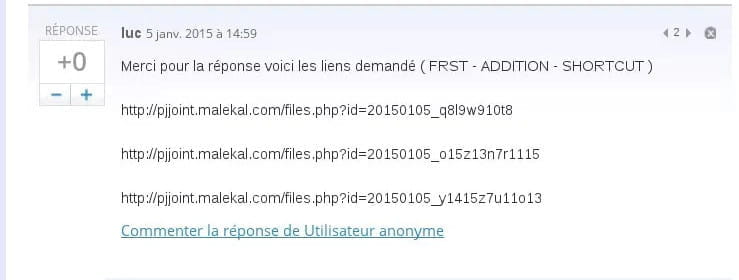
I don’t know how to use FRST so I won't be able to provide the fix to do it the best way (I believe there are 3 people who know how to use it). Moreover, it’s better not to do a copy/paste like that, but to upload the files to the pjjoint site from Malekal and just copy/paste the links of the 3 files, as explained in the tutorial > https://www.malekal.com/tutoriel-farbar-recovery-scan-tool-frst/#Envoyer_les_rapports_danalyse_sur_pjjoint otherwise there’s little chance of getting a response from them. Your response with the links should look like this:
But let's manually do it for now while we wait for one of those people to see the message.
So to start, you can uninstall AVG and McAfee; Windows Defender which is integrated into Windows 10 does a great job, consumes fewer resources, plus having two antivirus is counterproductive as they will only slow down the computer. (Windows Defender does not count, it is disabled when another antivirus is installed)
Then if you are not using OneDrive disable it > https://forums.cnetfrance.fr/tutoriels-windows-10/501931-windows-10-comment-desactiver-onedrive-au-demarrage-ou-completement (after disabling at startup, right-click > exit OneDrive on the icon)
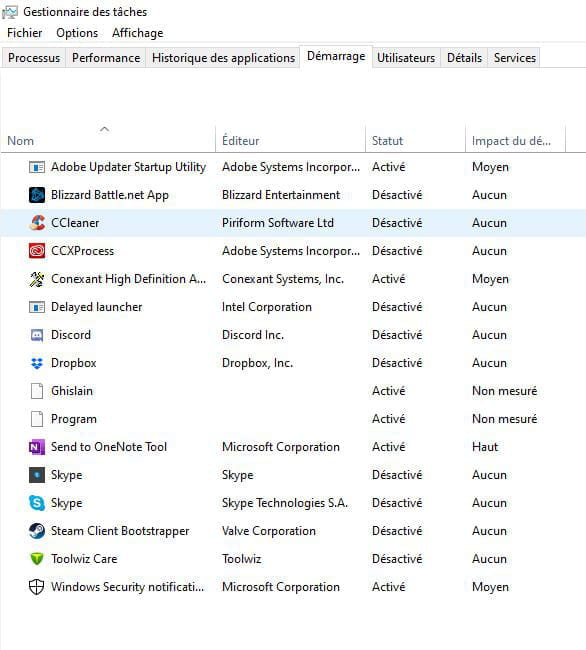
Can you please post a screenshot of the startup tab from the task manager?
In this tab, if you are not using TeamViewer every day, or if the person who intervenes on your computer remotely has not set a specific configuration, you can disable its startup, the same goes for Dropbox; if you do not use it daily, disable its startup.
You can also disable the startups of Adobe.
There are also some Asus software that you can uninstall, but if you could provide us with a list of Asus software (go to Windows settings > apps to see what is there) please. Because there are some that you should not delete, like ATKPackage and SmartGesture in particular.-
Thank you very much for your help, I’m sending this to you right away.

Also the screenshot of the Windows startup.

- Ok, you can uninstall Giftbox, Live Update, and Splendid.
In startup, you can disable Adobe and OneNote.
After that, I don't know what Ghislain and Program represent; if you right-click > Properties on them, what does it show in Location?
Then you can open CMD as an administrator and type in:
sfc /scannow
(press Enter)
chkdsk /F
(press Enter, it will tell you that it's not possible right now and if you want to do it on the next restart, type "y" then press Enter and restart the computer)
-
-
Hello,
Do a FRST scan to see if there are infections on the PC, then post the 3 results here for analysis by Malekal:
https://www.malekal.com/tutoriel-farbar-recovery-scan-tool-frst/
--
“Impose your luck, hold your happiness and move towards your risk. They will get used to looking at you.” René Char -
-
- Thank you Quentin, I'm patient lol, I just wanted to know if I was following the right procedure, because I'm a big anxious person by nature. So I saw that I wasn't ^^. I'm doing that right away.
https://pjjoint.malekal.com/files.php?id=20200930_q12x11e1210d7
https://pjjoint.malekal.com/files.php?id=FRST_20200930_w7u11j77j5
https://pjjoint.malekal.com/files.php?id=20200930_d6y14m6m15t11
-