DLL issue
Solved
MiLoute5208
Posted messages
10
Status
Member
-
MiLoute5208 Posted messages 10 Status Member -
MiLoute5208 Posted messages 10 Status Member -
Hello,
Since the last update of my PC, I am receiving the following error message:
FullTrustNotifier.exe - incorrect image
C:\Windows\System32\cdp.dll is not designed to run on Windows or it contains an error. Please reinstall the program using the original installation media, or contact your system administrator or the software provider for support.
Error Status: 0xc000012f
Apparently, it's the dll that is incompatible, but I don't know how to fix this.
Could you please help me? Thank you in advance
Configuration: Windows / Chrome 85.0.4183.102
Since the last update of my PC, I am receiving the following error message:
FullTrustNotifier.exe - incorrect image
C:\Windows\System32\cdp.dll is not designed to run on Windows or it contains an error. Please reinstall the program using the original installation media, or contact your system administrator or the software provider for support.
Error Status: 0xc000012f
Apparently, it's the dll that is incompatible, but I don't know how to fix this.
Could you please help me? Thank you in advance
Configuration: Windows / Chrome 85.0.4183.102
8 answers
-
Hi,
Try this:
1)
First, check the hard drive: How to check the health of the hard drive
With CrystalDiskInfo
- Download CrystalDiskInfo
The status should be blue; otherwise, it's not a good sign.
More explanations: CrystalDiskInfo: Check the health of the hard drive.
2)
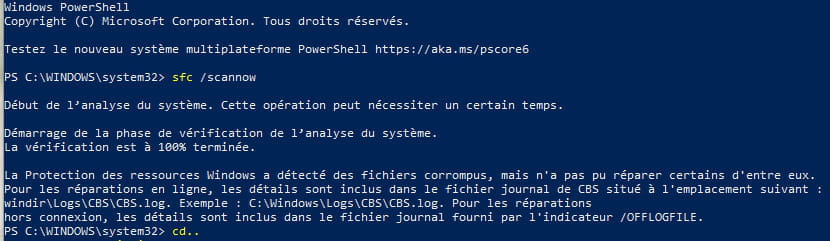
You can run an SFC Repair
Right-click on the "Start" menu and then "Command Prompt (admin)",
Type sfc /scannow in the window.
It should tell you that protection has detected damaged items,
and that you need to restart to correct them. At that point, restart.
--
Please press any key to continue the disinfection...