Current password issue Toshiba u500
Micka52
-
Micka52 -
Micka52 -
Hello,
I just acquired a Toshiba Satellite U500-11C
My problem is that I can't start it
At first, I had a message saying "enter HDD user password"
Well, after digging around in forums, I managed to find a solution
But then I get the message
"ENTER CURRENT PASSWORD"
While browsing the forums, I saw many things to try; a lot of people say to go into the BIOS, but I can't access it. Several codes are suggested, but none work, and removing the battery doesn't help either since it cannot be disassembled on this model
"Setup menu" doesn't work either, the same message "enter current password" appears immediately
Also, trying an incorrect code multiple times does nothing; after the third attempt, the computer shuts down
My question is, are there any other possible solutions for this computer model that I may have missed?
Or would changing the motherboard solve my problem or not?
Or is there nothing more to be done with this computer?
Thanks to anyone who could help, I hope to get a response ????
Configuration: Android / Chrome 84.0.4147.89
I just acquired a Toshiba Satellite U500-11C
My problem is that I can't start it
At first, I had a message saying "enter HDD user password"
Well, after digging around in forums, I managed to find a solution
But then I get the message
"ENTER CURRENT PASSWORD"
While browsing the forums, I saw many things to try; a lot of people say to go into the BIOS, but I can't access it. Several codes are suggested, but none work, and removing the battery doesn't help either since it cannot be disassembled on this model
"Setup menu" doesn't work either, the same message "enter current password" appears immediately
Also, trying an incorrect code multiple times does nothing; after the third attempt, the computer shuts down
My question is, are there any other possible solutions for this computer model that I may have missed?
Or would changing the motherboard solve my problem or not?
Or is there nothing more to be done with this computer?
Thanks to anyone who could help, I hope to get a response ????
Configuration: Android / Chrome 84.0.4147.89
2 answers
-
Hello,
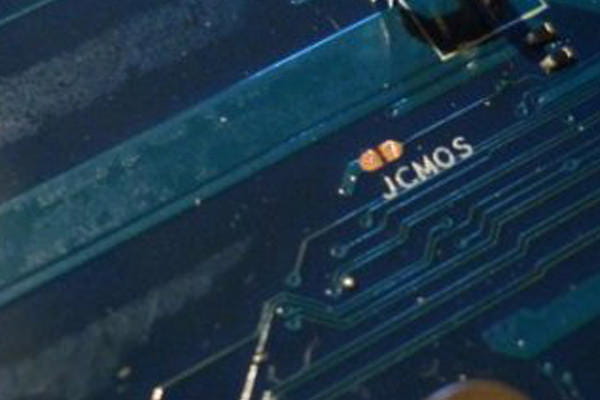
If the traditional "clear-CMOS" (disconnecting the battery and power cable, holding the power button for 30 seconds) doesn’t help, I’ve seen that some models have two contact points on the motherboard ("reset", "Clear", "cmos_clr", "jcmos" or something equivalent) that can be shorted for a few seconds to perform a more aggressive reset. Worth checking.
Otherwise, have you tried the usual passwords "admin" or "Toshiba"?
There’s also a technique where you need to hold down the left shift key while turning on the PC?
Best regards. -
Hello, thank you. I had already tried the traditional codes and other manipulations you mentioned, except for the points to bypass, but I don't see what they might look like or be.
If I change the motherboard, do you think that this code will still be required?