Admin account changed to standard account Mac
Solved
Capo_dtn
Posted messages
5
Status
Member
-
Capo_dtn Posted messages 5 Status Member -
Capo_dtn Posted messages 5 Status Member -
Hello,
I followed all the steps prescribed by @_Ritchi_ thanks to him
But upon reboot, the Mac restarts normally and brings me back to the administrator account choice page instead of a new page to create a new account, the one that is supposed to appear after the procedure.. Thanks in advance, friends!
Configuration: Macintosh / Safari 13.0.4
I followed all the steps prescribed by @_Ritchi_ thanks to him
But upon reboot, the Mac restarts normally and brings me back to the administrator account choice page instead of a new page to create a new account, the one that is supposed to appear after the procedure.. Thanks in advance, friends!

Configuration: Macintosh / Safari 13.0.4
5 answers
-
Hello,
If you were in discussion with Ritchi on the subject, it would have been more judicious to post your message as a reply in the discussion, so that Ritchi can continue to guide you, rather than opening a new discussion.
That said, it seems to me there is a syntax error in the command you typed:
You need to write:
rm /var/db/.AppleSetupDone
and it seems that you typed:
rm /var/db/ .AppleSetupDone
so, an extra space between the slash / and the term .AppleSetupDone
This is just an impression, with no certainty, based on your screenshot. So the command cannot succeed.
Best regards. -
Hello Francis and thank you for your response.
I wasn't in discussion with Ritchi, I read all the messages about the subject that's why.
And unfortunately, I didn't put a space between the slash and the dot, I noticed that many people made the mistake due to the impression given by the calligraphy or I don't know.
I typed the commands in every way, with space, without space, etc.
I don't know if it's due to the version of High Sierra 10.13.6 that I'm using, which is either too outdated or too recent compared to the solutions that have been presented on this forum already... :/ -
I see something else right now: You need to start in single-user mode for this operation.
Not from your user account + the Terminal...
See here for the detailed procedure:
https://www.commentcamarche.net/faq/44961-reinitialiser-un-mot-de-passe-utilisateur-sous-mac-os-x-10-6-et-versions-anterieures-sans-disque-d-installation#methode-alternative
EDIT: High Sierra is not the issue. It's the OS I'm using every day.-
It's really too bad that we can't send videos because I made one to show you in detail.
I have already done these manipulations by holding down cmd + S during restart, trying for more than a minute, pressing both keys before restarting and after, but nothing works. In all cases, lines of code appear at the beginning of the startup for about a second, and then disappear to give way to the Apple logo, followed by the standard user account selection interface...
So I resigned myself to doing cmd + R to try everything, and from there the Mac redirected me to another page with tabs where I went to find the terminal (the initial photo I sent).
I noticed that some advised cmd + S on the internet and others cmd + R; in both cases, the same protocol is to be followed with mount -uw / etc. etc.
So I don't know what else to do, sorry for the length of the message, but I tried to be as precise as possible :)
Thank you for your feedback.
-
-
There must be a handling error. Booting in single-user mode should work, unless the hard drive is damaged. In that case, we could explain the arrival of macOS utilities through a rescue partition taken from the internet, if the Mac is connected to the net. But I am leaning more towards a mishandling of the startup.
In the case of a simple mishap, here's what to do:
- turn off the Mac
- press the 2 keys cmd and S
- start the Mac without releasing those keys
- keep both keys pressed throughout the boot process
- release the 2 keys when the command line display appears and thus shows the possibility of input at the end of the display... -
Hello
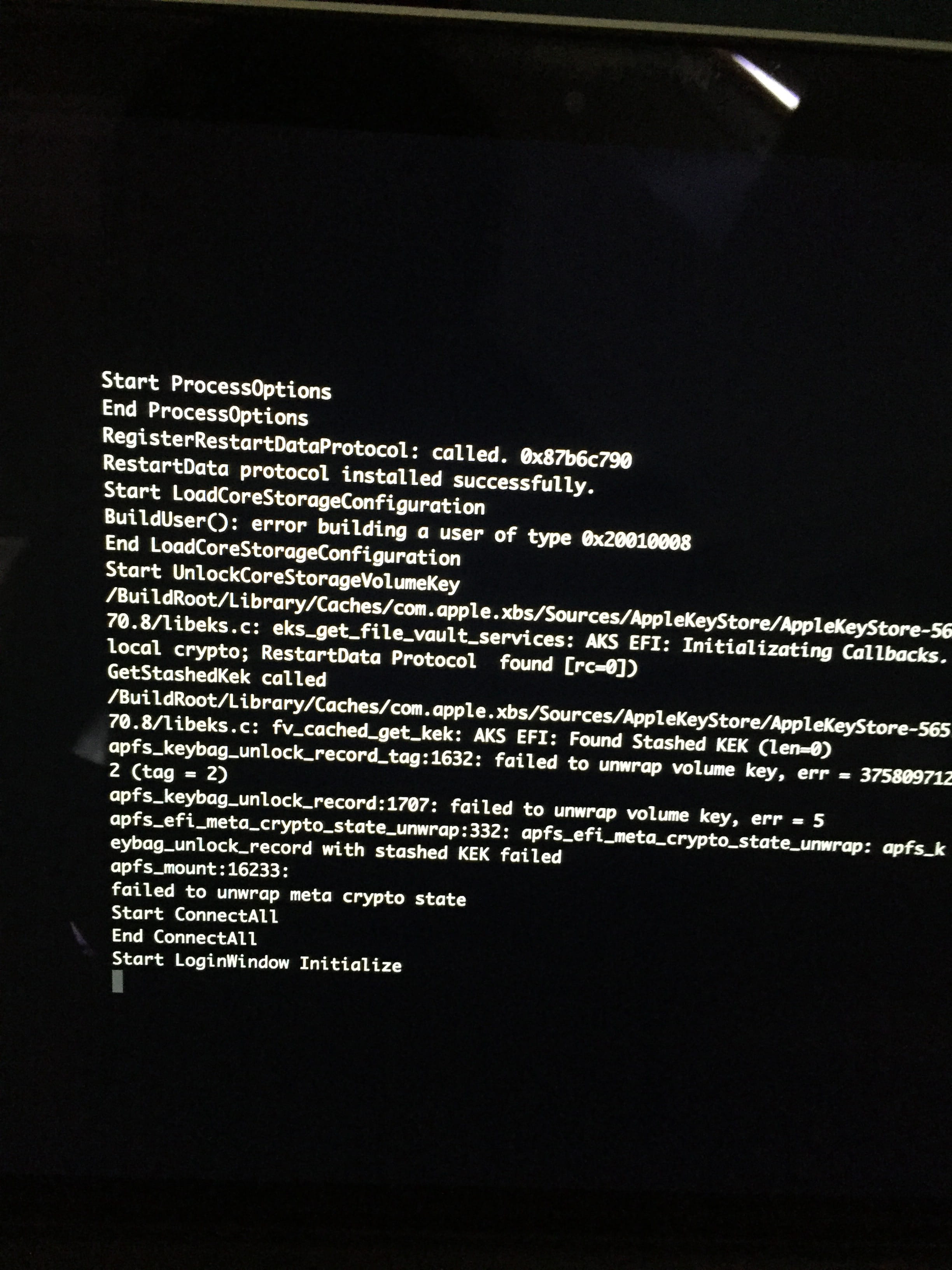
When I look at the screenshot, I don't recognize the usual startup messages of a Mac in Cmd+S mode
Questions:
Would you have chosen the option to encrypt your disk with File Vault 2?
Are you using a real Mac or is it another machine on which a VM (Virtual Machine) is running Mac OS High Sierra with File Vault enabled?
Ritchi-
Hello, apparently reinforcements have come to my rescue, thank you
So no, I encrypted my data and my Mac is indeed an authentic one.
BUT, I just tried to do the same manipulations and strangely it worked!
I am, of course, following the display lines that are supposed to appear. I simply entered my password to access my user space and the lines showed up... who knows why,
it seems to me that yesterday it didn't work though, but anyway, problem solved!
THANK YOU very much to both of you for your help and your patience with people and their everyday technical issues :)
-