Brother "on hold"
Solved
papageno33
Posted messages
1002
Status
Member
-
jmarion3 Posted messages 49489 Registration date Status Contributor Last intervention -
jmarion3 Posted messages 49489 Registration date Status Contributor Last intervention -
Hello, I can't print, my Brother 195 is on "paused" and I can't get it out of this status! Help please (desktop PC)
5 answers
-
-
Thank you for your help. I went to the link I had already visited, which did not provide any solution. I uninstalled the program and reinstalled it; the PC recognizes this printer that scans and copies without improvement. I'm attaching a screenshot that might tell you something; I'm not knowledgeable enough to find the solution. I don't understand this concept of "default." Best regards.

-
-
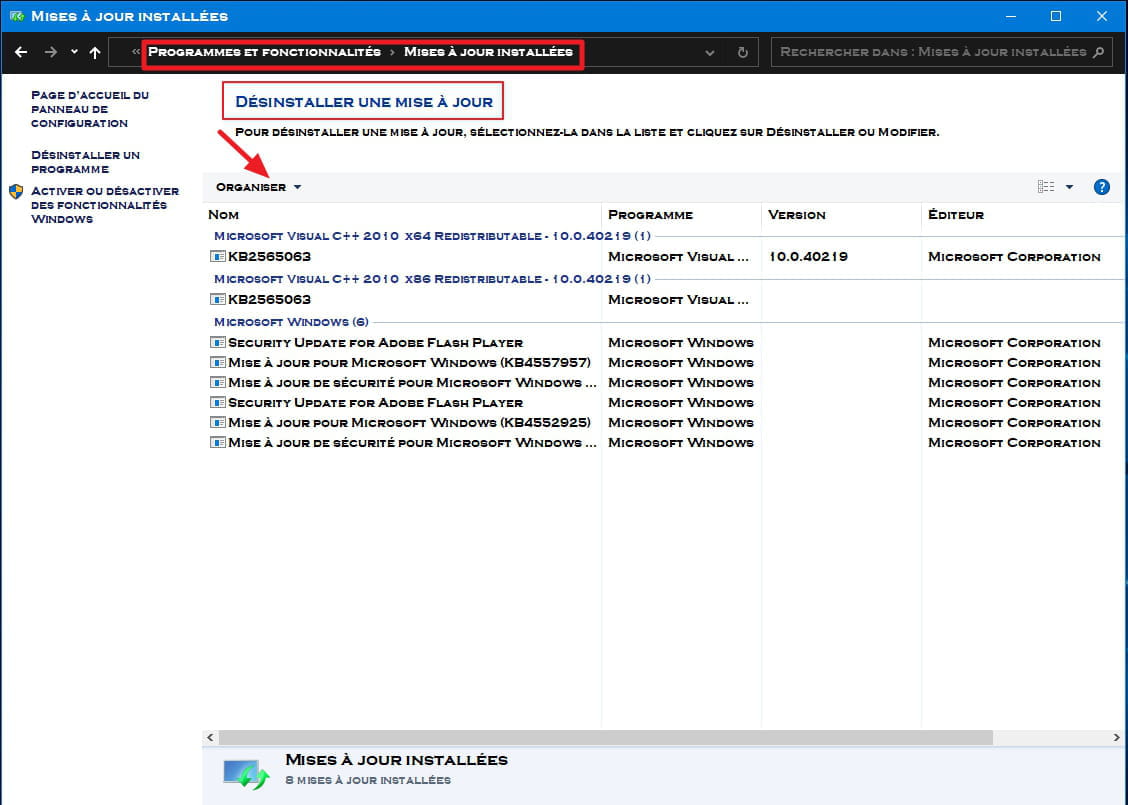
Brother is asking me to uninstall the Windows update KB4566960, how do I perform this operation? The machine is a DCP 195 C.
-
Hello.....
Before uninstalling this update, I suggest you do what is noted below, as your printer should be automatically recognized by Windows
1-Uninstall the printer completely and properly
2-Restart the PC
and do what is noted below after disconnecting the USB Printer/PC cable
1-Control Panel
2-Devices and Printers
3-Add a printer (2nd line from the top right)
4-Click on "The desired printer is not listed"
5-Check the last small box at the bottom >> Next
6-Leaving the top box checked >> Next
7-Click on Windows Update >> Let the machine search for compatible printers
8-In the window that opens >> Left Column >> Look for Brother >>> in the right column scroll down to Brother DCP 195 C >> Next
9-Connect the printer and plug in the USB cable when the system asks for it
Make sure to select the correct printer DCP 195C and not the 193
See the screen image below
Otherwise, to uninstall an update, you need to open the Control Panel ► Programs & Features ► View installed updates (on the left of the page) and in the window that opens ► Look for this update and uninstall it..

A+ -
https://support.microsoft.com/en-us/help/4560960/windows-10-update-kb4560960 here is the update to remove, I struggled to find it but couldn't manage to delete it. Help!
-
Did you see my message ...just above?
- Yes, I saw it, but Brother certifies that this update must be removed to reload the machine's software. Everything you wrote is mentioned on Brother's website; the only thing I did was uninstall Brother.
- Hello and thank you for all your input. Strangely, my printer started working again since yesterday morning for no specific reason. Furthermore, it does not appear on the "printers" list in Windows, but it works, and that's the main thing.
-
-
Hello ....
Thank you for the feedback and I'm happy for you if everything is okay...
Personally, I also have a Brother MFC J615W and I had the same issue with Windows 10... but it works now..
I will mark the topic as resolved..
Have a great Sunday and see you later!