
Slowdown of Windows 10 with Trend Micro Maximum Security antivirus
kaddow
Posted messages
13
Status
Member
-
kaddow Posted messages 13 Status Member -
kaddow Posted messages 13 Status Member -
Hello,
I got a new computer, but after installing the antivirus, it's a disaster.
On startup, or as soon as I open Chrome (where the Trend Micro Maximum Security plugin is installed) or the Control Panel, or even Outlook, the computer freezes for 2 minutes (with the mouse showing a spinning circle), and then it works fine.
When I disable the antivirus (disabled at startup or uninstalled), everything works normally again, no slowdowns, freezing, or crashes.
Here are the clues I found online:
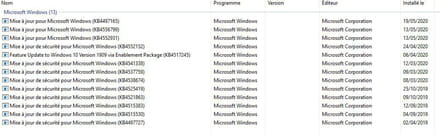
After researching, it could be due to a Windows update that was uninstalled; I saw that this had happened in the past on the Trend Micro forum, but it may no longer be relevant.
(I doubt it because I have laptops with this antivirus that work normally)
Here are the updates installed on the PC:
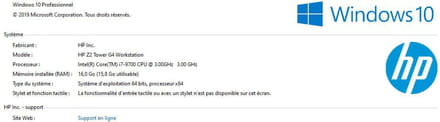
I also read that Trend Micro had trouble working with certain too-recent processors, but that's uncertain.
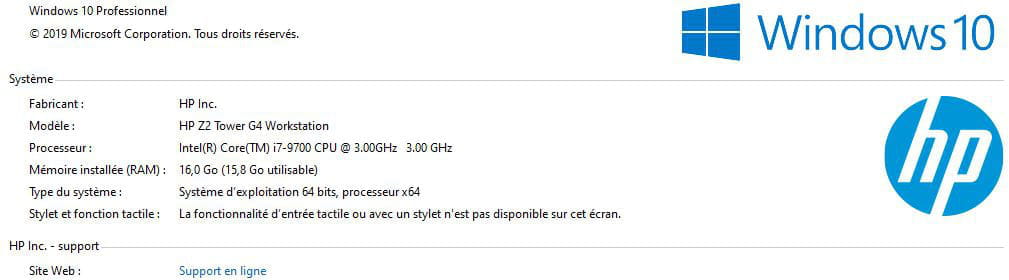
Here is the configuration of the computer:
The graphics card is an Nvidia Quadro P2200.
Thank you in advance for your responses and advice!
I got a new computer, but after installing the antivirus, it's a disaster.
On startup, or as soon as I open Chrome (where the Trend Micro Maximum Security plugin is installed) or the Control Panel, or even Outlook, the computer freezes for 2 minutes (with the mouse showing a spinning circle), and then it works fine.
When I disable the antivirus (disabled at startup or uninstalled), everything works normally again, no slowdowns, freezing, or crashes.
Here are the clues I found online:
After researching, it could be due to a Windows update that was uninstalled; I saw that this had happened in the past on the Trend Micro forum, but it may no longer be relevant.
(I doubt it because I have laptops with this antivirus that work normally)
Here are the updates installed on the PC:

I also read that Trend Micro had trouble working with certain too-recent processors, but that's uncertain.
Here is the configuration of the computer:
The graphics card is an Nvidia Quadro P2200.
Thank you in advance for your responses and advice!
1 answer
-
Hi,
Yes, like you I saw that:
https://success.trendmicro.com/solution/000247336-MS-Windows-10-KB4535996-Update-Causing-Freeze-and-Installation-Issues
Is your Windows on 1909?
Did you manually check if the antivirus didn't have a program update?
--
Win10 - Sophos Home & MalwareBytes Free & AdGuard-
Otherwise, the support to contact them: https://helpcenter.trendmicro.com/en-us/srf/
-
-
