
The sound from my PC is terrible.
Solved
Nilo
-
Nilo -
Nilo -
Hello everyone, first of all I hope you are doing well and that your confinement is going well.
Here is my problem; the day before yesterday, I received my HyperX headset, I plugged it into my PC, everything was working great except the headset's microphone. I looked into it, and apparently it’s a common issue with the new Windows 10 update. I went to the HyperX website, in the FAQ, and their response was the following; "This problem may be related to the Windows 10 update for Realtek audio drivers. In this case, we suggest updating the drivers directly from the Realtek website. First, open the Control Panel > Device Manager and go to the Audio, video and game controllers tab. Find Realtek High Definition Audio in the list of adapters, right-click on it and choose Uninstall from the displayed menu. When the uninstallation is complete, open the following page to download the latest driver to your computer:
http://www.realtek.com/downloads/
Select the High Definition Audio Codecs (software) link. Download the latest version corresponding to your version of Windows and install it. You may need to restart your computer. When this is done, plug in the headset-microphone, and test its microphone. FAQ: KHX-011218-HDST-17"
So I followed the instructions, but since reinstalling the driver, my sound is terrible, voices are cancelling out, there are crackles, distortions, echoes... I tested my headset on my Mac and it works very well (microphone included). So that's where I am and I don't know what to do, I can't do anything on my PC (which I only used for gaming).
Thanks in advance, Nilo.
Here is my problem; the day before yesterday, I received my HyperX headset, I plugged it into my PC, everything was working great except the headset's microphone. I looked into it, and apparently it’s a common issue with the new Windows 10 update. I went to the HyperX website, in the FAQ, and their response was the following; "This problem may be related to the Windows 10 update for Realtek audio drivers. In this case, we suggest updating the drivers directly from the Realtek website. First, open the Control Panel > Device Manager and go to the Audio, video and game controllers tab. Find Realtek High Definition Audio in the list of adapters, right-click on it and choose Uninstall from the displayed menu. When the uninstallation is complete, open the following page to download the latest driver to your computer:
http://www.realtek.com/downloads/
Select the High Definition Audio Codecs (software) link. Download the latest version corresponding to your version of Windows and install it. You may need to restart your computer. When this is done, plug in the headset-microphone, and test its microphone. FAQ: KHX-011218-HDST-17"
So I followed the instructions, but since reinstalling the driver, my sound is terrible, voices are cancelling out, there are crackles, distortions, echoes... I tested my headset on my Mac and it works very well (microphone included). So that's where I am and I don't know what to do, I can't do anything on my PC (which I only used for gaming).
Thanks in advance, Nilo.
32 answers
- 1
- 2
Next
-
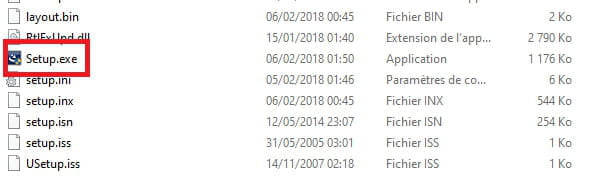
Go to the unzipped driver folder
Run setup.exe
Restart the PC.
-
Hello,
Press Windows + R
Type --> devmgmt.msc and OK.
What do you have under audio, video and game controllers?
What is the brand and the exact model number of the PC?
Is Windows 10 in 32 or 64 bits?
--
Human beings are at their best when things are at their worst. -
Thank you for your response!
In the controllers tab, I have BIRD UM1 (my microphone that I was using), HD WEBCAM c270, NVIDIA High Definition audio service, Realtek High Definition audio service (the one that is bugging).
It's a desktop PC that I built from scratch, so it's not a specific brand.
I have Windows in 64 bits. -
Download and install --> 7Zip 64 bits
Download this driver --> Realtek
Right-click on the driver --> Realtek_High_Definition_Audio_6.0.1.8454.zip
Select --> 7Zip
Choose --> extract to "Realtek_High_Definition_Audio_6.0.1.8454\"
Disconnect the network cable (ethernet) and wifi from the PC
Go to audio, video and game controllers
Right-click on --> Realtek High Definition audio
Uninstall
Check --> delete the device
Uninstall
Windows + R
Type --> control panel and OK
Programs and Features
Uninstall --> Realtek High Definition audio, if present
Restart the PC.
Go to Device Manager
Right-click on the device
Update driver
Browse my computer ......
Browse
Go to the unzipped driver folder --> Realtek_High_Definition_Audio_6.0.1.8454
Select the folder --> WIN64
OK, next
Restart.
--
Human beings are at their best when things are at their worst. -
I've done everything correctly, but I don't know which device to update since there's no Realtek High Audio Definition anymore.
Which driver should I update? -
Do you have a section --> other devices?
What do you have in audio, video and game controllers?
--
Human beings are at their best when things are at their worst. -
I don’t have an other devices section, and in controllers, I have the same as earlier except that there’s no Realtek; there are therefore NVIDIA High Definition Audio, BIRD UM1, HD Webcam C270, and High Definition Audio Service.
-
Well, I made a big decision on a whim, it was annoying me so I reset my computer, I don't know how long it will take, it's my first time. Do you have any rough idea?
Thanks anyway for providing your help and your time, luckily there are people like you on Earth.
I will keep the information carefully for next time. -
I'm getting back to you because even after resetting the PC, it still doesn't work :(
I really don't know what to do. -
Even after resetting the PC, it's not working
Press Windows Key + R
Type --> devmgmt.msc and OK.
What do you have now under audio, video and game controllers?
--
Human beings are at their best when things are at their worst. -
-
Press Windows + R
Type --> control panel and OK.
Go to Sound
In the Playback tab, do you have Realtek High Definition Audio (speakers) set as default?
Example image:
--
Man is at his best when things are at their worst. -
-
If everything is correct, mark the subject as resolved.
--
Human beings are at their best when things are at their worst. -
-
Press Windows + R
Type --> winver and OK
What version is it?
Example image:
--
Human beings are at their best when things are at their worst. -
-
What is the driver version?
Example image:
--
Human beings are at their best when things are at their worst. -
-
Windows key + R
Type --> devmgmt.msc and OK.
Go to Sound, video and game controllers
Provide the hardware identification number of the Realtek High Definition Audio
Look at this --> Find a device's identification number
Post the number in your next message.
--
Human beings are at their best when things are at their worst.



- 1
- 2
Next