Variable workbook name in a formula
Solved
alex141077
Posted messages
52
Status
Member
-
alex141077 Posted messages 52 Status Member -
alex141077 Posted messages 52 Status Member -
Hello,
I'm reaching out for a little help because despite my attempts, I can't find the solution...
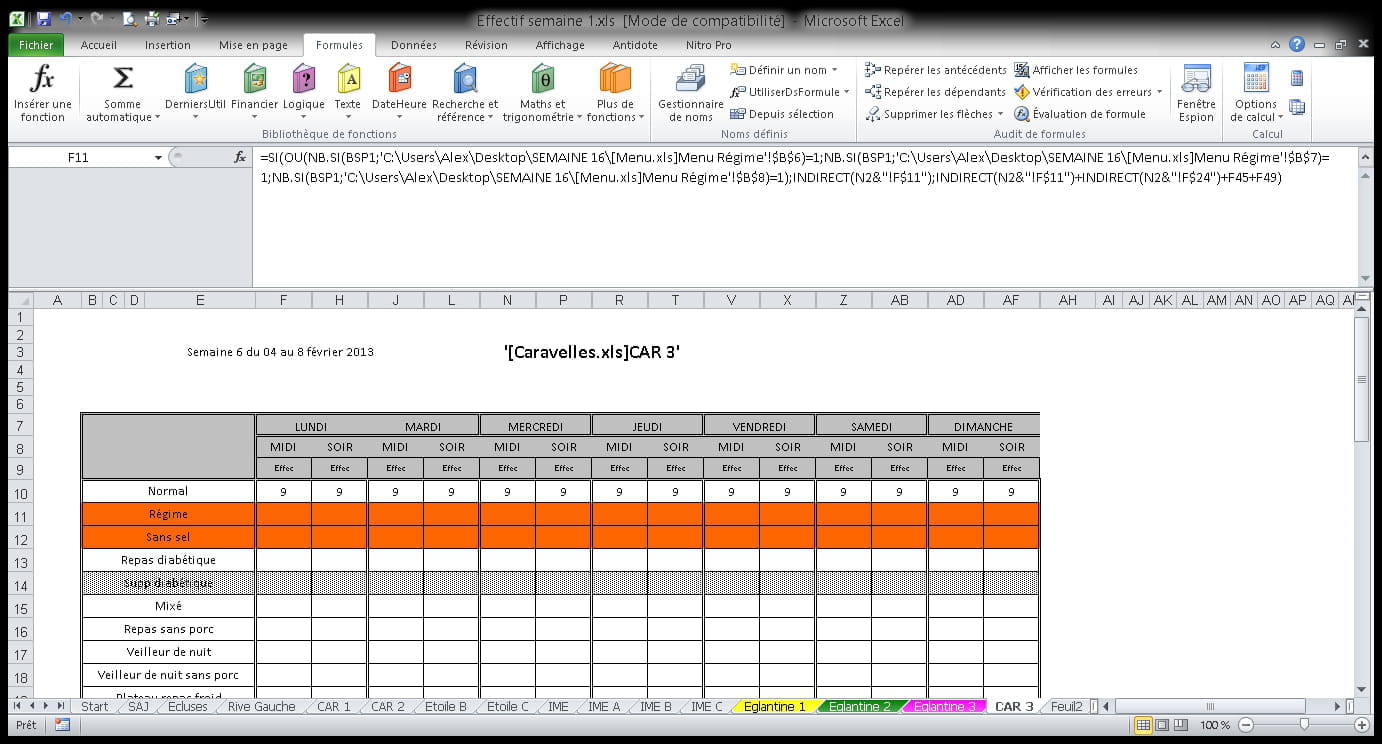
I would like to evolve my software and be able to change the workbook name or create a new sheet with a new workbook without having to copy and modify all the formulas, as there are really a lot. Until now, I used to go through each cell to modify the formulas, which takes me a huge amount of time.
For example, with this formula:
Workbook name: [Caravelles.xls]CAR 3
New workbook name: [Grillons.xls]Grillons D1
How can I change the name without having to manually modify all the formulas in the future?
=IF(OR(COUNTIF(BSP1,'C:\Users\Alex\Desktop\WEEK 16\[Menu.xls]Menu Régime'!$B$6)=1,COUNTIF(BSP1,'C:\Users\Alex\Desktop\WEEK 16\[Menu.xls]Menu Régime'!$B$7)=1,COUNTIF(BSP1,'C:\Users\Alex\Desktop\WEEK 16\[Menu.xls]Menu Régime'!$B$8)=1),'[Caravelles.xls]CAR 3'!F$11,'[Caravelles.xls]CAR 3'!F$11+'[Caravelles.xls]CAR 3'!F$24)+F45+F49
I also tried this "INDIRECT" formula by inserting the workbook name into a cell, but it gives me "#Ref...". This is what it looks like with the workbook name in "N2," but it doesn't work:
=IF(OR(COUNTIF(BSP1,'C:\Users\Alex\Desktop\WEEK 16\[Menu.xls]Menu Normal'!$B$6)=1,COUNTIF(BSP1,'C:\Users\Alex\Desktop\WEEK 16\[Menu.xls]Menu Normal'!$B$7)=1,COUNTIF(BSP1,'C:\Users\Alex\Desktop\WEEK 16\[Menu.xls]Menu Normal'!$B$8)=1),INDIRECT(N2&"!F$10"),INDIRECT(N2&"!F$10")+INDIRECT(N2&"!F$16")+IF(OR(COUNTIF(Base_SPoisson,'C:\Users\Alex\Desktop\WEEK 16\[Menu.xls]Menu Normal'!$B$6)=1,COUNTIF(Base_SPoisson,'C:\Users\Alex\Desktop\WEEK 16\[Menu.xls]Menu Normal'!$B$7)=1,COUNTIF(Base_SPoisson,'C:\Users\Alex\Desktop\WEEK 16\[Menu.xls]Menu Normal'!$B$8)=1),0,INDIRECT(N2&"!F$22")))+F47+F51)
Thank you in advance for your help
Configuration: Windows / Chrome 81.0.4044.129
I'm reaching out for a little help because despite my attempts, I can't find the solution...
I would like to evolve my software and be able to change the workbook name or create a new sheet with a new workbook without having to copy and modify all the formulas, as there are really a lot. Until now, I used to go through each cell to modify the formulas, which takes me a huge amount of time.
For example, with this formula:
Workbook name: [Caravelles.xls]CAR 3
New workbook name: [Grillons.xls]Grillons D1
How can I change the name without having to manually modify all the formulas in the future?
=IF(OR(COUNTIF(BSP1,'C:\Users\Alex\Desktop\WEEK 16\[Menu.xls]Menu Régime'!$B$6)=1,COUNTIF(BSP1,'C:\Users\Alex\Desktop\WEEK 16\[Menu.xls]Menu Régime'!$B$7)=1,COUNTIF(BSP1,'C:\Users\Alex\Desktop\WEEK 16\[Menu.xls]Menu Régime'!$B$8)=1),'[Caravelles.xls]CAR 3'!F$11,'[Caravelles.xls]CAR 3'!F$11+'[Caravelles.xls]CAR 3'!F$24)+F45+F49
=IF(OR(COUNTIF(BSP1,'C:\Users\Alex\Desktop\WEEK 16\[Menu.xls]Menu Normal'!$B$6)=1,COUNTIF(BSP1,'C:\Users\Alex\Desktop\WEEK 16\[Menu.xls]Menu Normal'!$B$7)=1,COUNTIF(BSP1,'C:\Users\Alex\Desktop\WEEK 16\[Menu.xls]Menu Normal'!$B$8)=1),'[Caravelles.xls]CAR 3'!F$10,'[Caravelles.xls]CAR 3'!F$10+'[Caravelles.xls]CAR 3'!$F$16)+IF(OR(COUNTIF(Base_SPoisson,'C:\Users\Alex\Desktop\WEEK 16\[Menu.xls]Menu Normal'!$B$6)=1,COUNTIF(Base_SPoisson,'C:\Users\Alex\Desktop\WEEK 16\[Menu.xls]Menu Normal'!$B$7)=1,COUNTIF(Base_SPoisson,'C:\Users\Alex\Desktop\WEEK 16\[Menu.xls]Menu Normal'!$B$8)=1),0,'[Caravelles.xls]CAR 3'!$F$22)+F47+F51
I also tried this "INDIRECT" formula by inserting the workbook name into a cell, but it gives me "#Ref...". This is what it looks like with the workbook name in "N2," but it doesn't work:
=IF(OR(COUNTIF(BSP1,'C:\Users\Alex\Desktop\WEEK 16\[Menu.xls]Menu Normal'!$B$6)=1,COUNTIF(BSP1,'C:\Users\Alex\Desktop\WEEK 16\[Menu.xls]Menu Normal'!$B$7)=1,COUNTIF(BSP1,'C:\Users\Alex\Desktop\WEEK 16\[Menu.xls]Menu Normal'!$B$8)=1),INDIRECT(N2&"!F$10"),INDIRECT(N2&"!F$10")+INDIRECT(N2&"!F$16")+IF(OR(COUNTIF(Base_SPoisson,'C:\Users\Alex\Desktop\WEEK 16\[Menu.xls]Menu Normal'!$B$6)=1,COUNTIF(Base_SPoisson,'C:\Users\Alex\Desktop\WEEK 16\[Menu.xls]Menu Normal'!$B$7)=1,COUNTIF(Base_SPoisson,'C:\Users\Alex\Desktop\WEEK 16\[Menu.xls]Menu Normal'!$B$8)=1),0,INDIRECT(N2&"!F$22")))+F47+F51)
Thank you in advance for your help
Configuration: Windows / Chrome 81.0.4044.129
3 answers
-
Hello
with INDIRECT, make sure that your reference cell contains the workbook name with all the signs that should surround it in the formula and that the text translates the complete address correctly
for example, if you want to replace
'[Caravelles.xls]CAR 3'
with a file zzzz.xls, write in N2
'[zzzz.xls]CAR 3'!
or if you only put zzzz in N2 use in the formula:
INDIRECT("'["&N2&".xls]CAR3'!F11")
best regards
--
The quality of the response mainly depends on the clarity of the question, thank you!-
Thank you for your help...
Okay, it works with "'[Caravelles.xls]CAR 3'"... but there's a problem if my workbook is not open, it doesn't work!
Can we bypass the issue with "INDEX" or ("IndirectExt" but through macro) but the complete address can also change if I work on another PC for example?
With INDIRECT(N2"!F$22") I always get "Ref#"

-
-
for INDIRECT: what exactly do you have in N2?
for the closed workbook, I don't have the answer, that doesn't mean there isn't one!
best regards
--
The quality of the answer mainly depends on the clarity of the question, thank you! -
Hello,
The INDIRECT() function only works with open workbooks; it returns #Ref! when the workbook is closed.
With Excel 2013 or later, I think it's easier to use Power Query.
Or with a macro, see this post:
https://forums.commentcamarche.net/forum/affich-27800356-equivalent-de-indirect-pour-un-fichier-ferme-sans-macro
Best regards
Patrice
No one can hold all the knowledge; that's why we share it.