Remove Norton scam POP-UP
Solved
corsicanous
Posted messages
9
Registration date
Status
Member
Last intervention
-
bazfile Posted messages 58539 Registration date Status Moderator Last intervention -
bazfile Posted messages 58539 Registration date Status Moderator Last intervention -
Configuration: Windows 10 / Chrome 81.0.4044.122
Hello,
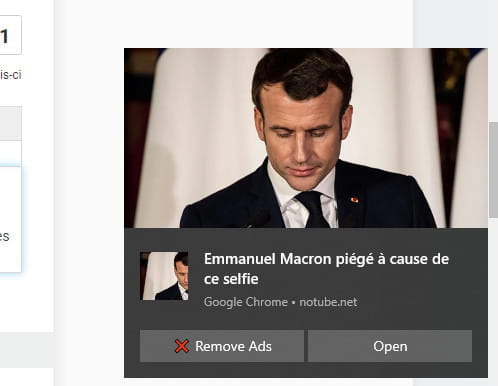
since this morning, I have a very present "aggressive" pop-up window at the bottom right of my screen asking me to reactivate Norton to be protected.
I have tried scans with Malwarebyte, Roguekiller, Spybot, and SUPERAntiSpyware with no results. I even tried PC Risk before stopping after the scan... I don't trust this product; the window keeps coming back.
I am attaching 2 screenshots of this window and another one in an additional tab of my browser.


Thank you for providing me with a solution to get rid of this junk.
Best regards
Dominique
Hello,
since this morning, I have a very present "aggressive" pop-up window at the bottom right of my screen asking me to reactivate Norton to be protected.
I have tried scans with Malwarebyte, Roguekiller, Spybot, and SUPERAntiSpyware with no results. I even tried PC Risk before stopping after the scan... I don't trust this product; the window keeps coming back.
I am attaching 2 screenshots of this window and another one in an additional tab of my browser.

Thank you for providing me with a solution to get rid of this junk.
Best regards
Dominique
3 answers
-
Hello,
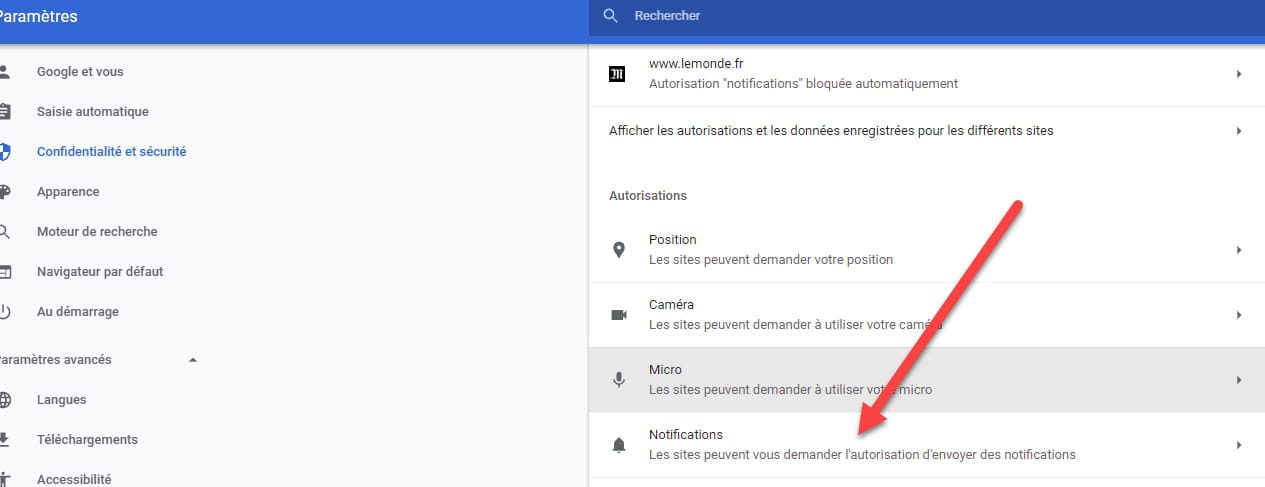
Open Chrome, click on the three dots in the top right corner, then settings==>Privacy and security==>site settings==>notifications and delete the sites that send you these notifications by clicking on the three dots next to the names of those sites.
Click on the images to enlarge them.

bazfile.
Moderator/Security Contributor.
A hello, a response, a thank you are always appreciated.-
Thank you, Bazfile, for this response that I hope is relevant to my case. I have removed pop-up permissions on all the site names reported by the pop-ups.
I hope this is the solution and... that it will hold.
QUESTION PLEASE... Is there a way to block pop-up notifications on all the sites listed in the Settings section? THANK YOU VERY MUCH, anyway.
Just before sending this message, a pop-up I had already seen this morning reappeared after canceling the pop-ups on this site. I don't understand. '
'
-
You must have clicked on a window offering this notification and a new notification has been added, read carefully THIS PAGE.
Reset Google Chrome with THIS SOFTWARE be sure to read the page.
-