
VCRUNTIME140_1.dll not found
Solved
Turnute
Posted messages
2
Status
Member
-
Le_Trismegiste Posted messages 470 Status Member -
Le_Trismegiste Posted messages 470 Status Member -
Hello! I'm sure you're not new to this topic since it's a fairly common issue, but I'm having some trouble with an application. When I try to launch it, the classic error message "VCRUNTIME140_1.dll not found" appears.
So, I've followed some guides on the Internet regarding this problem, and I was advised to install "Microsoft Visual C++ 2015 Redistributable Update 3 RC" following a link.
I downloaded the two files "vc_redist.x64" and "vc_redist.x86", and launched them. However, during the installation, I get the following error code:
"Another version of this product is already installed"
Why not, that seems quite reasonable considering I had to install Visual Studio last year to code in C. So I went into my settings to see if I could repair this error.

First problem: no trace of any version dating back to 2015.
Second problem, I can try to run the versions from 2012 to 2017 and request repairs, sometimes by restarting the computer, but nothing works; my software still won't launch. At this point, I'm starting to wonder if I've caught a virus somehow. Any advice? I've already tried uninstalling and reinstalling my application in question.
So, I've followed some guides on the Internet regarding this problem, and I was advised to install "Microsoft Visual C++ 2015 Redistributable Update 3 RC" following a link.
I downloaded the two files "vc_redist.x64" and "vc_redist.x86", and launched them. However, during the installation, I get the following error code:

"Another version of this product is already installed"
Why not, that seems quite reasonable considering I had to install Visual Studio last year to code in C. So I went into my settings to see if I could repair this error.
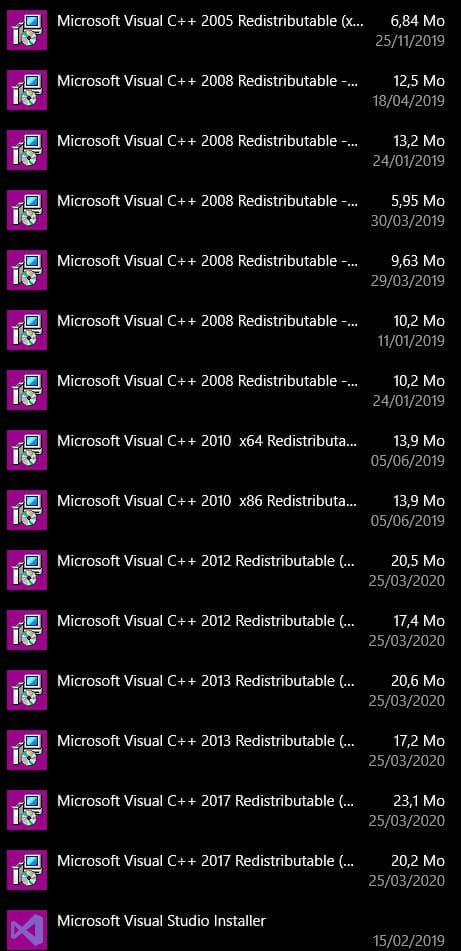
First problem: no trace of any version dating back to 2015.
Second problem, I can try to run the versions from 2012 to 2017 and request repairs, sometimes by restarting the computer, but nothing works; my software still won't launch. At this point, I'm starting to wonder if I've caught a virus somehow. Any advice? I've already tried uninstalling and reinstalling my application in question.
1 answer
-
I am downloading both files "vc_redist.x64" and "vc_redist.x86", and launching them.
I'm not sure I understand everything correctly. If you have a 64-bit OS version, you launch the x64 version. The x86 is, in my opinion, for 32 bits, hence the conflict.
Otherwise, for a complete uninstallation, try Revo Uninstaller +, Microsoft tends to leave a lot of junk in the registry, especially when it comes to their own programs.
--
You will separate the Subtle from the Thick, with Great Industry.
