
Unrecognized connection with Windows 10 and Livebox
tist53
Posted messages
29
Status
Membre
-
tist53 Posted messages 29 Status Membre -
tist53 Posted messages 29 Status Membre -
Hello,
I picked up my parents' PC to upgrade it from Windows 7 to Windows 10, which went very well, and when I tried to connect it at their place, I was never able to connect it to the Livebox.
It had been changed in the meantime from the LiveBox Play or Zen to the Livebox 4. It kept the same configuration as the old one since the Wi-Fi code had not changed, which surprised me.
So the error was that there was no possible connection, as if no cable was plugged in, the network card works perfectly, I tried with 3 different RJ45 cables, one of which worked with the CPL box that was connected to the LiveBox and there was traffic because the LEDs behind were flashing.
I tried all the ports on the box, no traffic, no LEDs lit.
So I brought the PC back home thinking there might be an issue with the RJ45 connector on the motherboard, but no, as soon as I plugged it in at home, it worked normally.
The problem therefore lies with the box or a network configuration.
I'm going back this weekend; I thought about trying to reset the box to factory settings and see.
What do you think?
Thanks in advance.
I picked up my parents' PC to upgrade it from Windows 7 to Windows 10, which went very well, and when I tried to connect it at their place, I was never able to connect it to the Livebox.
It had been changed in the meantime from the LiveBox Play or Zen to the Livebox 4. It kept the same configuration as the old one since the Wi-Fi code had not changed, which surprised me.
So the error was that there was no possible connection, as if no cable was plugged in, the network card works perfectly, I tried with 3 different RJ45 cables, one of which worked with the CPL box that was connected to the LiveBox and there was traffic because the LEDs behind were flashing.
I tried all the ports on the box, no traffic, no LEDs lit.
So I brought the PC back home thinking there might be an issue with the RJ45 connector on the motherboard, but no, as soon as I plugged it in at home, it worked normally.
The problem therefore lies with the box or a network configuration.
I'm going back this weekend; I thought about trying to reset the box to factory settings and see.
What do you think?
Thanks in advance.
10 réponses

Hi,
have you tried connecting directly to the box, without powerline adapters?
Do other devices work via ethernet on this box?
have you tried connecting directly to the box, without powerline adapters?
Do other devices work via ethernet on this box?
Actually, on the box, the PC is connected directly and the powerline adapter is used to extend the Wi-Fi in the longhouse.
So it's properly connected directly and nothing is happening.
The powerline adapter, on the other hand, works because we can see the traffic LEDs on the RJ45 socket of the box.
So it's properly connected directly and nothing is happening.
The powerline adapter, on the other hand, works because we can see the traffic LEDs on the RJ45 socket of the box.
OK,
check what speed it's connecting to at your place in the status of connections (manage adapter settings) like this: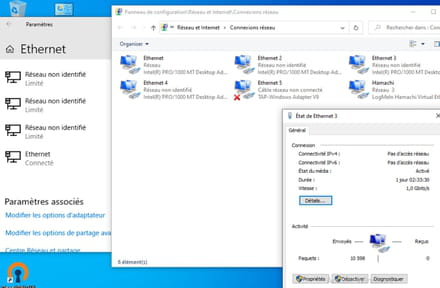
here in my example, we're at 1 Gbit/s
then,
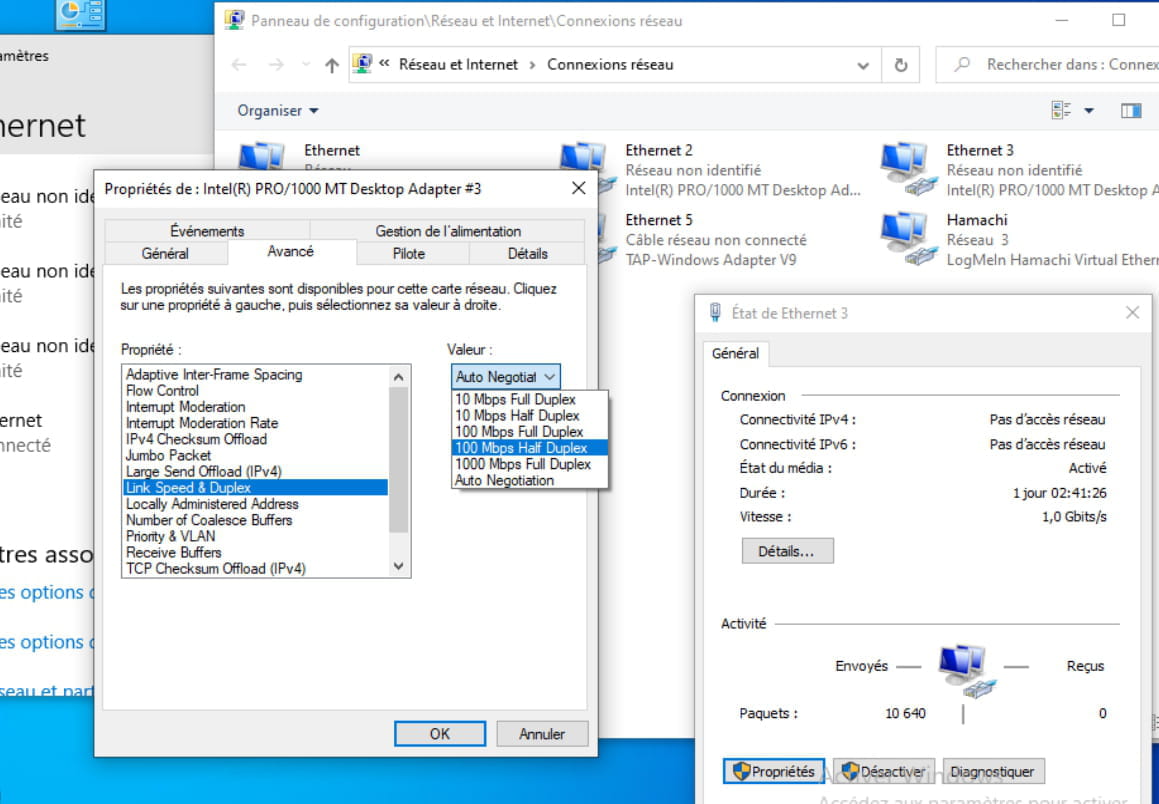
properties > the big configure button > advanced and see if you have the speed and duplex parameter as shown in the driver options, make sure you have autoneg:
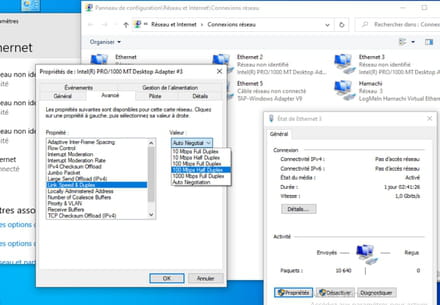
check what speed it's connecting to at your place in the status of connections (manage adapter settings) like this:

here in my example, we're at 1 Gbit/s
then,
properties > the big configure button > advanced and see if you have the speed and duplex parameter as shown in the driver options, make sure you have autoneg:
I already checked in the control panel, and when I run the troubleshooting utility, it diagnoses that no cable is connected.
At home, I don't do anything special other than plugging in the same cables and everything works, but at my parents' house, nothing goes through, as if there were no cable.
That's why I had a doubt about the box; if it has kept the old Windows 7 configuration, could there be an issue!!!
Another thing, I'm not at my parents', so I can't test it; I'm gathering all possible information to make it work on Sunday when I go...
At home, I don't do anything special other than plugging in the same cables and everything works, but at my parents' house, nothing goes through, as if there were no cable.
That's why I had a doubt about the box; if it has kept the old Windows 7 configuration, could there be an issue!!!
Another thing, I'm not at my parents', so I can't test it; I'm gathering all possible information to make it work on Sunday when I go...
No, but already at your place,
check these speed and duplex settings.
If you could find a little switch too, to put between the PC and the box to see.
a gigabit/usb3.0 adapter would also be a good idea to test and it can always be useful elsewhere.
check these speed and duplex settings.
If you could find a little switch too, to put between the PC and the box to see.
a gigabit/usb3.0 adapter would also be a good idea to test and it can always be useful elsewhere.
At home, I have the same box as my parents, the Livebox 4.
I need to unplug my PC to install the other one, which is not easy for me; I'll do it later or tomorrow.
At home, the connection is at 100Mb and it’s set to auto. I’ll check on the other PC.
I have a switch; I’ll take it with me. But what information will it give me?
However, I don't have a gigabit/USB adapter.
I need to unplug my PC to install the other one, which is not easy for me; I'll do it later or tomorrow.
At home, the connection is at 100Mb and it’s set to auto. I’ll check on the other PC.
I have a switch; I’ll take it with me. But what information will it give me?
However, I don't have a gigabit/USB adapter.
I suspect a bad negotiation of the speed with the box.
You could try forcing it to 100M.
Otherwise, this poor gigabit negotiation could come from a faulty driver or a defective box.
A speed negotiation that fails leads to different speeds at each end, resulting in no connection, like an unplugged cable.
Duplex mode is also negotiated, but if that fails, it doesn’t prevent the connection, just causes collisions and retransmissions under heavy load.
If you place a switch between the two, the network card will negotiate with the switch instead of the box, and the box will negotiate with the other port of the switch.
If a speed is forced on one side or the other, that speed will be imposed by negotiation; if both sides of the cable are forced, there will be no negotiation, it either connects directly or not if the forced speeds are different.
You could try forcing it to 100M.
Otherwise, this poor gigabit negotiation could come from a faulty driver or a defective box.
A speed negotiation that fails leads to different speeds at each end, resulting in no connection, like an unplugged cable.
Duplex mode is also negotiated, but if that fails, it doesn’t prevent the connection, just causes collisions and retransmissions under heavy load.
If you place a switch between the two, the network card will negotiate with the switch instead of the box, and the box will negotiate with the other port of the switch.
If a speed is forced on one side or the other, that speed will be imposed by negotiation; if both sides of the cable are forced, there will be no negotiation, it either connects directly or not if the forced speeds are different.
Ok, I'll give it a try.
And by resetting the box?
Is it normal to have the same Wi-Fi code when changing boxes?
And by resetting the box?
Is it normal to have the same Wi-Fi code when changing boxes?
No,
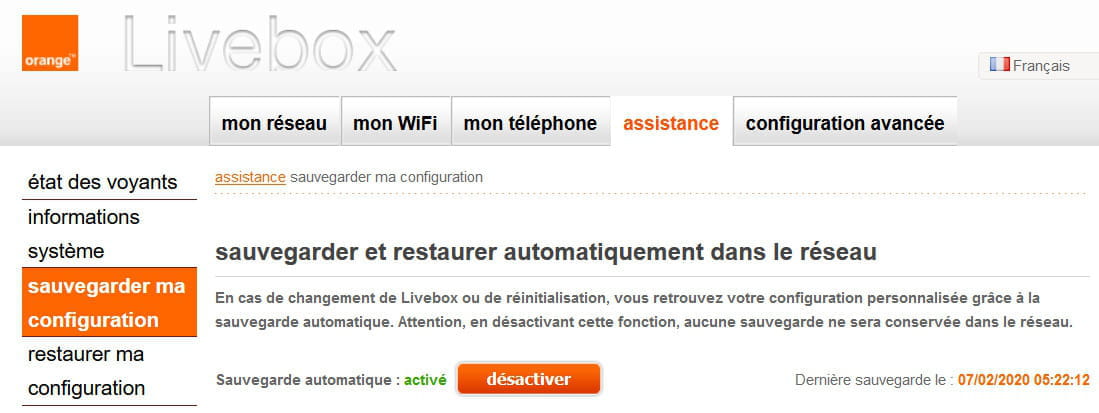
and I don't think that Orange automatically backs up the box's configuration, especially when it's not the same model,
so someone must have intentionally configured it.
Resetting the box, yes why not, make sure you have the login ID.
and I don't think that Orange automatically backs up the box's configuration, especially when it's not the same model,
so someone must have intentionally configured it.
Resetting the box, yes why not, make sure you have the login ID.

Ah OK,
thanks buddy :-)
Is it enabled by default?
And so when it changes model, are the configurations compatible?
Also, since I have you here,
do you know if we can force a speed (10/100/1000) on the switch ports of the box, or is it necessarily in autoneg?
thanks buddy :-)
Is it enabled by default?
And so when it changes model, are the configurations compatible?
Also, since I have you here,
do you know if we can force a speed (10/100/1000) on the switch ports of the box, or is it necessarily in autoneg?
Hi
For questions 1 and 2, I don't know, but if he found the same Wi-Fi security key, that's likely*
For question 3, no port speed configuration
I find it strange that he indicates being at home with a speed of 100 Mbps on a Livebox 4
Could there be a problem with the Ethernet cable (< Cat-5e)?
https://assistance.orange.fr/livebox-modem/toutes-les-livebox-et-modems/installer-et-utiliser/brancher-ou-debrancher-votre-livebox-modem/livebox-4-recuperer-la-configuration-de-votre-livebox-play_169867-718157
For questions 1 and 2, I don't know, but if he found the same Wi-Fi security key, that's likely*
For question 3, no port speed configuration
I find it strange that he indicates being at home with a speed of 100 Mbps on a Livebox 4
Could there be a problem with the Ethernet cable (< Cat-5e)?
- Edit: the configuration files between the 3 and the 4 are compatible
https://assistance.orange.fr/livebox-modem/toutes-les-livebox-et-modems/installer-et-utiliser/brancher-ou-debrancher-votre-livebox-modem/livebox-4-recuperer-la-configuration-de-votre-livebox-play_169867-718157
OK, thank you, for compatibility,
if the Ethernet cable has 4 pairs, even cat3, in cat 5, it shouldn't be a problem, it will connect, but we will have errors and retransmissions that will slow it down overall.
So why it's at 100 at his place, I don’t really know, I suppose it connects at 100 there, but not on the other box, it must be desperately trying at 1000.
if the Ethernet cable has 4 pairs, even cat3, in cat 5, it shouldn't be a problem, it will connect, but we will have errors and retransmissions that will slow it down overall.
So why it's at 100 at his place, I don’t really know, I suppose it connects at 100 there, but not on the other box, it must be desperately trying at 1000.
Just a quick update on what I did, I had tried with my box and had the same issue, then I tried with a switch between the two and it worked, I also tried with the RJ45/USB 3.0 adapter and that worked too.
I left that adapter in place.
I still don’t know where the problem comes from, I should try a few manipulations when I go back but it works as is.
Thanks for the idea.
I left that adapter in place.
I still don’t know where the problem comes from, I should try a few manipulations when I go back but it works as is.
Thanks for the idea.