Windows license key
Solved
Good evening,
I tested your method to retrieve the Windows license key (the sticker part on my PC and it was originally W7), it doesn't work: even with a copy-paste of the proposed command and even though my administrator name was correctly displayed, nothing appears on the black background...
And if I try to run produkey.exe from Nirsoft, my antivirus blocks it, identifying it as malware. I don't dare to allow its loading by authorizing it... Really no issues with this site? Thank you in advance for your advice.
Best regards
matou83
I tested your method to retrieve the Windows license key (the sticker part on my PC and it was originally W7), it doesn't work: even with a copy-paste of the proposed command and even though my administrator name was correctly displayed, nothing appears on the black background...
And if I try to run produkey.exe from Nirsoft, my antivirus blocks it, identifying it as malware. I don't dare to allow its loading by authorizing it... Really no issues with this site? Thank you in advance for your advice.
Best regards
matou83
3 answers
-
Hello.
Open Notepad and copy/paste the following
Set WshShell = CreateObject("WScript.Shell")
MsgBox ConvertToKey(WshShell.RegRead("HKLM\SOFTWARE\Microsoft\Windows NT\CurrentVersion\DigitalProductId"))
Function ConvertToKey(Key)
Const KeyOffset = 52
i = 28
Chars = "BCDFGHJKMPQRTVWXY2346789"
Do
Cur = 0
x = 14
Do
Cur = Cur * 256
Cur = Key(x + KeyOffset) + Cur
Key(x + KeyOffset) = (Cur \ 24) And 255
Cur = Cur Mod 24
x = x -1
Loop While x >= 0
i = i -1
KeyOutput = Mid(Chars, Cur + 1, 1) & KeyOutput
If (((29 - i) Mod 6) = 0) And (i <> -1) Then
i = i -1
KeyOutput = "-" & KeyOutput
End If
Loop While i >= 0
ConvertToKey = KeyOutput
Click on file at the top left and "save as"
click on list and choose "All files"
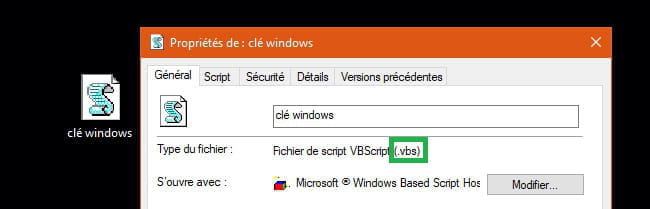
Name the file (e.g. windows key vbs)
Choose the file destination (usually on the desktop)
Finally click "save" and then close Notepad.
Click on the S-shaped icon on the desktop. The activation key is displayed.
Warning! If you have installed Windows 10 you will have the key for that version and not for Windows 7.
Another solution: Belarc Advisor software available on CCM.
See you . . .
--
"Patience leads to success, haste leads to nothing"-
ContributorHi Jojo,
You forgot the period → Name the file (example windows key vbs)
Between windows and vbs
It stays in Notepad:
The correct file name → windows key .vbs
Otherwise it's this file.
We can see the license key with ''cmd''
It's a Windows command.
Keyboard key Windows + R
Type → cmd
Copy and paste this line:
powershell "(Get-WmiObject -query ‘select * from SoftwareLicensingService’).OA3xOriginalProductKey"
Confirm with the enter key.
A+ -
@pistouriHello Pistou.
Indeed . . . Thank you for the reminder. I will correct my Word document.
Otherwise, I based myself on this ==> it doesn't work: even with copy-paste the proposed command
That’s why I suggested this to Matou 43. Maybe we will get an answer?
See you later . . . -
Contributor@JojolaguitareHi Jo,
Matou 43
''I tested your method to recover the Windows license key... nothing appears on the black background.... it doesn’t work''
We don't know about the tutorial you made.
The latest post from CCM is recent (March 4, 2020) → Recover a Windows license key on a PC
Maybe it's this one.
''I'm trying to run produkey.exe from Nirsoft, my antivirus blocks it by identifying it as malware''
Matou, what antivirus do you have?
Windows Defender (W10) doesn't see produkey as malware apparently.
''it's not working: even with copy-pasting the proposed command''
Copy-pasting which command?
There must be a knot to start with the antivirus or two antiviruses activated at the same time if Matou did the migration, which seems to be the case.
Often with Windows Defender, it’s the option (to disable) → Controlled folder access
Or the Smartscreen filter that blocks downloads.
I did an online scan on VirusTotal for ProduKey from Nirsoft, the file is clean.
To be continued.
-