Black square cursor under Adobe Acrobat
Solved
billou54
Posted messages
27
Status
Member
-
pistouri Posted messages 19010 Registration date Status Contributor Last intervention -
pistouri Posted messages 19010 Registration date Status Contributor Last intervention -
Hello everyone,
For a few days, my cursor (arrow) is no longer displayed when I open PDF documents. Instead, I get a black square. And only under ACROBAT READER.
I checked my mouse settings, uninstalled the software, reinstalled it...
Nothing works.
I found a page on the Internet where I need to modify something under C:\users... but I don't know how to do that.
I hope you can help me, as it's very annoying.
Looking forward to hearing from you.
For a few days, my cursor (arrow) is no longer displayed when I open PDF documents. Instead, I get a black square. And only under ACROBAT READER.
I checked my mouse settings, uninstalled the software, reinstalled it...
Nothing works.
I found a page on the Internet where I need to modify something under C:\users... but I don't know how to do that.
I hope you can help me, as it's very annoying.
Looking forward to hearing from you.
4 answers
-
pistouri Posted messages 19010 Registration date Status Contributor Last intervention Ambassador 8 732
Hello,
You found this solution
Summary:
---------------------------------------------------------------------------------------------------------------------------------------------------------
Solution: delete the icon cache file
Adobe is working on resolving this issue. In the meantime, follow these steps as a solution
-Open the local application data folder:
-C:\Users\<username>\AppData\Local\Adobe\Acrobat\DC
-Delete the following file in the local application data folder:
-For Acrobat Reader DC: IconCacheRdr.dat
-For Acrobat DC: IconCacheAcro.dat
Restart Acrobat Reader DC or Acrobat DC.
---------------------------------------------------------------------------------------------------------------------------------------------------------
You need to show hidden files and folders
The procedure
Then go to Computer or This PC (with W10).
Then go to → Drive (C)
Click on → User
Click on → Your username
Continue along the path → AppData → Local → Acrobat Reader → Acrobat → DC
And depending on your version of Adobe Reader delete IconCacheRdr.dat or IconCacheAcro.dat
Or press the keyboard Windows + R
Copy/paste or type → AppData
Go to → Local
Go to → Acrobat Reader → Acrobat → DC
In the DC folder delete one of the two files IconCacheRdr.dat or IconCacheAcro.dat
See you soon
-
Good evening,
I took some time to respond because I didn't have much access to my computer.
Anyway, thank you very much for all these explanations!!
I arrived safely in DC, and I found an IconCacheRdr.dat with some numbers.
I still deleted the file and then!!!! YAY!! it's working like a charm.
I am really thrilled!! Looking forward to it, Pistouri
-
-
pistouri Posted messages 19010 Registration date Status Contributor Last intervention Ambassador 8 732
Hello,
Happy for you.
If one day you decide to change your PDF reader while keeping Adobe Acrobat, you have a
list on this practical guide
My favorite is PDF-XChange Viewer
Best wishes.
--
pistouri -
I'm going to try your favorite! It seems very good.
THANK YOU!!!
Have a nice evening and happy end of year celebrations. -
pistouri Posted messages 19010 Registration date Status Contributor Last intervention Ambassador 8 732
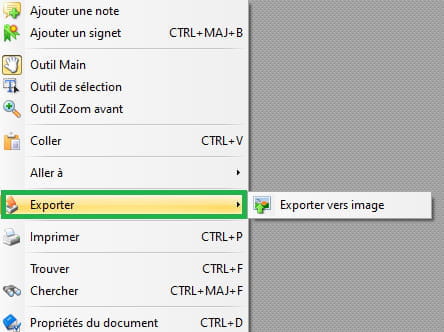
A right-click in the PDF to export to an image if the PDF refuses to be printed (and it often does with W10).
Happy holidays to you too.
--
pistouri