
Issue with checkboxes
Paris163
Posted messages
213
Registration date
Status
Member
Last intervention
-
Paris163 Posted messages 213 Registration date Status Member Last intervention -
Paris163 Posted messages 213 Registration date Status Member Last intervention -
Hello,
I inserted checkboxes in the cells of an Excel table, spacing them well one above the other.
But when I close the file and reopen it, the arrangement of the checkboxes has completely changed, like in the photo: some are clustered together, others are overlapping, and still others are in different cells than where I placed them.
I’ve put them back in place several times, but every time I close and open the file, it’s the same thing.
Could someone help me?
Thank you!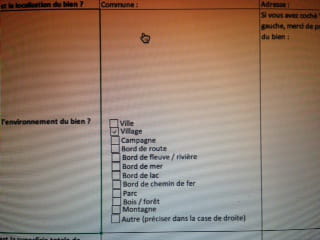
I inserted checkboxes in the cells of an Excel table, spacing them well one above the other.
But when I close the file and reopen it, the arrangement of the checkboxes has completely changed, like in the photo: some are clustered together, others are overlapping, and still others are in different cells than where I placed them.
I’ve put them back in place several times, but every time I close and open the file, it’s the same thing.
Could someone help me?
Thank you!
