Stream PC screen on Freebox Mini 4K via Wi-Fi
bentoto
Posted messages
38
Registration date
Status
Member
Last intervention
-
virtuose1 Posted messages 202 Status Member -
virtuose1 Posted messages 202 Status Member -
Hello
I am using Windows 10 and I have a Freebox Mini 4K
I would like to stream my PC screen to my TV (which is more of a video projector) via Wi-Fi going through the Freebox devices
The HDMI port is already occupied by the Freebox device, so I can't use it for my PC screen unless I always have to unplug it
What are my options? And how should I proceed?
I searched, and the answer that seems most relevant is found in the link below, but I don't understand what I should do or if it's even possible.
https://forums.commentcamarche.net/forum/affich-33934733-afficher-son-ecran-de-pc-sur-tv-freebox-via-wifi#answers
Thank you in advance for your responses
Benjamin
I am using Windows 10 and I have a Freebox Mini 4K
I would like to stream my PC screen to my TV (which is more of a video projector) via Wi-Fi going through the Freebox devices
The HDMI port is already occupied by the Freebox device, so I can't use it for my PC screen unless I always have to unplug it
What are my options? And how should I proceed?
I searched, and the answer that seems most relevant is found in the link below, but I don't understand what I should do or if it's even possible.
https://forums.commentcamarche.net/forum/affich-33934733-afficher-son-ecran-de-pc-sur-tv-freebox-via-wifi#answers
Thank you in advance for your responses
Benjamin
3 answers
-
Hello,
It depends on what you want to do. I also have a Mini 4K, I don't really use the streaming via the Mini 4K player since I can do it directly from the PC to the TV via Wi-Fi.
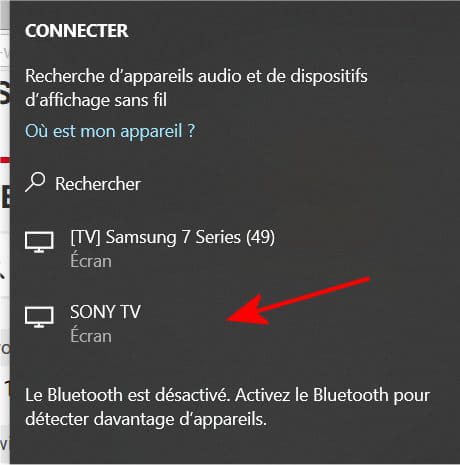
For the entire desktop, use Windows+P then Connect to a wireless display (sometimes on the TV I need to choose "Screen Mirroring" as the input device):
If we look for the Mini 4K, what is indicated in your link does not work for me, it’s the casting of the desktop via the Chrome browser, the Mini player is seen but not usable:
If it’s for streaming a movie, music, or image, we can use VLC, it works with the Mini player:
But the appearance of the device list on VLC is sometimes random.
For streaming, I also use Windows Explorer, but the Mini player is not detected:
Best regards
-
Hello
thank you for your response
I would need it for the entire office
my video projector doesn't have its own wifi, that's why I would like to connect directly through the Free boxes
when I press Windows P, the PC doesn't find the boxes
is there an application or a setting for that?
could the media explorer maybe help? when I go there, I feel like it detects the PC since it displays the name of the PC
thank you-
If it's for the office, you should test with Chrome, because if it doesn't work for me, it's a proposed solution that should work depending on the network contexts.
Because the media explorer of the player will never display the desktop. It's a UPnP/DLNA multimedia client used to display files video, music, or images. -
-
-
Hello, I have a similar problem and the random aspect is annoying.
For me, it's about casting my issue; only YouTube can be cast via Chrome, everything else doesn't work regardless of the application system or device.
Tablets, phones, and PCs running Windows 7 or Windows 10, the same problem.
However, DLNA works but it's different because you need to have the files on the hard drive listed by Plex or Servioo or others, but casting is another issue and apparently quite different.