
Screen time "ignore limit"
Solved
karnameismy
Posted messages
18
Status
Member
-
Bantunes -
Bantunes -
Hello everyone!!
In my family, we all have an iPhone: my three kids, my partner, and I.
We activated the Screen Time app on my children's iPhones. We thought we were doing the right thing by limiting their screen exposure!
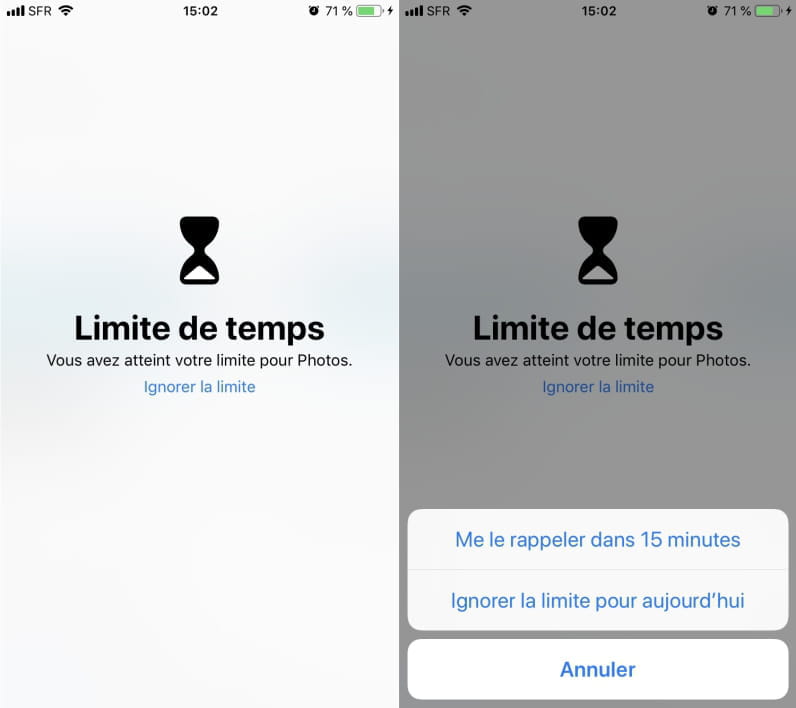
This morning, as he was leaving for school, my eldest told me that he can easily ignore the limit for each app by clicking on the "ignore limit" option located just below the message "you have reached your limit for ...(app name)".
Moreover, he can ignore it for the whole day!!!!
As a result, Screen Time has become completely useless for me, as my children, like many others, will no longer be fooled by the simple message of limit reached; they will just click on "ignore limit"!
So here’s my question: can we remove this option on our children's phones, and if so, what is the procedure?
Thank you in advance and I wish you all a great day!!

In my family, we all have an iPhone: my three kids, my partner, and I.
We activated the Screen Time app on my children's iPhones. We thought we were doing the right thing by limiting their screen exposure!
This morning, as he was leaving for school, my eldest told me that he can easily ignore the limit for each app by clicking on the "ignore limit" option located just below the message "you have reached your limit for ...(app name)".
Moreover, he can ignore it for the whole day!!!!
As a result, Screen Time has become completely useless for me, as my children, like many others, will no longer be fooled by the simple message of limit reached; they will just click on "ignore limit"!
So here’s my question: can we remove this option on our children's phones, and if so, what is the procedure?
Thank you in advance and I wish you all a great day!!
5 answers
-
Hello,
It is possible to block the "Ignore Limit" feature by setting a code in Screen Time.
To get started, go to Settings > Screen Time and tap Turn Off "Screen Time". Then tap Turn On "Screen Time" > Continue > This iPhone is for my child.
Then configure Downtime, app limits, etc. and set the lock code for Screen Time. Therefore, once the device is locked, the code set in Screen Time will be required to ignore the limit.-
Better late than never, but having faced the problem, I propose a solution. It is not a bug but rather a somewhat unclear adjustment order. After configuring the code that we often add after setting our app limits, you need to go back into the app limits one by one; you will see a new option available that is unchecked by default, as simple as that.
-

