Ryzen 7 2700x at 80°C

ptitele
Posted messages
32
Status
Member
-
AluMinioume Posted messages 3107 Registration date Status Member Last intervention -
AluMinioume Posted messages 3107 Registration date Status Member Last intervention -
Hello,
I would like to know if 80°C is a normal temperature for the CPU during gaming sessions.
I did some research online before asking here, but I didn't necessarily find a clear answer to my question, as some said yes and others no and that something should be done.
I saw several topics where people were complaining about the high temperatures of this processor.
Then I went to check benchmarks on YouTube where people didn't exceed 65°C (again during gameplay).
I want to emphasize that my processor is not overclocked (with 4 months of use) and I am using the stock cooler with properly applied thermal paste. My case is quite large with 4 fans for air circulation, 3 at the front for intake and 1 at the back to exhaust. Case reference: Sahara P35.
I also haven't changed anything in the BIOS (voltage, fan speeds, etc.), and I believe the fans are at max since the PC is quite noisy. I left everything on "auto" and similarly during gaming sessions, I don't play in 4K but 1080p with auto settings, which often suggest ultra or high, and I'm not streaming, I just play casually after work.
I know some might say "well, lower the settings to reduce consumption and temperature," but I didn't spend a certain amount on this setup just to play in Low at 720p ^^.
I'm attaching a screen of the temperature taken with MSI Afterburner during a gaming session.

As we can see, I am at 50°C, but I had the game in the "background" for about ten minutes. In-game, it varies between 69 and 80°C.
Here is the complete config:
CPU: Ryzen 7 2700x
GPU: RTX2080
Motherboard: Aorus x470 ultra gaming
RAM: 32 GB (4x8 GB) 3200MHz
PSU: Corsair TX650M 80+ gold (650W)
I just want to know if I should be seriously worried to resolve this "problem" as soon as possible, knowing that I believe the max supported temperature for the CPU is 95°C and that the heat wave period has passed.
Or if others have had the same case as mine and managed to remedy it.
I considered changing the cooling system for the CPU, but will that really be effective? If so, do you have any recommendations for me?
Thank you in advance for your help.
I would like to know if 80°C is a normal temperature for the CPU during gaming sessions.
I did some research online before asking here, but I didn't necessarily find a clear answer to my question, as some said yes and others no and that something should be done.
I saw several topics where people were complaining about the high temperatures of this processor.
Then I went to check benchmarks on YouTube where people didn't exceed 65°C (again during gameplay).
I want to emphasize that my processor is not overclocked (with 4 months of use) and I am using the stock cooler with properly applied thermal paste. My case is quite large with 4 fans for air circulation, 3 at the front for intake and 1 at the back to exhaust. Case reference: Sahara P35.
I also haven't changed anything in the BIOS (voltage, fan speeds, etc.), and I believe the fans are at max since the PC is quite noisy. I left everything on "auto" and similarly during gaming sessions, I don't play in 4K but 1080p with auto settings, which often suggest ultra or high, and I'm not streaming, I just play casually after work.
I know some might say "well, lower the settings to reduce consumption and temperature," but I didn't spend a certain amount on this setup just to play in Low at 720p ^^.
I'm attaching a screen of the temperature taken with MSI Afterburner during a gaming session.
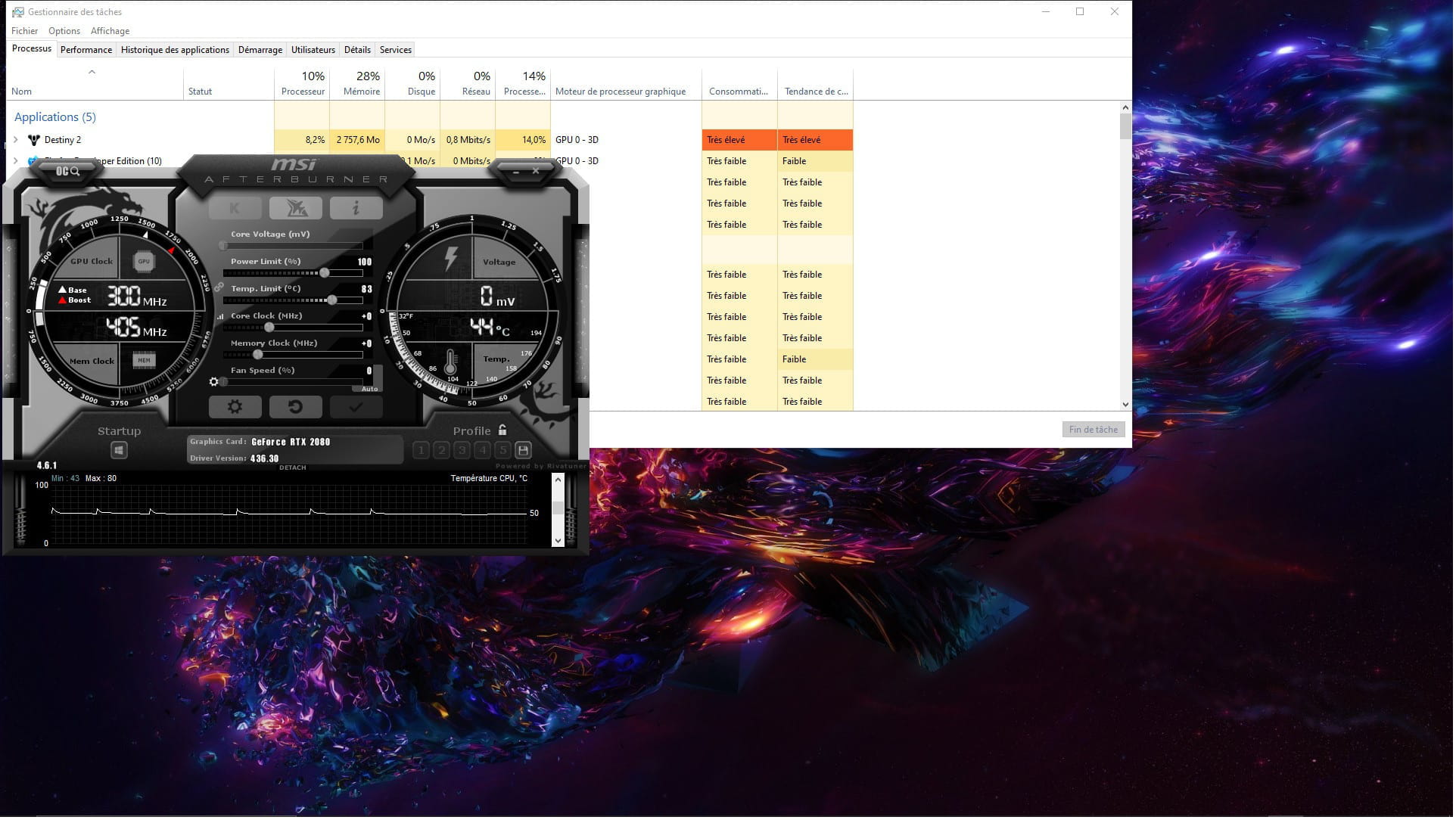
As we can see, I am at 50°C, but I had the game in the "background" for about ten minutes. In-game, it varies between 69 and 80°C.
Here is the complete config:
CPU: Ryzen 7 2700x
GPU: RTX2080
Motherboard: Aorus x470 ultra gaming
RAM: 32 GB (4x8 GB) 3200MHz
PSU: Corsair TX650M 80+ gold (650W)
I just want to know if I should be seriously worried to resolve this "problem" as soon as possible, knowing that I believe the max supported temperature for the CPU is 95°C and that the heat wave period has passed.
Or if others have had the same case as mine and managed to remedy it.
I considered changing the cooling system for the CPU, but will that really be effective? If so, do you have any recommendations for me?
Thank you in advance for your help.
2 answers
-
Hi,
80°C is not an excessive temperature for a CPU.
But it is true that temperatures while gaming often don't exceed 60-70°C; however, you don't have to worry about the heat as long as you don't exceed 90°C.
I think it simply comes from the fact that you're using the stock cooler, which is less efficient than a good aftermarket cooler. And most of the time, benchmarks on YouTube are done with good coolers.
Info+: if your CPU exceeds 95°C, nothing will happen to it (I mean it won't get damaged or die), but it will throttle itself to prevent overheating, resulting in poor performance (that's thermal throttling). And if that isn't enough, the CPU will shut down on its own, and the PC will turn off.
-
Hi, and thank you for your reply
So, would this be more of a hardware issue where things are going wrong? Because I read another thread where the person was concerned about their CPU temperature and had changed to a bequiet cooler, I believe, but they still had the same issue with the high temperatures.
What I don't understand is that for me, when I'm on my PC's desktop with no tasks running, the temperatures are between 43°c and 55°c, which I think is normal for a CPU with 8 cores, but as soon as I launch something, the temperature skyrockets. But then I also think about next summer, because if it’s as hot as the summer we had, I think I could easily reach 90°c or more ^^. So for now, it’s okay, I have time but I plan to invest in water cooling soon because I think they are a bit better for cooling since they are often used for overclocked CPUs.
In any case, I will try to update the BIOS as advised above to see if there’s any change afterwards. -
What would be abnormal is if you have your current temperatures with a good cooler already.
The stock cooler provided with the CPU is not very efficient.
As for the heat when IDLE, it doesn't change much since the processor isn't working, it's doing nothing. So there's no heat to dissipate, that's why there's only a few °C difference.
The main problem if it heats up is just that you might have a fan that runs faster and therefore makes noise.
And regarding water cooling, I won’t criticize it here (I've already done that in other threads dedicated to the comparison), but I'm not a big fan of it.
In any case, I repeat, as long as you don't reach over 90°C, there's nothing to worry about.
-