
Web Companion Lavasoft
Solved
Hello,
Recently, Bing has replaced Firefox. I removed the former. I suppose this is the cause of the unwanted installation of Web Companion. I have uninstalled it from the control panel. The response was: "This item may already be uninstalled..." I scanned with AdwCleaner which detects nothing.
Could you please let me know a way (not too complicated) to permanently remove the intruder?
Thank you and best regards.
Recently, Bing has replaced Firefox. I removed the former. I suppose this is the cause of the unwanted installation of Web Companion. I have uninstalled it from the control panel. The response was: "This item may already be uninstalled..." I scanned with AdwCleaner which detects nothing.
Could you please let me know a way (not too complicated) to permanently remove the intruder?
Thank you and best regards.
5 answers
-
ModeratorHello,
Download FRST once downloaded save it on the desktop and then open it you will see this:
Click on Scan at the end of the scan you will have two text files on the desktop FRST and Addition send these reports to https://pjjoint.malekal.com/ see this tutorial paragraph Send the analysis reports to pjjoint then provide the two links generated by Pjoint in your next message.
--
bazfile
Moderator/Contributor security.
click here -
Hello,
Here are the corresponding links.
Please keep me updated on the follow-up.
Thank you and best regards.
https://www.cjoint.com/c/IJgm5NqmkJs
https://www.cjoint.com/c/IJgm6Ry08hs-
ModeratorFirstly if it still appears in the installed programs, uninstall Web Companion with RevoUninstaller in Advanced scan mode.
Secondly, procedure to follow in the order indicated:
1- Open FRST
- Copy the entire script that is in the box below:Start::
CreateRestorePoint:
CloseProcesses:
GroupPolicy: Restriction ?
FF HKLM\SOFTWARE\Policies\Mozilla\Firefox: Restriction
CHR HKLM\SOFTWARE\Policies\Google: Restriction
HKLM\SOFTWARE\Policies\Microsoft\Internet Explorer: Restriction
2019-10-02 16:19 - 2019-10-02 17:35 - 000000000 ____D C:\Users\PIERRETTES\AppData\Local\Lavasoft
2019-10-02 16:19 - 2019-10-02 17:27 - 000000000 ____D C:\Users\PIERRETTES\AppData\Roaming\Lavasoft
2019-10-02 16:19 - 2019-10-02 17:27 - 000000000 ____D C:\ProgramData\Microsoft\Windows\Start Menu\Programs\Lavasoft
2019-10-02 16:19 - 2019-10-02 17:27 - 000000000 ____D C:\ProgramData\Lavasoft
2019-10-02 16:19 - 2019-10-02 17:27 - 000000000 ____D C:\Program Files (x86)\Lavasoft
SearchScopes: HKLM -> DefaultScope {0633EE93-D776-472f-A0FF-E1416B8B2E3A} URL =
SearchScopes: HKLM -> {0633EE93-D776-472f-A0FF-E1416B8B2E3A} URL =
SearchScopes: HKLM-x32 -> DefaultScope {0633EE93-D776-472f-A0FF-E1416B8B2E3A} URL =
SearchScopes: HKLM-x32 -> {0633EE93-D776-472f-A0FF-E1416B8B2E3A} URL =
EmptyTemp:
End::
2- Once the script is copied return to FRST and click on Fix.
FRST will automatically take the script from the clipboard and execute it.
Let the fix complete and once it is done, restart your computer.
Then once your computer has restarted:
4- You will have a Fixlog file on your desktop, send it via https://pjjoint.malekal.com/ then put the link generated by Pjoint in your next message.
5- Reset your internet browsers, especially Firefox https://forums.commentcamarche.net/forum/affich-37585758-reinitialiser-son-navigateur
6- CHECK AND LET ME KNOW IF YOUR PROBLEM IS STILL PRESENT.
-
-
Hello,
Open FRST
- Copy the entire script that is in the box below:
Start::
Copy where, and how? Please excuse me, but at over 95 years old, I am not confident in myself!-
ModeratorSee this page paragraph Copy/Paste a text.
You need to select and copy as shown in the photo below:
Click on the image below to enlarge it.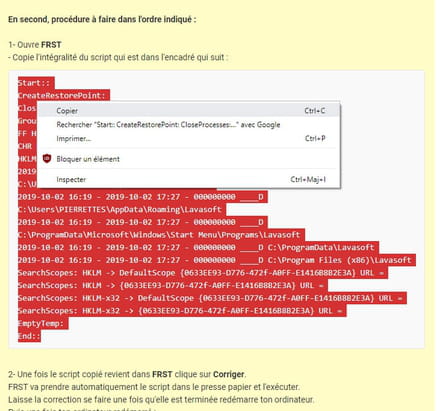
-
-
Hello,
Here is the link for Fixlog:
http://dl.free.fr/getfile.pl?file=/NPpNps6u
I removed Firefox and switched back to Chrome. The Web Companion icon remained in the control panel, but the second icon below it has disappeared. Can I remove the remaining icon as the panel suggests?
Thank you and best regards.-
ModeratorThe link to the fixlog file is inaccessible (password protected) and has not been uploaded to https://pjjoint.malekal.com/ as stated, but that's okay, Web Companion needs to be uninstalled.
Can I remove the remaining icon as the panel suggests?
Yes, since the application has been uninstalled, you can proceed with what is suggested and remove the remaining icon.
When you feel the issue is resolved, don't forget to mark it as resolved or let me know, see this page.
-
-
Hello,
The password for Fixlog is <removed by moderation>
I wasn't able to use your link https://pjjoint.malekal.com/
I have removed the Web Companion icon.
I am checking "resolved" pending any new observations.
Thank you very much.


