Disable iCloud notifications
Debbie
-
Anonymous user -
Anonymous user -
Hello,
I receive the following notification every 5 minutes:
"There is not enough space to save this document on iCloud. Buy more storage or delete documents from iCloud."
I would like to know if there is a way to just get rid of the notifications, since the alternative would be to move all my files to the computer's hard drive and remove the desktop and documents from the iCloud backup, which I would like to avoid since in the absence of space on iCloud it saves on my hard drive, which suits me perfectly if it could just stop reminding me that I have no space, I would be infinitely grateful.
Thank you in advance!
Configuration: Macintosh / Safari 13.0
I receive the following notification every 5 minutes:
"There is not enough space to save this document on iCloud. Buy more storage or delete documents from iCloud."
I would like to know if there is a way to just get rid of the notifications, since the alternative would be to move all my files to the computer's hard drive and remove the desktop and documents from the iCloud backup, which I would like to avoid since in the absence of space on iCloud it saves on my hard drive, which suits me perfectly if it could just stop reminding me that I have no space, I would be infinitely grateful.
Thank you in advance!
Configuration: Macintosh / Safari 13.0
4 answers
-
Hello,
I’m not quite sure I fully understand your request... But if I understood correctly:
You know that you no longer have space on iCloud, but you are still asking to save these recordings on iCloud, hoping that these recordings will eventually go local, but you want this to happen without notifications...
In short, if you are receiving this message, it means you are trying to save your files to iCloud storage while you no longer have the necessary space. In conclusion, to stop receiving these notifications, you just need to stop trying to save your files to iCloud and instead ask to save them directly in the correct location.
It seems logical and simple, but I may have misunderstood something...
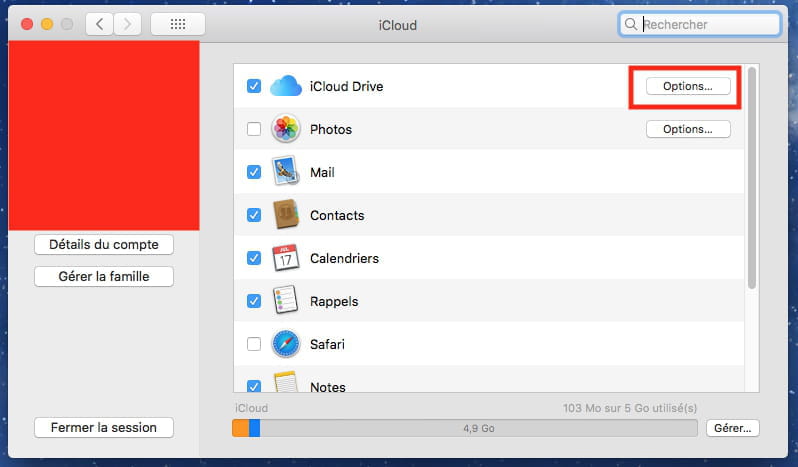
You can also simply disable "Desktop and Documents" from System Preferences / iCloud Drive, so that your saves in the Documents folder or on the desktop no longer try to go to iCloud, but only locally. (Those that are already on iCloud will remain there and can be manually retrieved).
Best regards.