.jpg opening with Notepad!
tarou
Posted messages
17
Status
Member
-
Dadou -
Dadou -
Hello,
I have lots of .jpg photos that open with Notepad, so they can't be viewed. How, please, can I change the extension? I don't have "open with."
Thank you and have a great weekend.
I have lots of .jpg photos that open with Notepad, so they can't be viewed. How, please, can I change the extension? I don't have "open with."
Thank you and have a great weekend.
5 answers
-
Hello,
Right-click on one of these files and select Properties.
In the new window that pops up, you will see something like this:
File type: .jpg
Opens with: Notepad Edit.
If you click on Edit, you'll be able to choose an image viewer, and it will change for all .jpg files.
Best regards
--
I excel as a spreadsheet -
Hello tarou,
On Windows 10. Right-click on the "Start" icon (at the bottom left of the screen).
- Settings
- Apps
- Default apps
- At the bottom of the page, click on "Choose default apps by file type"
- The list of extensions will appear (it may take some time)
- Look for .jpg in the list
- Click on the currently set application (Notepad, in your case)
- A list will be presented: choose the one that suits you.
Let me know if it worked.
Armojax. -
Hello.
It is possible that this was caused by a cleaner like CCleaner64 or another registry cleaner, thus the "open with" key disappeared.
Try a system restore to a date point prior to the appearance of this problem. Perform this restoration in safe mode, which is more effective than normal mode. Check the "other points" box if the problem seems to be further back in time.
See you later . . .
--
"Patience leads to good, haste leads to nothing." -
Hello,
1) The main issue is the disappearance of “Open with.”
You need to recreate the registry key. Be careful!
Follow the tutorial which is here.
You need to open Regedit as an administrator.
If you have difficulty opening it, type Regedit in the search box (to the right of the Start button). Then right-click on Registry Editor and select Run as administrator.
2) Once you have found “Open with,” you will use it on one of the problematic files.
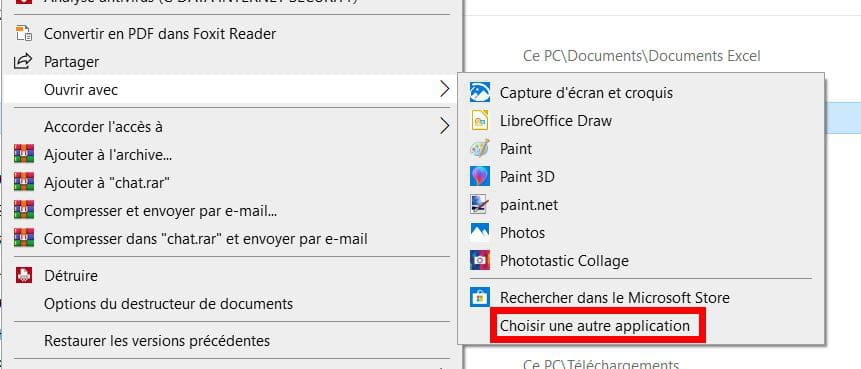
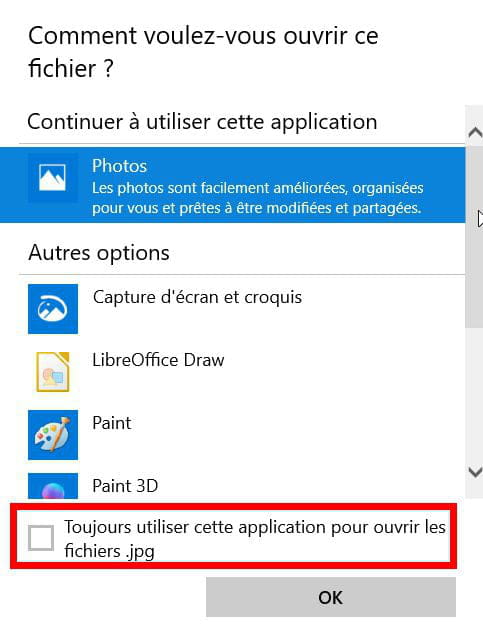
Click on Choose another app (even if the suggested application is suitable for you)
Then choose the application and check the box at the bottom: .
.
That should be good!-
Hello, thank you for your replies.
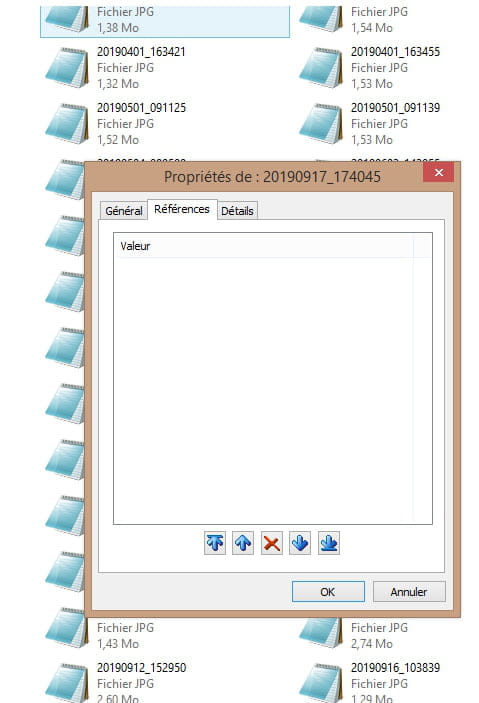
I have "open with," but it's when I connect my mobile phone and open the photos. They are like the screenshots from my post on the 19th at 12:31, so I need to open them with notepad. I'm not quite understanding. And here, there is no "open with," and I don't know how to go about changing the file extensions that are on my phone. My photos have never opened like this before when I connected my phone to the PC. Thank you all and have a great weekend.
Pieer10, I'm keeping your tutorial, thanks.- Indeed, if you right-click on one of the photos located on the smartphone, the "Open with" option is not present.
It is only available for files saved on the hard drive.
It remains to be seen whether the jpeg images on the hard drive open normally.
If not, it's easy to fix.
Otherwise, it's really problematic, especially since the images from the phone are clearly labeled as jpg.
Even if the images on the hard drive open normally, I will redo the "open with" procedure to re-register the association.
-
Copy the photos to your computer, and from the copy, the open with option should appear.
- Hello Tomsuper,
Thank you for your response.
It's true, it works like that. I search by date on the page that opens for the photo I'm looking for, like in my post from the 19th at 12:31, I copy-paste the photo, I send it to the desktop and it opens normally.
I would simply like to remove this notepad extension from the phone, which I didn't have before.
Thank you and have a good weekend.
-
-
Have you tried what I suggested?
Armojax.