Unable to open Internet Explorer a certificate has been expressly revoked.
Solved
JeremyTenil
-
Jeepgg -
Jeepgg -
Hello everyone,
I've just encountered a problem with Internet Explorer. Last night, I performed an update proposed by Windows on my tablet (Surface 2). And since today, I can't open Internet Explorer. When I open it, an error message appears: "A certificate has been expressly revoked by its issuer."
As a result, I can no longer access the internet and that was the only browser I had, and I can't download a new one because there isn't one available on the Windows Store...
I tried changing the date and time on my tablet, but it hasn't changed anything. I'm giving you some information that might be useful: my operating system is Windows RT 8.1 and my version of Internet Explorer is "11.0.9600.19463."
If you have any ideas on how to resolve this issue, please feel free, as I'm completely lost...
Thank you in advance.
I've just encountered a problem with Internet Explorer. Last night, I performed an update proposed by Windows on my tablet (Surface 2). And since today, I can't open Internet Explorer. When I open it, an error message appears: "A certificate has been expressly revoked by its issuer."
As a result, I can no longer access the internet and that was the only browser I had, and I can't download a new one because there isn't one available on the Windows Store...
I tried changing the date and time on my tablet, but it hasn't changed anything. I'm giving you some information that might be useful: my operating system is Windows RT 8.1 and my version of Internet Explorer is "11.0.9600.19463."
If you have any ideas on how to resolve this issue, please feel free, as I'm completely lost...
Thank you in advance.
13 answers
-
pistouri Posted messages 19010 Registration date Status Contributor Last intervention Ambassador 8 732
Uninstall the latest update you had yesterday.
The tutorial
Control Panel → Programs and Features → View installed updates
In the list check the dates if you don't know, section Microsoft Windows.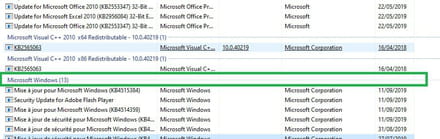
A+
--
scalpel -
Good evening JeremyTenil,
I also have a Surface 2 RT and I encountered the same problem as you. The issue arose following an update from the September 2019 Patch Tuesday. The problematic one is KB4516067: 2019-09 Monthly Quality Rollup for Windows RT 8.1 for ARM-based systems.
Only this one needs to be uninstalled and it is sufficient to resolve the issue.
I hope I have helped you!-
-
-
-
A HUGE THANK YOU to anony really, I've spent 2 hours stressing out searching... it works by uninstalling the announced update, you need to go to the Control Panel, click on Windows Update then on View update history and then on Installed updates written in blue, select the update KB4516067 and click on Uninstall. Restart the PC and it's good, phew!!!!!
-
-
-
pistouri Posted messages 19010 Registration date Status Contributor Last intervention Ambassador 8 732
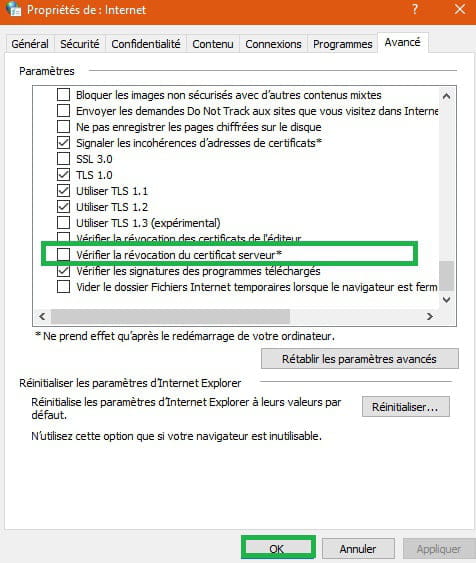
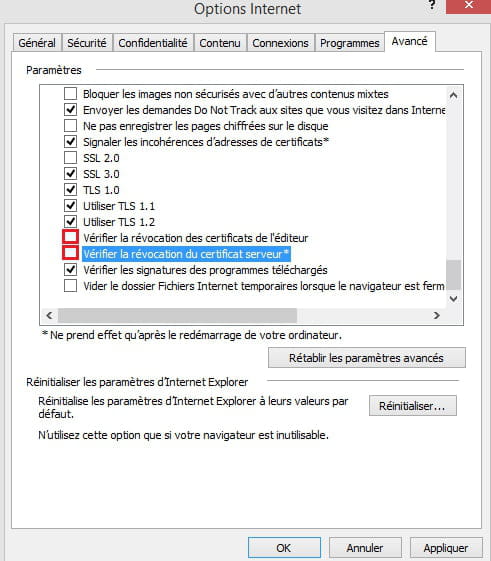
Disable if the box is checked: the revocation of the server certificate
Internet Options Control Panel
Go to the tab → advanced
Scroll down to Security
Uncheck the box → check for server certificate revocation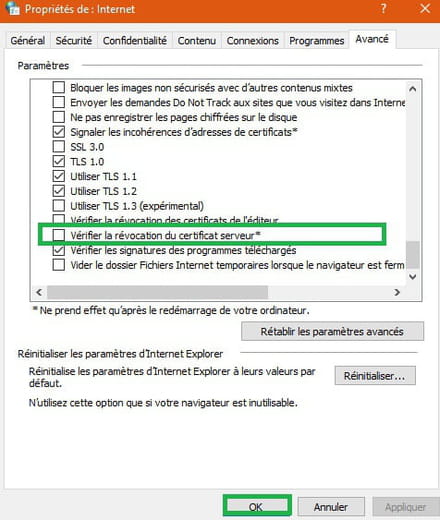
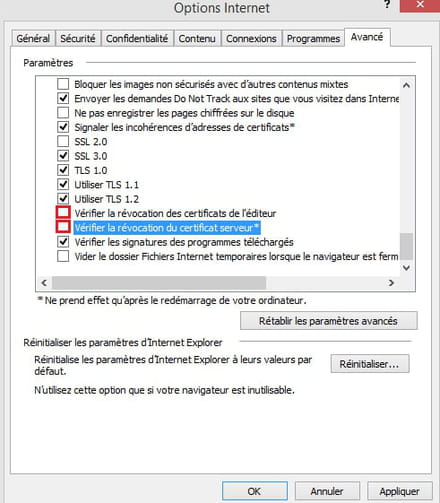
Imperative: Restart the PC.
A+
-
-
-
-
-
hello louise,
you need to go to the control panel to get started.
For this with Windows 8.1 / Windows RT 8.1Swipe in from the right edge of the screen, tap Search (or if you're using a mouse, point to the upper right corner of the screen, move the mouse pointer down, and then click Search), type Control Panel in the search box, and tap or click Control Panel.
Microsoft support
Or keyboard keys Windows + R
Type → control
Then OK
Or like this
Then continue the procedure 9
Once in → Control Panel → Programs and Features → View installed updates
Look at the top right for a box with a search field.
Type or copy/paste → KB4516067
If you see it, right-click on KB4516067 and uninstall it.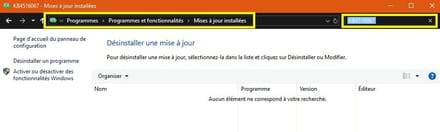
Edit;
Although a damaged Internet Explorer may not interest most people, many business sites rely on Internet Explorer, which means that a damaged Internet Explorer means no work gets done.
.................
-
-
pistouri Posted messages 19010 Registration date Status Contributor Last intervention Ambassador 8 732
Hello,
Try this:
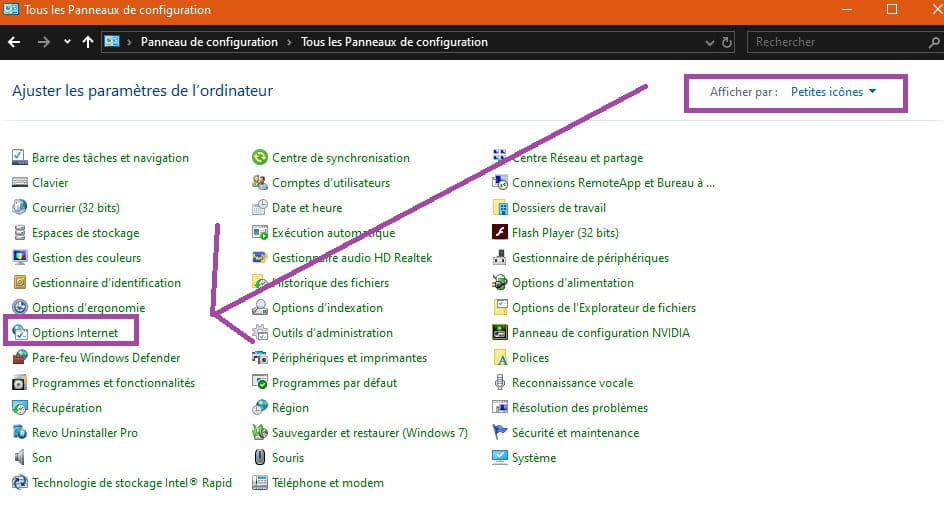
1- Go to Control Panel
Select View by → Small icons
Click on → Internet Options
Go to the tab → Advanced
Click on → Reset
2- Create a restore point
The tutorial
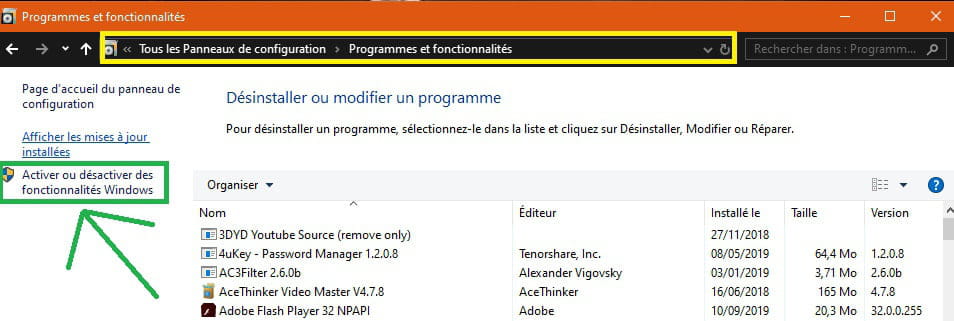
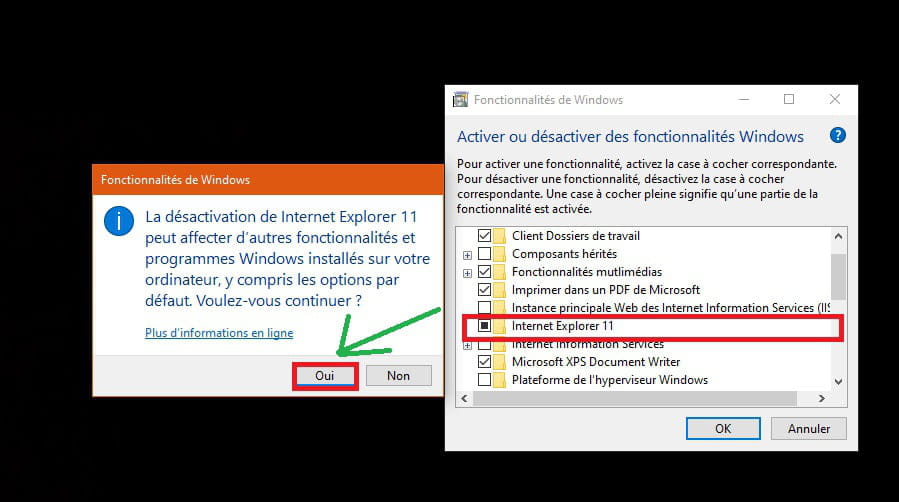
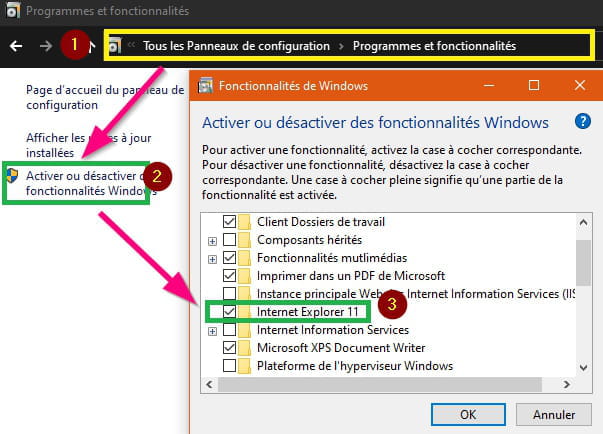
Go to Control Panel → Programs and Features
Click on the line (on the left) → Turn Windows features on or off
Uncheck the box → Internet Explorer 11
A dialog box opens.
Click on → Yes
Windows will take a few seconds to remove Internet Explorer.
Then restart the PC → Restart now

To reinstall, follow the same path, check the box for Internet Explorer 11.
3- System restore to a previous date.
A+.
--
pistouri -
pistouri Posted messages 19010 Registration date Status Contributor Last intervention Ambassador 8 732
Microsoft: You should no longer use Internet Explorer 11
The browser is almost forgotten by the general public, but it still survives well on Windows 10 for compatibility reasons. The same reasons that have led companies to stick with it: specific modifications of websites developed for often internal needs. "Simplicity at the expense of technical debt."

Windows 10 may be approaching its fourth anniversary, but Edge is still not the only browser in the house. Chris Jackson emphasizes: "Internet Explorer is a compatibility solution." Why keep it? Because some companies really need it, and migrating from Windows 7 and 8.1 would have become problematic.

So Microsoft must explain again that even though the browser still receives security patches, its support for standards has not been maintained for a long time. "Even if many websites work correctly, most developers no longer test Internet Explorer 11."

Today, migrating to Edge would be as complex as migrating to Chrome or Firefox. All these browsers now swear by standards, shattering old hacks. If Microsoft wants to get rid of Internet Explorer, it has no choice: it must be removed from Windows 10.

The publisher might have an opportunity with the renewal of Edge, currently being rewritten on a Chromium base. One of the differences will be backward compatibility with Windows 7 and 8.1. The new Edge is expected soon, but Microsoft might be laying the groundwork for next year.

The issue of old internal web applications could extend for several more years. As with Windows XP and soon Windows 7, it is likely that a clear end-of-life date or end-of-support date will be a better argument than simply adhering to standards.
Source
A+
--
pistouri -
Hello, I uninstalled the update but as soon as I turn off the tablet, it comes back. What should I do?
-
pistouri Posted messages 19010 Registration date Status Contributor Last intervention Ambassador 8 732
Hello,
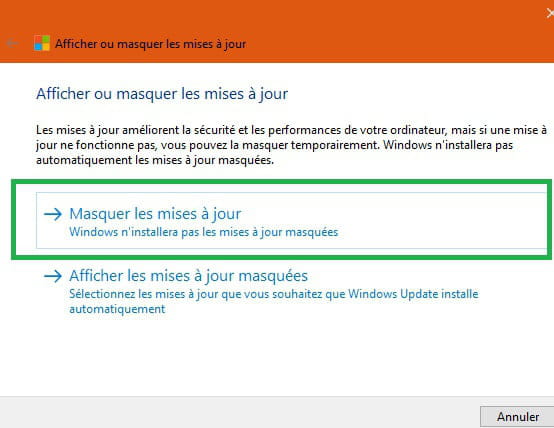
If the update comes back, it needs to be hidden.
1- Microsoft provides a tool to hide updates → wushowhidediagcab
2- With the Windows Update Minitool
The tutorial
Extract the archive using for example the free version of Winrar
Right-click on the archive then → Extract to wumt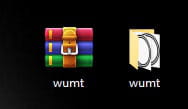
Run the 32 or 64-bit version depending on your version of Windows as Administrator (Right-click).
3- To try.
Keyboard shortcut Windows + R
Copy/paste → control /name Microsoft.WindowsUpdate
Select the update.
Right-click → Hide
4- Wait for a new Windows Update patch
A+
--
pistouri -
Hello
I have a Surface tablet, I managed to find the list of updates but I can't find how to uninstall them. Can you please let me know how to do that? Thank you in advance. -
Oh, lucky to read this article. I also have this problem. Thank you for the great share.
-
pistouri Posted messages 19010 Registration date Status Contributor Last intervention Ambassador 8 732
Hello,
Happy for you.
I'm closing the discussion.
--
pistouri -
Good evening, I come here because I have the same problem and to see if it's working for you again?
-
Thank you very much to all of you.
I uninstalled the update and everything is working fine again.
A big thank you :) -
Hello Pistouri,
I can't find the update KB4516067...
So I followed the other tutorial to uninstall Internet Explorer 11 and reinstall it (steps 1 and 2) but I don't know how to restore the system to an earlier date step 3.
How can I do that please?
And should I recheck the box "Check for certificate revocation..." afterwards?
Thank you very much for your help,
Alexandra-
Hello,
1- Check if your Windows is up to date, a patch fixes the problem.
Here’s the tutorial
2- No need to uninstall Internet Explorer 11
If you have, recheck the box.
See Message 3
Control Panel -> Programs -> Programs and Features -> Turn Windows features on or off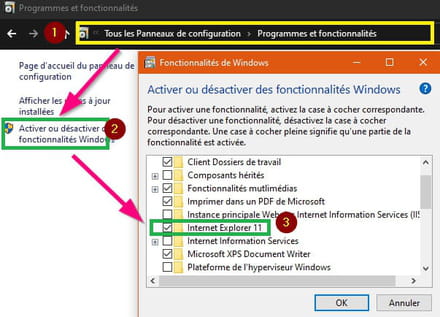
Restart the PC
3- Don't worry about → the box "Check for certificate revocation''
4- If you want to perform a system restore to a previous date.
Here’s the tutorial
Then restart a Windows Update search.
5- Advice:
Use another browser, Firefox or Google Chrome for example
Good luck. -
-
Content for you.
→ I can't download Chrome but Explorer is working now.
We're not really sure how you did it (With Edge or IE???)
Maybe try disabling the SmartScreen filter
Here’s the tutorial.
Try this
First, check if your PC is 32 or 64 bits.
Here’s the tutorial
Then download or save the correct version of Google Chrome.
- Chrome 32 bits
- Chrome 64 bits
For Firefox:
- Firefox 32 bits
- Firefox 64 bits
If you still can't get it, open a new thread on the Forum, this one is starting to get saturated.
....
-