Discord, automatically hide a channel
Solved
Ju.Le
Posted messages
119
Status
Member
-
Jean20B Posted messages 1861 Registration date Status Member Last intervention -
Jean20B Posted messages 1861 Registration date Status Member Last intervention -
Hi,
On Discord, I want to make it so that when a user clicks on a reaction, it hides that channel from them.
How do I do that, with a bot or a setting in Discord...?
--
--Ju.Le--
On Discord, I want to make it so that when a user clicks on a reaction, it hides that channel from them.
How do I do that, with a bot or a setting in Discord...?
--
--Ju.Le--
4 answers
-
Hello, you can use a bot like Zira, which adds or removes a role, and set up that role so that the user who has it / does not have it can or cannot see the channel.
-
Hi, yeah I have Zira to add a role, but I can't find how to delete one...
- Remove the role or access to the channel? If you are talking about removing the role, you need to click the reaction a second time.
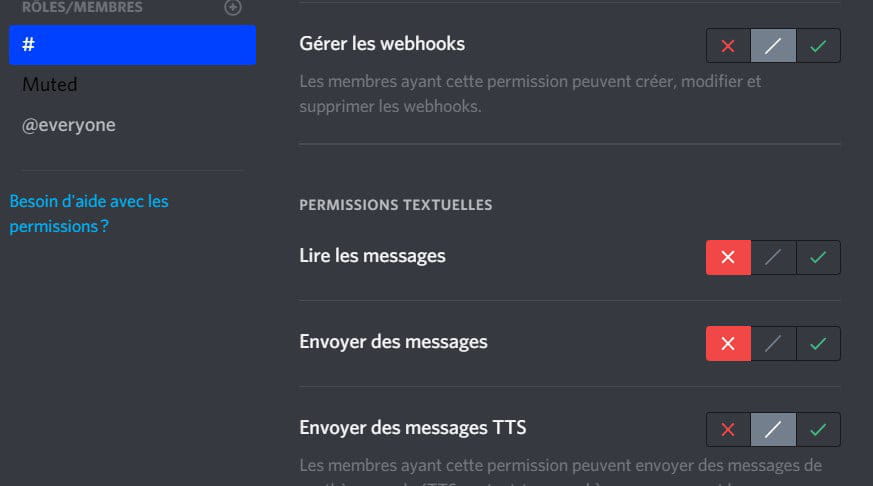
To hide a channel from those who have this role, you need to go to the channel settings, add the role, and deny these 2 permissions (the second permission is just in case; the most important is the first):
The little problem with this is that if you hide the channel where the reaction is, the user who clicks on the reaction will remain in that channel even if it is hidden, and they will have to switch channels to no longer see it, but they will not be able to interact with that channel once they have clicked on the reaction, so it's not really a problem.
-
But since I start with a role that allows access to the 1st room, when I assign the 2nd role where access to the 1st room is not allowed but access to the 2nd room is granted, he will not see the 1st room even if he has a role that allows it?
- It depends on the order of the roles. If you have set permissions in the channel for both roles, role 2 must be positioned above role 1 (in the server settings) for its permissions to override those of role 1.

If someone has both roles,
and "Read Messages" is allowed for role 1
and "Read Messages" is denied for role 2,
and role 2 is above role 1,
then they will not be able to read the messages.
It's a bit complicated to understand at first, so I'm trying to explain it as best as I can ^^'
-