
Horizontal lines issue on laptop screen
Yrauma_1011
Posted messages
12
Status
Member
-
Yrauma_1011 Posted messages 12 Status Member -
Yrauma_1011 Posted messages 12 Status Member -
Hello, I did a bit of research on the forums and couldn't find a post with a problem similar to mine.
(Following the replacement of a keyboard top case by technicians, thus opening the chassis, I never had this issue before), white, green, and blue horizontal lines are running across my laptop screen. The LCD panel doesn't seem to be broken or damaged; it's unlikely that the problem comes from the display itself.
I just installed the latest version of the graphics drivers as well as the latest Windows updates, and the issue persists. I'm attaching photos of the screen with the lines in question. The lines move and change position and shape when an element moves on the screen: the trackpad cursor or the appearance of a window, for example (see how the lines form around the Nvidia window but not directly on it, 2nd photo).
It's impossible to connect the computer to an external screen via the HDMI port for testing, nothing is detected.
I just noticed in the device manager that "Windows has stopped the Geforce GTX 1070 graphics card due to a problem (error code 43)." This seems to indicate a software issue (drivers?), but updating them doesn’t change anything.
Could it be possible that a cable or ribbon for the graphics card was poorly reconnected during the technicians' intervention? (Or some other hardware issue).
Does anyone have a clue? Thank you in advance!

(Following the replacement of a keyboard top case by technicians, thus opening the chassis, I never had this issue before), white, green, and blue horizontal lines are running across my laptop screen. The LCD panel doesn't seem to be broken or damaged; it's unlikely that the problem comes from the display itself.
I just installed the latest version of the graphics drivers as well as the latest Windows updates, and the issue persists. I'm attaching photos of the screen with the lines in question. The lines move and change position and shape when an element moves on the screen: the trackpad cursor or the appearance of a window, for example (see how the lines form around the Nvidia window but not directly on it, 2nd photo).
It's impossible to connect the computer to an external screen via the HDMI port for testing, nothing is detected.
I just noticed in the device manager that "Windows has stopped the Geforce GTX 1070 graphics card due to a problem (error code 43)." This seems to indicate a software issue (drivers?), but updating them doesn’t change anything.
Could it be possible that a cable or ribbon for the graphics card was poorly reconnected during the technicians' intervention? (Or some other hardware issue).
Does anyone have a clue? Thank you in advance!
2 answers
-
"Could it be that a cable or ribbon of the graphics card was poorly reconnected during the technicians' intervention?"
It's more than a possibility, it's clearly the case!
--
Because the manuals don't say everything... But they don't say nothing either, right!-
-
""Does that seem certain to you?"
"Following the replacement of a keyboard top case by technicians [...]
The LCD screen doesn't appear to be broken or damaged [...]
the latest version of the graphics drivers as well as the latest updates for Windows [...]"
There you go...
https://support.nvidia.eu/hc/fr/articles/211970129-Windows-a-arr%C3%AAt%C3%A9-ce-p%C3%A9riph%C3%A9rique-car-il-pr%C3%A9sente-des-probl%C3%A8mes-Code-43-pour-ma-carte-graphique -
-
-
-
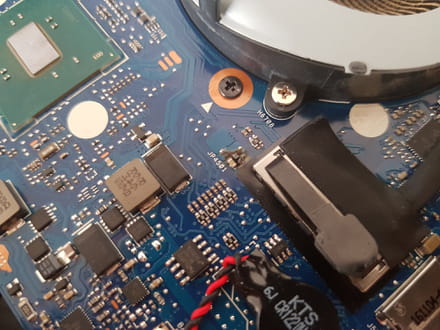
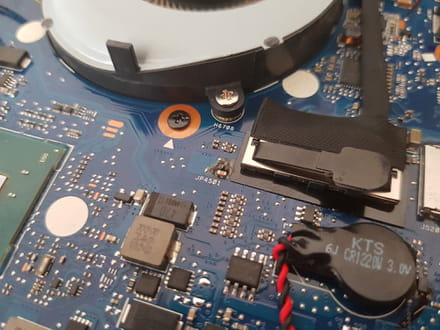
Well, new episode: I have once again entrusted the device to the same company, asking them to analyze and fix the problem (yes, I have faith), they informed me that according to them an internal component has "burned out", hence the malfunction.
I did not hesitate to tell them what I thought about the coincidence between their intervention and this damage... and I asked them to send me photos of the component in question. I am attaching them to this post; I cannot identify this component, I don't see anything burnt but I don't have the eye...
Can someone help me/ take a look please? Thank you in advance.
-
In the center of the photo, next to the inscription "JP4501", there is a CMS-type component (very small, without legs in the shape of rods).
Probably a capacitor, or maybe a resistor... hard to say once it has burned!
Changing this kind of component is possible, but requires suitable equipment (fine-tipped soldering iron, binocular microscope to see what you are doing, tweezers to handle the component) and considerable skill! -
-
-
-


