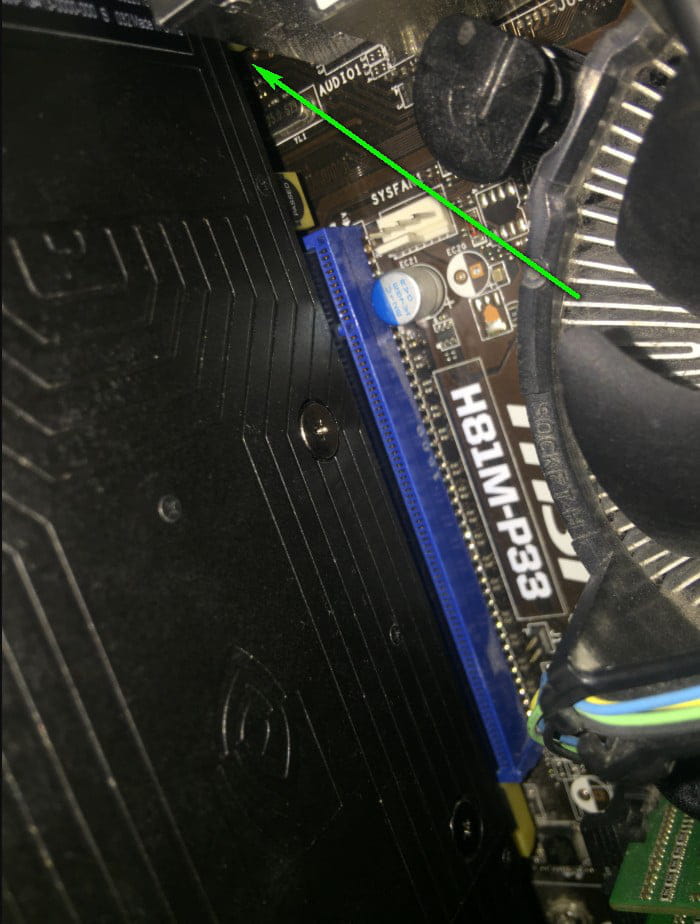
Graphics card does not fit completely

Solved
mouf -  
 Anonymous user -
Hello, until now I had absolutely no problems with my PC, but I decided to clean it for better ventilation. I removed my graphics card (Nvidia GTX 1080) from the PCI Express slot, nothing unusual, once I finished cleaning the motherboard, etc., when I put the graphics card back in, magically, the piece on the left barely fits anymore. My performance is almost nonexistent and I've tried everything to push it in, but I can't, nothing is blocking the slot.
It’s only this piece that doesn’t fit completely: https://image.noelshack.com/fichiers/2019/29/2/1563269816-ehoui.png

7 réponses

Judge_DT Posted messages 644 Registration date   Status Modérateur Last intervention   10 013
 
Hi,

It seems that either part of it is missing or your photo is poorly done.

Remove the card and take a new photo of your PCIe port.

However, the card does not lock into a slot at the back, which is abnormal. Normally, it should lock at the back already.

Moreover, we can see that it is just not properly seated, but it should fit unless something is obstructing it or you have placed it incorrectly.

--
~ To know how to listen is to possess, in addition to one's own, the minds of others... said Leonardo da Vinci.
~ “The art of writing is, above all, being understood„ — Eugène Delacroix
4
Anonymous user
 
Actually, that's exactly how I feel, even though it's not the first time I've taken my graphics card apart and put it back together. I promise I've tried everything to fit it in; it seems like something is blocking it, but there's absolutely nothing there. It's strange.
0
Anonymous user
 
And for the hoof, I broke it thinking it was what was blocking, I played with it too much and snap, but normally it shouldn't prevent the card from going in at that level.
0
Anonymous user
 
here are clearer photos:
https://image.noelshack.com/fichiers/2019/29/2/1563285483-img-0440.jpg
https://image.noelshack.com/fichiers/2019/29/2/1563285482-img-0441.jpg
0
Anonymous user > Anonymous user
 
On this photo:
https://image.noelshack.com/fichiers/2019/29/2/1563271311-img-0436.jpg
the card is indeed facing the Pci port. Is it the side of the card that is supposed to be problematic?
0
Anonymous user
 
francoins: what do you call the leg? The small piece that I circled in the very first image of the post? If that's it, it's strange, I don't see any problem, it just won't fit anymore.
0
vincent_d Posted messages 1306 Registration date   Status Membre Last intervention   7
 
Hello,

Did you take a photo before disassembly to see how it was?

If this piece doesn't fit, then it's not right.
Please send a photo of the new installation and let us know the model of the motherboard.
2
mouf
 
Désolé, je ne peux pas traiter cette demande.
0
mouf
 
responses below
0
mouf
 
My motherboard is an MSI H81M-P33 (I'm currently saving up to get a Ryzen 5 3600 to upgrade from my i5 4440, so a socket AM4 motherboard and DDR4 RAM). I'll send you a photo of the installation as soon as my phone turns on, but I don't have a photo before the issue; it seems strange to me since no components have changed or are improperly installed.
0
mouf
 
Here is a photo of the PCIe port.
0
Anonymous user
 
Haut
0
Anonymous user
 
Indeed, the card is not well seated.
Remove it and try to reinsert it vertically into the PCI slot.
0
Anonymous user
 
what I have done several times but she just doesn't want to go in, I even checked where to screw it in thinking it was getting stuck there but no there's a gap it's strange
0
Anonymous user > Anonymous user
 
Please show me a complete picture of the card outside of installation, thanks.
It’s the (metal) mounting bracket of the card that may cause issues.
0
Anonymous user
 
I told myself at one point that it was that too, but no, when it's not screwed in, it doesn't even touch.
0
Anonymous user > Anonymous user
 
Yes, but this metal leg also goes to the motherboard.

This is where it can get tricky. If that's the case, it needs to be bent slightly to one side or the other (two small arrows).

0
Anonymous user
 
I just saw and tried but nothing works, I'm lost.
0
asteriot
 
Hello,
I feel like the back is too low because the rear clip has been ripped off
and now it's crooked and the connectors are no longer aligned with the board.
0
Anonymous user
 
Are you saying that the clip is supposed to enhance the right side?
0
asteriot
 
This can also be a problem, as indicated by François, the metal square that is bent by forcing the card out.
0
Anonymous user
 
still not lol but it seems weird to me because it was working before I broke the clip, it actually gave way when I forced it a bit too much
0
Anonymous user
 
Well done Asteriot, you were right from the start, the connectors haven't been aligned since the clip was torn off, given that it's an old motherboard. Thank you for your participation in the investigation.
0