Why the same software in Programs Files (x86) and "Program Files"?
Solved
aikimoz80
Posted messages
8
Status
Member
-
Malekal_morte- Posted messages 178136 Registration date Status Moderator, Security Contributor Last intervention -
Malekal_morte- Posted messages 178136 Registration date Status Moderator, Security Contributor Last intervention -
Hello,
Why are some software present in both the "Program Files (x86)" and "Program Files" folders?
I know that the "Program Files (x86)" folder is for 32-bit software installations,
and the "Program Files" folder is for 64-bit software installations, but why are the same programs present in both?
For example: Windows Sidebar in both directories, Windows Portable Devices, Windows Photo Viewer, Windows NT, Windows Media Player, Microsoft.NET, and others.
Thank you for your response.
Why are some software present in both the "Program Files (x86)" and "Program Files" folders?
I know that the "Program Files (x86)" folder is for 32-bit software installations,
and the "Program Files" folder is for 64-bit software installations, but why are the same programs present in both?
For example: Windows Sidebar in both directories, Windows Portable Devices, Windows Photo Viewer, Windows NT, Windows Media Player, Microsoft.NET, and others.
Thank you for your response.
Related links:
- Pixel trails on my screen, why? Settings?
- Why does MSE display 'your PC is protected and being monitored'?
- Lock the session and leave the program running in the background
- Why does my PC go to setup F2 or F12 when I turn it on?
- Message "Échec de vérification des paramètres système..." qui apparaît trois fois.
- x86 vs x64
2 answers
-
Hello,
It depends if they are in 64-bit version or not.
That's perfectly normal.
--
Please press any key to continue the disinfection...-
In fact, I'm seriously short on space; the system drive is a 120 GB SSD (I know it's tight) and Windows 7 takes up 100 GB, and I don't know how to free up space, especially since some of my folders are inaccessible, like "this folder is not accessible, access denied," even though I thought I had "administrator" rights. It's a bit of a puzzle.
Anyway, thank you for your reply.
Have a good evening.- To free up disk space, you can start with a Windows cleanup:
Press Windows + R
Type cleanmgr
Perform the cleanup.
Then, follow this tutorial: how to free up disk space on Windows
From the link, use WindirStat to visualize what is taking up abnormal disk space and clean accordingly.
Try to determine what is taking up abnormal disk space using WindirStat.
Some points to check mentioned in the link:- Clean up with the Windows cleanup program and free up disk space in the Windows folder: How to reduce the size of the Windows folder
- Check for misconfigurations, System Restore, Antivirus, etc...
- Presence of the windows.old folder following a Windows 10 update or reset
- See if you have videos or others that are taking up space as well
It is important to use the WindirStat program to see what might be taking up space; feel free to take a screenshot if needed.
-
-
Hello,
Install WinDirStat, you'll quickly see what's taking up space.
https://windirstat.net/
--
Light a fire for someone and they'll be warm for the rest of the day. Set a man on fire and he'll be warm for the rest of his life. -Terry Pratchett--
-
-
Unzip the Windows folder and take a screenshot
but given how things are going, we need to clean up Windows\installer
Check out this tutorial: https://www.malekal.com/supprimer-dossier-windows-old/ -
Hi
First of all, thank you for your interest in my case.
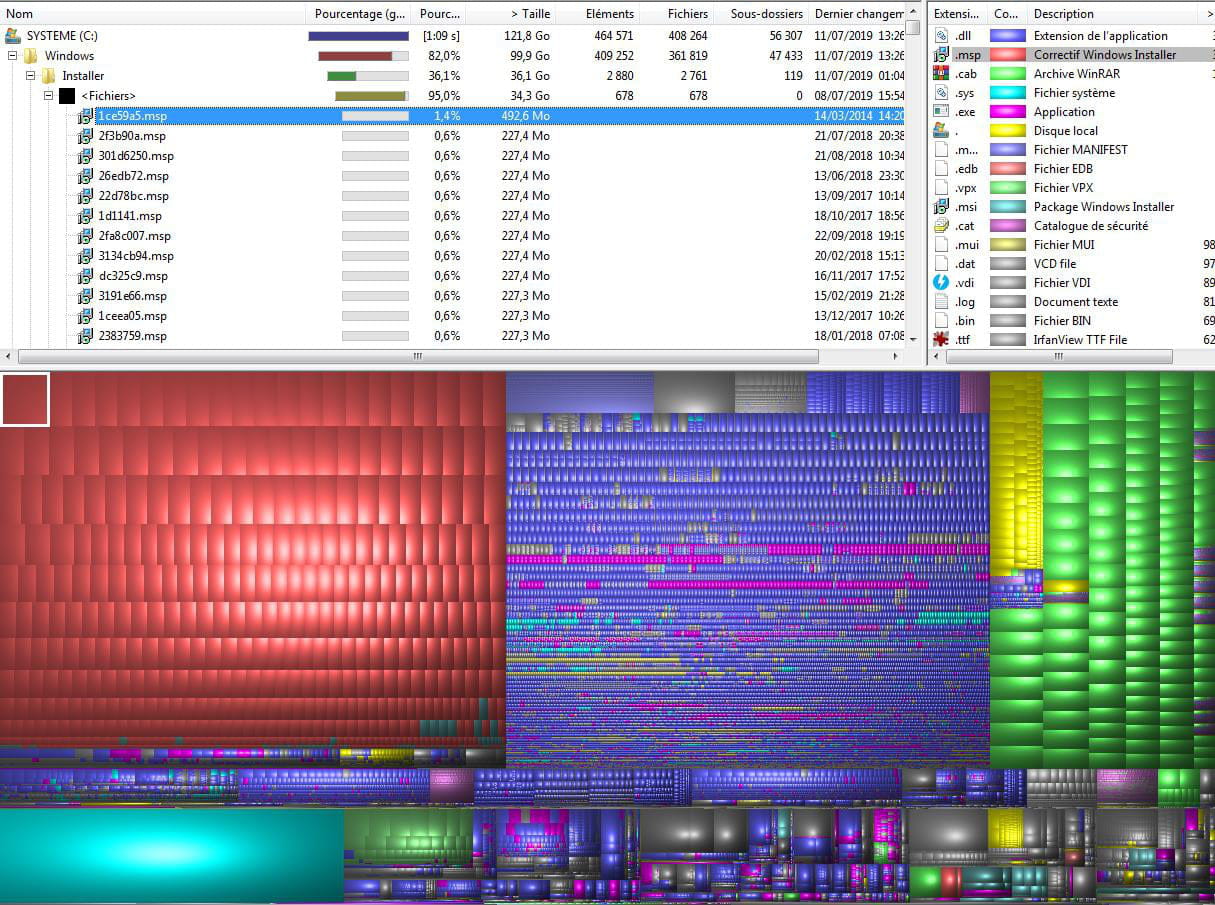
Screenshot of the Windows folder
In the red section, there is a series of files located in the folder C:\Windows\Installer files → 1ce59a5.msp (492.6MB), 2f3b90a.msp (227.4MB), etc.
In the green section: Series of files (apparently it’s a .rar archive)?
On another note, I checked the tutorial See this tutorial: https://www.malekal.com/supprimer-dossier-windows-old/ I ran cleanmgr
1) I don’t have a Windows.old file (I also ran CCleaner, but I run that regularly)
The result is disappointing.
I confess I'm losing a little hope of finding a bit of space. -
See here to clean up the installer folder:
https://www.malekal.com/nettoyer-dossier-windows-installer-fichiers-msi/
And for the green files, see here:
https://www.malekal.com/vider-catalogue-softwaredistribution-mise-a-jour-windows-update/
-