
No sound after hardware change
bAtOcIsO
Posted messages
26
Status
Member
-
bAtOcIsO Posted messages 26 Status Member -
bAtOcIsO Posted messages 26 Status Member -
Hello everyone,
Following the purchase and installation of a new motherboard and processor, I no longer have sound coming from my speakers.
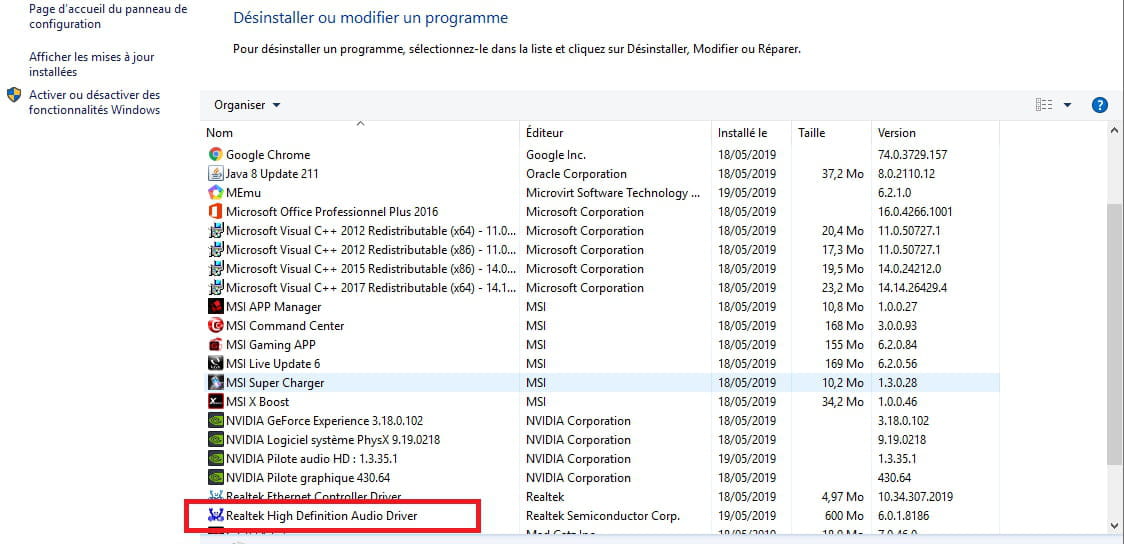
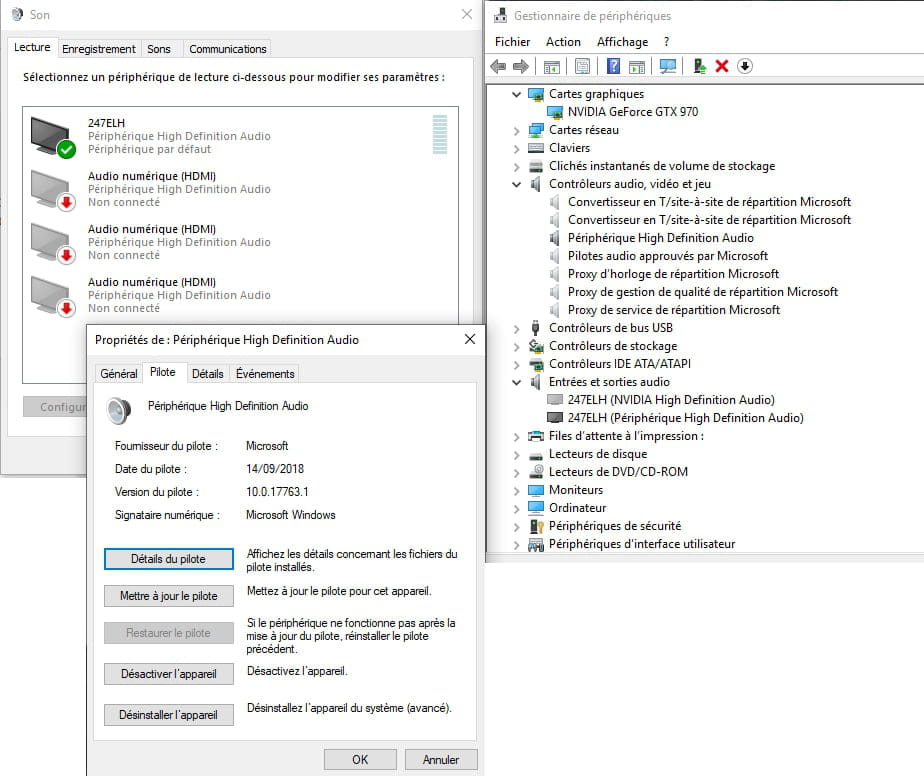
Having searched a bit, I realize that the Realtek drivers are no longer in my device manager, even in "hidden." However, I have reinstalled them via the manufacturer’s site for my motherboard and they are indeed present in my program files and in the list of programs I can uninstall.
https://image.noelshack.com/fichiers/2019/20/7/1558289650-gestionnaire-periph.png
In my sound manager, my speakers are not showing up either. Only the outputs from my graphics card and monitor are present. Let's not even talk about the audio quality of my monitor, which is of poor quality.
I have also tested other speakers and headphones but still nothing from the motherboard outputs.
https://image.noelshack.com/fichiers/2019/20/7/1558289832-son.png
I have already reinstalled Windows twice, but I am still facing this problem. After scouring various forums, I also installed Nahimic 3 (recommended by MSI for my motherboard) but when I launch it, it tells me that I do not have the necessary drivers or that my PC is not compatible...
In short, I am at a dead end and would really need help to solve this problem.
Thank you in advance for the time you will give me.
Motherboard: MSI x470 Gaming Plus
CPU: Ryzen 7 2700+
Windows 10 version 1809 64bit
Following the purchase and installation of a new motherboard and processor, I no longer have sound coming from my speakers.
Having searched a bit, I realize that the Realtek drivers are no longer in my device manager, even in "hidden." However, I have reinstalled them via the manufacturer’s site for my motherboard and they are indeed present in my program files and in the list of programs I can uninstall.
https://image.noelshack.com/fichiers/2019/20/7/1558289650-gestionnaire-periph.png
In my sound manager, my speakers are not showing up either. Only the outputs from my graphics card and monitor are present. Let's not even talk about the audio quality of my monitor, which is of poor quality.
I have also tested other speakers and headphones but still nothing from the motherboard outputs.
https://image.noelshack.com/fichiers/2019/20/7/1558289832-son.png
I have already reinstalled Windows twice, but I am still facing this problem. After scouring various forums, I also installed Nahimic 3 (recommended by MSI for my motherboard) but when I launch it, it tells me that I do not have the necessary drivers or that my PC is not compatible...
In short, I am at a dead end and would really need help to solve this problem.
Thank you in advance for the time you will give me.
Motherboard: MSI x470 Gaming Plus
CPU: Ryzen 7 2700+
Windows 10 version 1809 64bit
22 answers
- 1
- 2
Next
-
In the Device Manager, do you have an alert in system devices?
--
Human beings are at their best when things are at their worst. -
For the tutorial > https://www.youtube.com/watch?v=XKCA94x7BXs&feature=youtu.be&list=PLblE4aI-yJlV9eE6v4MgEFla9BOLqzeGe
For the BIOS file to download:
AMI BIOS
Version 7B79vA9
Date of upload 2019-03-11
File size 10.79 MB
--
the druid without the potion. -
It's long to review everything that has already been said. So if you haven't done it yet, try to indicate to the system the path to reach the downloaded driver. After downloading the driver, in the window of your first link, click on Driver, then Update Driver and Browse my computer for driver software. In principle, you should land on the Documents path. Click on Browse. Look for the file of the previously downloaded driver. When you find it, double-click on it to install the driver.
PS: You can also try updating the chipset drivers of the motherboard.
Good luck!
--
Misnaming things is adding to the misery of the world (Albert Camus) -
Hello,
Check in the BIOS if the audio device is properly enabled, either on enable or auto.
--
Human beings are at their best when things are at their worst. -
In the device manager under Audio Input and Output, don't you have Realtek?
--
the druid without the potion. -
Good evening,
If you have access to your Windows, try going to the notification bar at the bottom right > right-click on the speaker icon > Sound > Playback tab
And let us know what you see with a "validated" logo. -
Try the codecs from Realtek > https://www.realtek.com/en/component/zoo/category/pc-audio-codecs-high-definition-audio-codecs-software
--
the druid without the potion. -
Hello
to update the drivers go to "drivers cloud or alldrivers.com" -
So kaneagle, I just checked and yes, in integrated peripherals I do have "HD audio controller" enabled. Just to be sure, I disabled it and then re-enabled it, but the problem persists.
Druide and Jfmimi, I've already tried through Realtek and with all the drivers, but it hasn't changed anything.
The worst part is that in my installed programs, the drivers are clearly displayed:

By the way, I’d like to ask because I have no idea, but I see that NVIDIA audio drivers for my graphics card are installed. Is that unrelated or could it cause a conflict since that also appears in my device manager and when I click on the sound icon in the notification bar? -
Okay! I'll see tomorrow. Surprising that you don't have a Realtek peripheral, only Nvidia, when your motherboard clearly specifies Realtek Audio.
--
the druid without the potion. -
This morning I received a message from MSI support telling me to reset the BIOS (remove the battery), load the BIOS configuration to default, and save it, and then Realtek should normally appear in my device manager.
But no, still nothing... -
And no BIOS update available to fix this problem?
--
the druid without the potion.-
They didn't offer it to me...
Furthermore, I'm a bit lost, I don't know what I could put
I'm sending you the links to the BIOS drivers for my motherboard (x470 gaming plus)
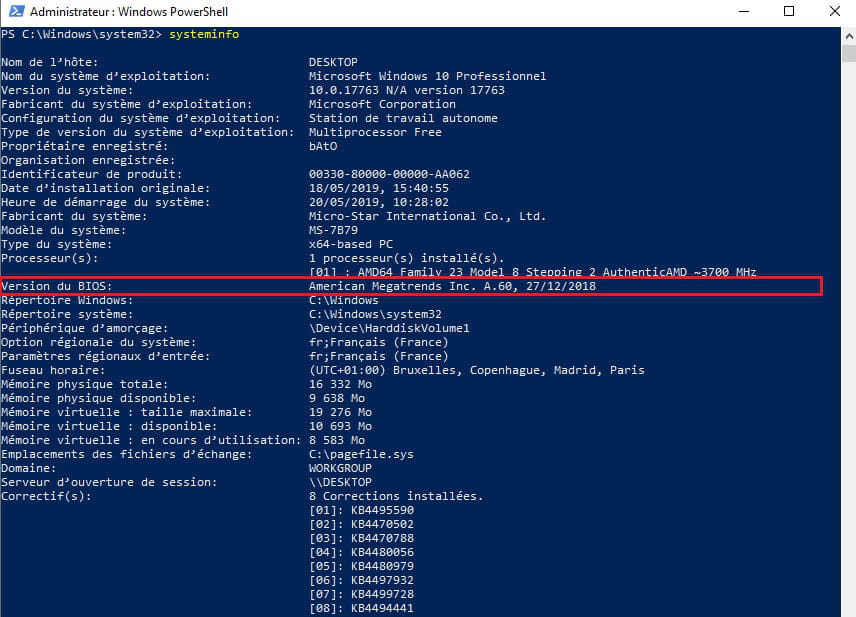
my current version is:
MSI BIOS:
https://fr.msi.com/Motherboard/support/X470-GAMING-PLUS
-
-
Try this software Nahimic 2, it refers to Realtek, from the support link > https://fr.msi.com/Motherboard/support/X470-GAMING-PLUS#down-driver&Win10%2064
We'll look at the BIOS update later, a suggestion: try with Linux via a USB stick to see if it can recognize the audio.
-
Okay, I’m preparing a tutorial for Linux, it's just for testing, no installation on the hard drive. If the BIOS update resolves the issue, Linux will not be necessary.
For the BIOS update, please check the video tutorial and download the file > https://fr.msi.com/Motherboard/support/X470-GAMING-PLUS
--
the druid without the potion. -
BIOS update completed but no change in audio.
I was wondering, since I have Nvidia HD audio drivers from my graphics card, could that be causing a conflict? -
Maybe! Uninstall them, then you'll see, it's easier to start there or just disable them in the device manager. What do you have exactly in the sound/recording settings?
Help! You mention a graphics card, do you have audio inputs and outputs on that card?
-
Defective sound card ??
--
Human beings are at their best when things are at their worst. -
So in the sound/recording settings I have this:

I disabled them, even uninstalled them, but upon restarting they automatically reinstall.
On my graphics card, a GTX970, I have besides HDMI, 3 mini DisplayPorts and 1 female DVI. But on my old setup, my graphics card never caused any issues. -
For the epango solution, it indeed launches the driver update that transforms Nvidia HD audio into > HD audio device. I restart the PC and still no sound, and in the sound icon in the notification bar, I see my 3 old Nvidia outputs, which have been changed to HDMI digital audio not connected instead of Nvidia HD not connected.

-
-
-
Your screen is set as the default playback device. Start by unchecking it. Then right-click in the window. Next, click on Show Disabled Devices and Disconnected Devices. Scroll down your right-hand bar. Normally, if everything is fine, you should see your Speakers. Then right-click on them. Finally, click on Set as Default Device.
-
-
Originally, while searching online, I had thought about the famous sound bug with Realtek drivers in Windows 10. So, I had indeed taken the recommended drivers from MSI and installed Nahimic 3, but Nahimic won't launch. I get a message saying that my PC is not compatible or that the drivers are not up to date...
-
-
If the customer service is nice, they should solve your problem, and at worst, a return within 15 days after purchase is possible. Other than that, I don't see how to solve this problem, except to check if it works under Linux, and even that! ...
-
I need to get back to them tomorrow, he's stuck and is going to try to find a solution.
Another solution I was thinking of, if nothing really changes, is whether buying a small sound card could solve my problem?
Like this one: https://www.topachat.com/pages/detail2_cat_est_micro_puis_rubrique_est_w_son_puis_ref_est_in10060658.html
-




- 1
- 2
Next