RJ45 Home Wiring
patrice86
Posted messages
1520
Status
Member
-
brupala Posted messages 111195 Registration date Status Member Last intervention -
brupala Posted messages 111195 Registration date Status Member Last intervention -
Hello,
Today, the technician from France Telecom came to carry out the ADSL connection for my house.
I have 7 RJ45 sockets in the house, the cables of which are all gathered near the GTL in the garage.
The technician used a cable tester and it turns out that the sockets in the house are not working. According to him, the RJ45 connections need to be redone as they must be preventing the signal from passing. We just need to strip the cables a bit more and reconnect the RJ45 connectors.
In any case, I'm wondering how to patch the sockets in the house to send the internet signal. I want to install the operator's box in the living room and not in the garage. The Wi-Fi signal would be too weak otherwise.
Internet arrives in the garage. The connection is plugged into the DTI box. From the DTI, a RJ11 cable comes out.
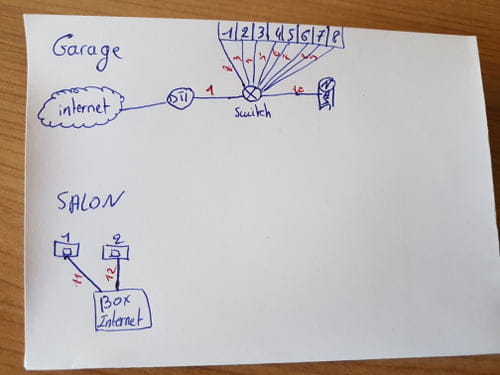
Box in the living room:
1/ Connect the RJ11 cable from the DTI to a splitter that takes in an RJ11 and outputs an RJ45
2/ Connect this RJ45 output to a switch
3/ Connect cat 6 SSTP RJ45 cables from the switch outputs to the RJ45 cable outputs in the house
4/ Plug the operator's box in the living room via RJ45.
By doing this, will the internet be propagated through all the RJ45 sockets in the house? I have a doubt.
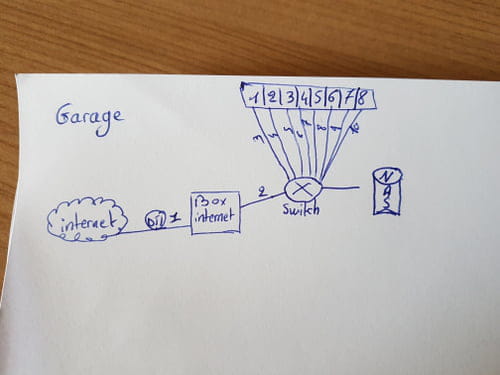
Box in the garage:
1/ Connect the RJ11 cable from the DTI to the box
2/ Connect a cat 6 SSTP RJ45 cable from the box to a switch
3/ Connect cat 6 SSTP RJ45 cables from the switch outputs to the RJ45 cable outputs in the house
4/ Connect a Wi-Fi repeater to one of the RJ45 sockets in the house
I'm using SSTP cable because there's the GTL right next to it with all the electrical systems of the house, so there could be strong interference.
This is a temporary installation to at least have internet in the house.
Later, I will buy a 9 or 12U patch panel with power supplies and a rackable switch to patch all the sockets in the house, my NAS, UPS, and operator's box.
I welcome all your ideas.
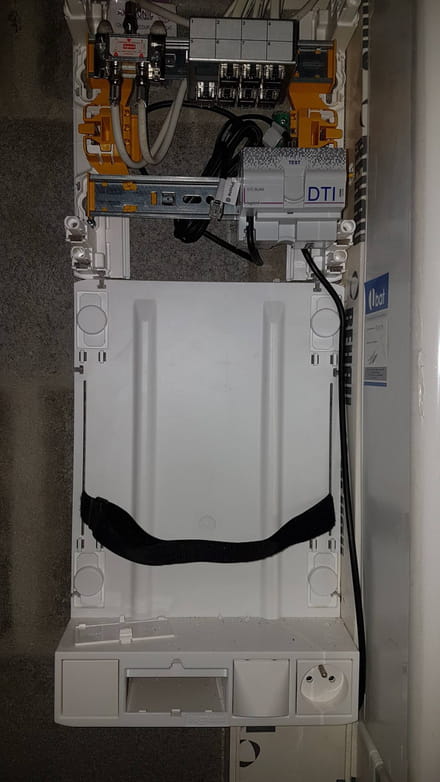
In the photo, the black cable for internet connected to the bottom of the DTI.
A RJ11 cable coming out from the top of the DTI
At the top, the outputs for the 7 ethernet sockets that I need to connect.
Thank you :)
Today, the technician from France Telecom came to carry out the ADSL connection for my house.
I have 7 RJ45 sockets in the house, the cables of which are all gathered near the GTL in the garage.
The technician used a cable tester and it turns out that the sockets in the house are not working. According to him, the RJ45 connections need to be redone as they must be preventing the signal from passing. We just need to strip the cables a bit more and reconnect the RJ45 connectors.
In any case, I'm wondering how to patch the sockets in the house to send the internet signal. I want to install the operator's box in the living room and not in the garage. The Wi-Fi signal would be too weak otherwise.
Internet arrives in the garage. The connection is plugged into the DTI box. From the DTI, a RJ11 cable comes out.
Box in the living room:
1/ Connect the RJ11 cable from the DTI to a splitter that takes in an RJ11 and outputs an RJ45
2/ Connect this RJ45 output to a switch
3/ Connect cat 6 SSTP RJ45 cables from the switch outputs to the RJ45 cable outputs in the house
4/ Plug the operator's box in the living room via RJ45.
By doing this, will the internet be propagated through all the RJ45 sockets in the house? I have a doubt.
Box in the garage:
1/ Connect the RJ11 cable from the DTI to the box
2/ Connect a cat 6 SSTP RJ45 cable from the box to a switch
3/ Connect cat 6 SSTP RJ45 cables from the switch outputs to the RJ45 cable outputs in the house
4/ Connect a Wi-Fi repeater to one of the RJ45 sockets in the house
I'm using SSTP cable because there's the GTL right next to it with all the electrical systems of the house, so there could be strong interference.
This is a temporary installation to at least have internet in the house.
Later, I will buy a 9 or 12U patch panel with power supplies and a rackable switch to patch all the sockets in the house, my NAS, UPS, and operator's box.
I welcome all your ideas.
In the photo, the black cable for internet connected to the bottom of the DTI.
A RJ11 cable coming out from the top of the DTI
At the top, the outputs for the 7 ethernet sockets that I need to connect.

Thank you :)
4 answers
-
Hello,
To distribute ethernet around the house, the box needs to be in the garage. You even have the base with a strap to hold it in place.
In the living room, you need 2 RJ45 sockets, one for the ADSL line input, and one for output to run the ethernet down to the central box where you would have a switch. Alternatively, you can use a pair of splitters to run the ADSL line and ethernet over the same cable, but then ethernet, using only 4 wires instead of 8, will be limited to 100 Mbps, not 1 gigabit.
-
I have 2 RJ45 sockets right next to each other in the living room for this case.
What do I do with the RJ11 then? Should I buy an RJ11 to RJ45 "adapter" that I plug into a switch? Then run cables from the switch to all the female RJ45 sockets?
In the living room, one RJ45 from the wall to a RJ45 port on the box and one RJ45 from the box to the second RJ45 socket in the living room?
This way, all the sockets in the house will have internet?- You connect an RJ11 cable to the output of the DTI (there should be a line or ADSL output) to the RJ45 No. 1 outlet in the living room (an RJ11 male cable fits perfectly into a female RJ45).
In the living room, using another RJ11 cable, you connect RJ45 No. 1 to the ADSL input of the box.
On the box, you connect an RJ45 output to the second wall RJ45 in the living room.
In the central box, you connect a switch to RJ45 No. 2 in the living room and connect the other RJ45 outputs to the switch.
-
-