CPU not connected or its initialization failed
Dreaxe
Posted messages
9
Status
Member
-
didmed Posted messages 2654 Registration date Status Member Last intervention -
didmed Posted messages 2654 Registration date Status Member Last intervention -
Hello,
I had already asked a question on this forum because my PC "starts halfway" (https://forums.commentcamarche.net/forum/affich-35998071-mon-pc-demarre-a-moitie-help, but no one has been able to help me.
Basically, my PC starts but without the screen.
In the meantime, I noticed that my motherboard had a lit LED, which, according to the manual, indicates that the
CPU is not connected or its initialization has failed. Any ideas on how to fix this problem?
Thanks in advance.
Configuration: Android / Chrome 73.0.3683.90
I had already asked a question on this forum because my PC "starts halfway" (https://forums.commentcamarche.net/forum/affich-35998071-mon-pc-demarre-a-moitie-help, but no one has been able to help me.
Basically, my PC starts but without the screen.
In the meantime, I noticed that my motherboard had a lit LED, which, according to the manual, indicates that the
CPU is not connected or its initialization has failed. Any ideas on how to fix this problem?
Thanks in advance.
Configuration: Android / Chrome 73.0.3683.90
5 answers
-
Hi,
so, if you have checked all the voltages on the 24-pin connector AND on the 8-pin connector powering the CPU indicating that the power supply is correct > motherboard is faulty (one or more MOSFETs faulty, capacitor faulty...)
--
If you need anything, just let me know!... -
Hi,
to isolate the problem - presumably hardware, try starting with:
1- the power supply + the motherboard with the CPU/cooler + 1 single RAM stick + the screen connected to the HDMI port of the motherboard (or to the DVI port of the motherboard) AND THAT'S IT!!! > no graphics card, keyboard, mouse, any drives, SSD, burner, or USB drive connected
Question: does the BIOS/UEFI display???
Catch you later
--
If you need anything, just let me know!... -
Or - more precisely: do you have a message on the screen like NO BOOT DEVICE FOUND?
--
If you don't need anything, just let me know!...-
Hi,
My screen won't turn on at all. Also, the steps you advised me to take, I have already done unfortunately and there was no result. I even tried resetting my motherboard and changing the BIOS battery and the problem persists.
In any case, thank you for taking the time to help me resolve my issue, and if you have any other advice, don't hesitate : )
-
-
1- I'm quoting what you said in this link:
https://forums.commentcamarche.net/forum/affich-35998071-mon-pc-demarre-a-moitie-help
"After browsing several forums, here is what I tried to do:
- clean the components
- disconnect the CD drive and the hard drive
- check the power supply and its connections "
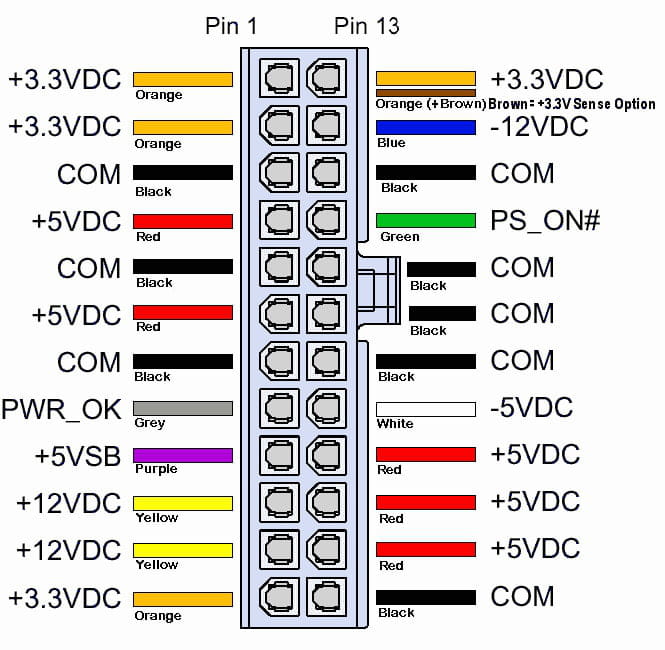
>>> checking the power supply means (for me) that you checked all the voltages on the 24-pin connector AND on the 8-pin connector supplying the CPU meaning that the power supply is correct (in the sense that it delivers the right voltages > for the stability of the power supply, it’s a different process)
> we check the power supply voltages (+12VDC, -12VDC, +5VDC, 3.3VDC etc...) with a multimeter
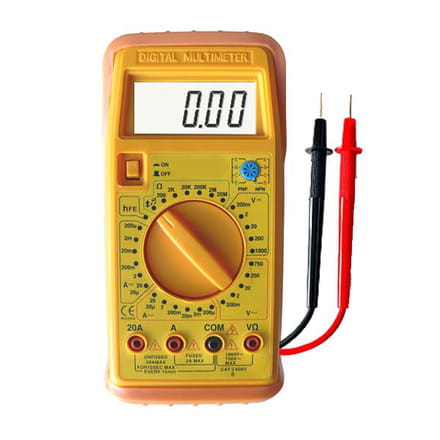
2- "By the way, I smelled a burning odor one day, coming from my computer, so is it possible that my CPU has burned out?"
>>> I don’t really believe that: the smell must have come either from the power supply or from the motherboard
> the only way to be sure is to use (in order)
A- another power supply
B- another processor
--
If you need anything, just let me know!... -
Here are the voltages to check on the 24-pin connector (with colors):
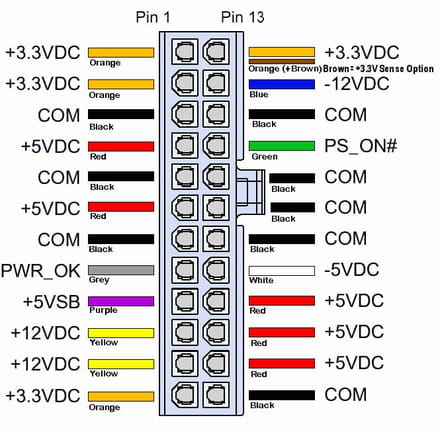
on the motherboard:
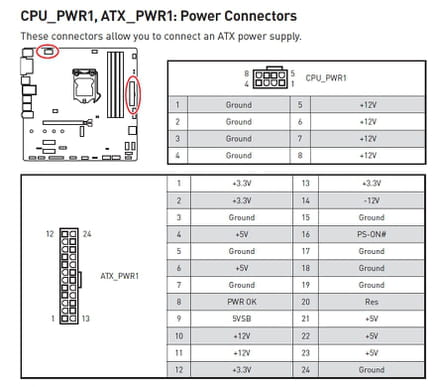
--
If you need anything, just let me know!...