
Chrome opens by itself
Solved
woody74
Posted messages
46
Status
Member
-
Malekal_morte- Posted messages 178136 Registration date Status Moderator, Security Contributor Last intervention -
Malekal_morte- Posted messages 178136 Registration date Status Moderator, Security Contributor Last intervention -
Hello,
For the past 3 days, Chrome has been opening by itself and a "fake" survey request appears telling me that my IP address has been selected to win a smartphone.
I installed Block Site, which is effective, but the requests change with other addresses...
Currently, about fifteen web addresses are blocked.
Could you please let me know what is happening and how this can stop?
Thank you
Best regards
Configuration: Windows / Internet Explorer 11.0
For the past 3 days, Chrome has been opening by itself and a "fake" survey request appears telling me that my IP address has been selected to win a smartphone.
I installed Block Site, which is effective, but the requests change with other addresses...
Currently, about fifteen web addresses are blocked.
Could you please let me know what is happening and how this can stop?
Thank you
Best regards
Configuration: Windows / Internet Explorer 11.0
21 answers
- 1
- 2
Next
-
Hello,
To check your computer for any infections and to get a general status of the system:
Follow the FRST tutorial by clicking on this blue link. ( take the time to read carefully - everything is well explained there ).
Download and run the FRST scan,
Wait for the scan to finish, a message will indicate that the analysis is complete.
Three FRST reports will be generated:- FRST.txt
- Shortcut.
- Additional.txt
Send these 3 reports to the site https://pjjoint.malekal.com/ and in return provide the 3 pjjoint links that lead to the reports here in a new response so that we can review them.
(The blue links lead to step-by-step explanatory tutorials, click on them to get more precise instructions to follow).
--
Please press any key to continue the disinfection... -
To uninstall:
App Explorer
CCleaner
CyberLink
then repair the affected WEB browsers with the issues:- Repair Google Chrome (only the first paragraph).
--
Please press a key to continue the disinfection... -
The problem is that in safe mode, you can't see the scheduled tasks...
Can't you really run a scan in normal mode?
It really won't start?
-
No, still not, I think it's coming from FRST... they must have changed something.
So we can't check if a scheduled task launches Chrome.
There are infections that do that.
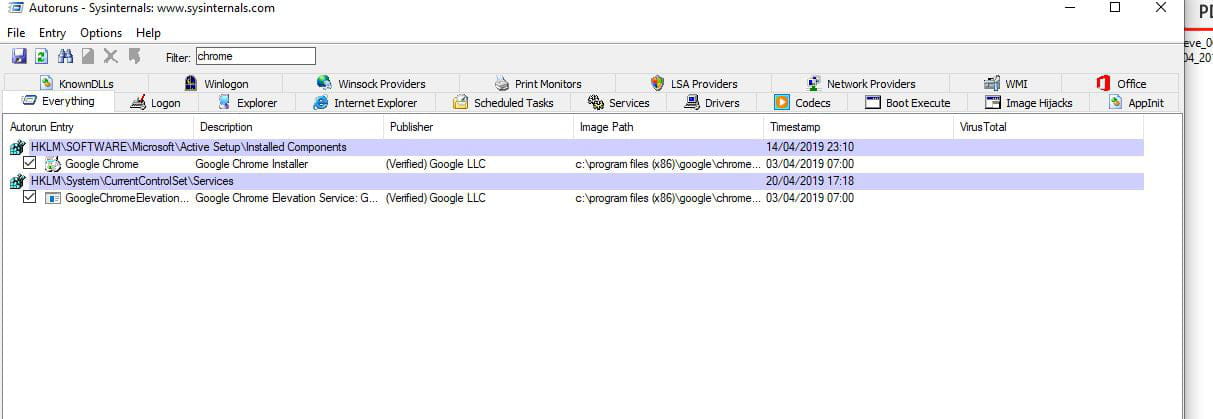
If it's not too complicated, try using Autoruns.
Download it.
Run it by right-clicking and then selecting run as administrator.
At the top in filter, type chrome
and see if you get a result, especially with a line that launches a site.
You can send a screenshot if needed.
-
yes, these are classic scams.
So ESET isn't detecting anything... just like on FRST.
Try a minimal startup for a few hours: https://www.malekal.com/demarrer-windows10-mode-minimal/
See if it stops; if so, it's one of the startup processes that is causing these openings.
--
Please press any key to continue the disinfection... -
Here is the correction to perform with FRST. You can refer to this explanatory note with screenshots.
Restart FRST and on your keyboard press the CTRL + Y keys.
The Notepad will open, copy/paste this.
Start
CloseProcesses:
CreateRestorePoint:
Task: {3D7B91BD-8DEF-4161-A5F4-717101945ACD} - System32\Tasks\CareCenter\Discord_Reg_HKCURun_S-1-5-21-2054178315-926740230-1395833870-1001 => C:\Users\woody\AppData\Local\Discord\app-0.0.305\Discord.exe (Discord Inc. -> Discord Inc.)
:\Users\woody\AppData\Local\Discord
Hosts:
EmptyTemp:
RemoveProxy:
Reboot:
End
Save the content via the file menu and then save.
Close Notepad, return to FRST and click the "Fix" button.
A restart may be necessary and automatic.
A text file appears, copy/paste the content here in a new message.
Restart the computer.
--
Please press any key to continue the disinfection...-
You are a real "wizard", everything worked perfectly
I want to say THANK YOU VERY MUCH again.
Attached are the files
https://pjjoint.malekal.com/files.php?id=20190422_f7z15o15k13l8
https://pjjoint.malekal.com/files.php?id=20190422_o12n12d15k11e13 -
-
-
-
-
for now, no new alerts on chrome.
Now I don't understand why removing these 3 programs
solves the problem.
They have been installed for months, whereas the problem started 3 days ago. -
-
-
-
Nothing unusual at first glance.
I've looked over your FRST reports again and nothing seems abnormal either.
Does Chrome start on its own to open the advertisement?
For example, are you on Word or on the desktop and suddenly Chrome launches with the ad?
Or does the ad only come up when Chrome is open? -
the browser launches on its own without my intervention.
I just saw that it's actually not just Chrome, but the
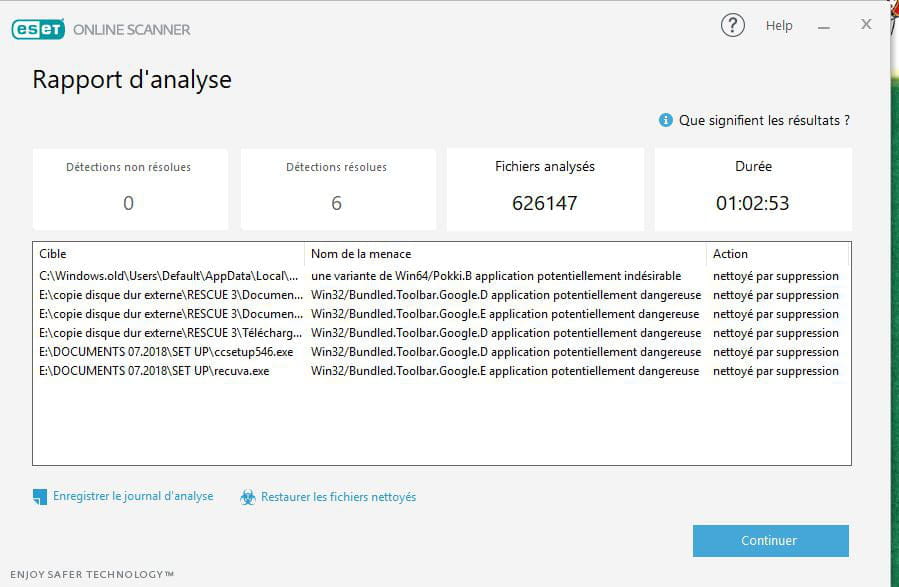
default browser.- Make an online scan with NOD32 then save the report. Send it to https://pjjoint.malekal.com/ and provide the link here.
-
-
-
screenshot of deleted objects
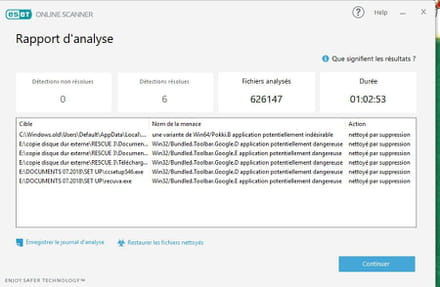
and scan log
https://pjjoint.malekal.com/files.php?id=20190421_n14s7w14l13o6 -
always the same.
capture of the message that appears before it is "full screen on the browser with the appearance of SFR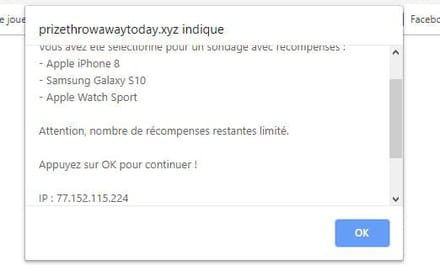
After blocking with "block site" new message with a different address -
Well, it's done, I'm in minimal mode.
I'm going to let the PC run and wait
I'll keep you posted (and thanks again) -
the PC has been running for 2 hours and 30 minutes without any issues.
launched 2 applications: I TUNES and Discord
new request with the opening of Chrome.
I will restart the PC and launch only one of the 2 applications. -
I think it comes from Discord.
I uninstalled it and restarted the PC and here is what appears about 30 seconds after the
restart /
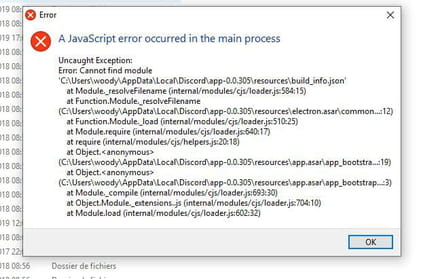
-
It's a Discord crash, but I don't see why it would randomly load ads, especially scam ads.
The only way to find out what's triggering it is to use Procmon: https://www.malekal.com/procmon-surveiller-activite-windows-application/
You need to let it run until the popup appears, and when it does, save the report (file / save)
and upload it to a sharing site, as it's often quite large.
-
-
ok thanks, I'm going to install it
but if it came from Discord, it shouldn't have any problems anymore, I uninstalled Discord and deleted
the file in the registry editor -
The PC has been running since this morning at 6:30 and there have been no unexpected issues.
It seems that the problem was probably due to a "hidden" file in Discord.
Yesterday, I performed the procedure for minimal startup, and Discord still loaded after about a minute upon startup.
What would be great is to manually erase all remaining traces in the registry.
Logs used:
Outlook - Excel - Chrome -
15 PM and still calm.
In your opinion, can I reinstall Discord to see what's going on?
And any idea on how to delete the message on startup?
And again, THANK YOU for everything.



- 1
- 2
Next